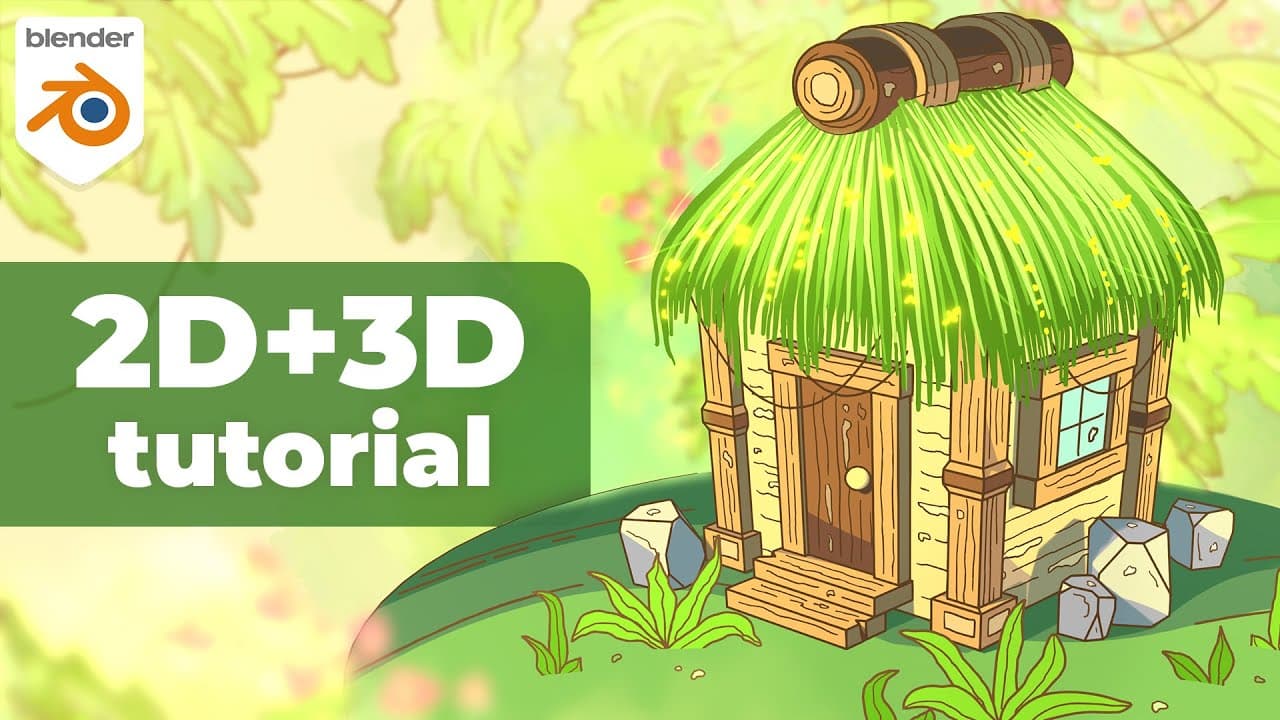
Blender 4.2 2D + 3D Tutorial | Cozy Jungle Hut with Grease Pencil
TL;DR
Learn to create a cozy jungle hut using Blender's Grease Pencil.
Transcript
Hey, everyone, it's Kevin. Welcome back to the channel. In this video, I'll walk through creating this cozy jungle hut in blender 3D. this project combines both 2D and 3D elements with the 2D components created using grease pencil. This was inspired by a piece I made a little over two years ago, and it utilizes a similar workflow. I... Read More
Key Insights
- The tutorial combines 2D and 3D elements using Blender's Grease Pencil, creating a versatile workflow for hybrid designs.
- Kevin emphasizes the importance of taking time and pausing the video as the tutorial is not in real-time.
- Having some prior experience with Blender is recommended, but beginners can still follow along with the tutorial.
- A tablet is suggested for the Grease Pencil part, but a mouse can also be used.
- The tutorial covers modeling, shading, and adding details with Grease Pencil, providing a comprehensive guide to creating the jungle hut.
- Kevin provides specific measurements and steps, ensuring precision in the modeling process.
- The tutorial includes optional extras for personalization and enhancing the final render.
- Kevin offers a downloadable project file and links to his Grease Pencil course for further learning.
Install to Summarize YouTube Videos and Get Transcripts
Explore YouTube Video Summarizer or Get YouTube Transcript Extractor
Questions & Answers
Q: What is the main focus of this Blender tutorial?
The main focus of this Blender tutorial is to guide viewers through the process of creating a cozy jungle hut using Blender's Grease Pencil. The tutorial combines both 2D and 3D elements, showcasing a versatile hybrid workflow. Kevin provides detailed instructions on modeling, shading, and adding details to create the jungle hut scene.
Q: Is prior experience with Blender required for this tutorial?
While having some prior experience with Blender is recommended, it is not strictly necessary. Beginners can still follow along with the tutorial, as Kevin provides detailed instructions and specific measurements to ensure precision. The tutorial is not in real-time, so viewers are encouraged to pause and take their time to understand each step.
Q: What tools does Kevin recommend for the Grease Pencil part?
Kevin recommends using a tablet for the Grease Pencil part of the tutorial, as it can provide more control and precision when drawing. However, he also mentions that a mouse can be used if a tablet is not available. The Grease Pencil is a versatile tool in Blender that allows for drawing and animating directly in the 3D viewport.
Q: Are there any additional resources provided with the tutorial?
Yes, Kevin provides a downloadable project file for the jungle hut, which can be accessed through a link in the video description. Additionally, he mentions his Grease Pencil course, available on CG Boost, for those interested in learning more about the workflow and techniques used in the tutorial. The course offers over ten hours of content and covers various 2D/3D workflows.
Q: What are some optional extras mentioned in the tutorial?
The tutorial includes optional extras for personalization and enhancing the final render. These extras involve adding additional details to the jungle hut, such as flowers, ropes, and more foliage. Kevin also discusses quick compositing nodes for a final touch, like adding glare for a glow effect. These extras are included in the downloadable project file.
Q: How does Kevin suggest dealing with the tutorial's non-real-time pace?
Kevin acknowledges that the tutorial is not done in real-time and encourages viewers to take their time, pause the video, and go through the steps at their own pace. This approach helps ensure that viewers can understand and follow each part of the tutorial without feeling rushed, allowing them to grasp the concepts and techniques more effectively.
Q: What is the role of the lattice in the tutorial?
The lattice is used towards the end of the tutorial to give the hut an angled shape. By scaling the lattice points, viewers can easily deform the entire hut structure to achieve the desired look. This step is optional but adds a unique touch to the overall design, demonstrating the flexibility and creativity possible with Blender's tools.
Q: What rendering settings does Kevin recommend for the final output?
For rendering the final output, Kevin suggests going to the Output Properties tab in Blender. He recommends sticking with a 16:9 resolution but mentions that viewers can adjust it to vertical or square if desired. The resolution percentage can be increased to 150 for higher resolution, depending on the use case. For video export, Kevin advises using FFmpeg video format with perceptually lossless quality settings.
Summary & Key Takeaways
-
Kevin guides viewers through creating a cozy jungle hut in Blender using a combination of 2D and 3D elements with Grease Pencil. The tutorial covers modeling, shading, and adding details, with specific measurements provided for precision.
-
The tutorial is not in real-time, encouraging viewers to pause and take their time. Prior experience with Blender is recommended, but beginners can still follow along. A tablet is suggested for the Grease Pencil part, but a mouse can be used.
-
Kevin provides a downloadable project file and links to his Grease Pencil course for further learning. Optional extras for personalization and enhancing the final render are also included, along with insights into Kevin's workflow and techniques.
Read in Other Languages (beta)
Share This Summary 📚
Summarize YouTube Videos and Get Video Transcripts with 1-Click
Try YouTube Summary with ChatGPT & Claude or YouTube Transcript Generator
Explore More Summaries from Kevandram 📚
Summarize YouTube Videos and Get Video Transcripts with 1-Click
Try YouTube Summary with ChatGPT & Claude or YouTube Transcript Generator