Long Tail Pro Demo I - Keyword Research Software
TL;DR
Long Tail Pro software simplifies keyword research for niche websites by allowing multiple entries and quick filtering.
Transcript
hello my name is Spencer and today I wanted to give you a brief demonstration of my new software long tail Pro this powerful piece of software can help you find keywords to build profitable niche websites based upon now one of the most powerful features of long tail Pro is that you can search for multiple root keywords at once you can fetch additio... Read More
Key Insights
- 👨🔬 Long Tail Pro automates the keyword research process, enabling rapid keyword generation that would typically take hours manually.
- ✋ Users can efficiently filter keywords based on specific search criteria, highlighting high-value opportunities for niche website creation.
- ❓ The software integrates seamlessly with Google AdWords, enhancing its data accuracy and relevancy.
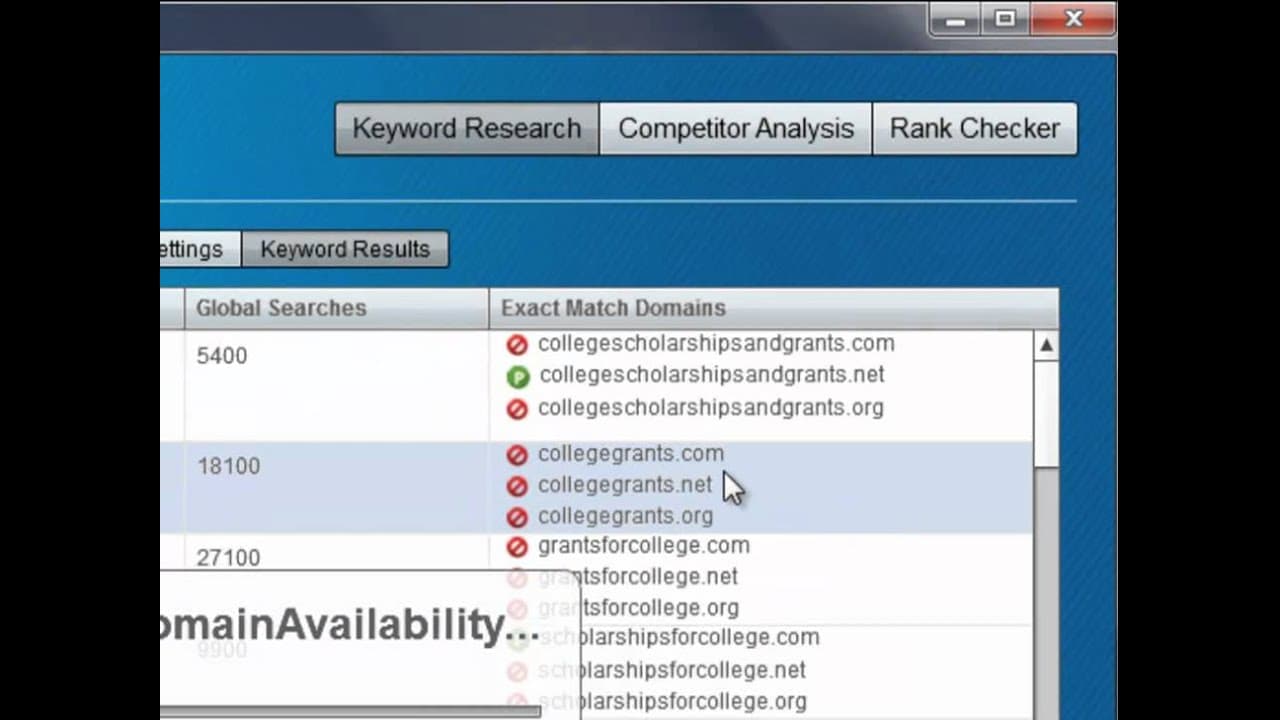
- 👤 By providing insights into exact match domains, Long Tail Pro helps users tap into potentially lucrative niches with available web addresses.
- 👻 Users can quickly adjust filter settings to explore various search volume and CPC parameters, allowing for tailored keyword selection based on their business model.
- 👤 Long Tail Pro's user-friendly interface reduces the learning curve for beginners, making it accessible for all levels of digital marketers.
- 👨🔬 An important feature is the software's ability to save time, as users can conduct keyword research more efficiently compared to traditional methods.
Install to Summarize YouTube Videos and Get Transcripts
Explore YouTube Video Summarizer or Get YouTube Transcript Extractor
Questions & Answers
Q: What makes Long Tail Pro stand out compared to other keyword tools?
Long Tail Pro distinguishes itself by allowing users to input up to five root keywords at once, unlike many other keyword tools that restrict searches to one keyword at a time. This capability enables users to cast a wider net for keyword opportunities, making the research process significantly more efficient and comprehensive.
Q: How does Long Tail Pro help in filtering keywords?
In Long Tail Pro, users can apply multiple filters to refine search results based on criteria such as monthly search volume and cost per click (CPC). For instance, users can set a minimum search volume of 3,000 and a minimum CPC of $1, quickly narrowing down the search results to high-value keywords that meet their specific business needs.
Q: What is the maximum number of keywords recommended for input, and why?
The software recommends entering no more than five seed keywords simultaneously. Entering more than five can lead to performance issues, either due to overloading the software or compliance issues with data fetching processes from Google, which may negatively impact the keyword generation accuracy.
Q: How does the domain availability check work in Long Tail Pro?
Long Tail Pro performs a domain availability check for the keywords generated. Users can see different symbols indicating the availability status of domains next to each keyword: a red cross for unavailable domains, a 'P' for premium domains that can be purchased at a higher price, and a green checkmark for those that are available, enabling users to choose the best options for their niche websites.
Summary & Key Takeaways
-
Long Tail Pro is a software tool designed to assist users in finding profitable keywords to create niche websites efficiently. It enables users to input up to five root keywords simultaneously, significantly simplifying the keyword research process.
-
The software features a powerful filtering system that allows users to refine their keyword searches based on criteria such as search volume, competition, and exact match domain availability, ensuring that only high-potential keywords are considered.
-
By automating the keyword generation and filtering process, Long Tail Pro saves users a considerable amount of time, making it an essential tool for anyone looking to build a successful niche website swiftly.
Read in Other Languages (beta)
Share This Summary 📚
Summarize YouTube Videos and Get Video Transcripts with 1-Click
Try YouTube Summary with ChatGPT & Claude or YouTube Transcript Generator
Explore More Summaries from Niche Pursuits 📚




Summarize YouTube Videos and Get Video Transcripts with 1-Click
Try YouTube Summary with ChatGPT & Claude or YouTube Transcript Generator