1.4.3 R1. Understanding Food - Video 2: Working with Data in R
TL;DR
This content provides a tutorial on using the R console, clearing the console, changing the working directory, reading a dataset in R, and obtaining statistical information about the dataset.
Transcript
Let's go ahead and start R. The first thing you'll see in the R console is the version of R you are using, and other basic information related to licensing, citations, and demos. To clear the console, you can simply go to Edit and select Clear Console. We'll start by reading in our dataset USDA.csv, which contains all foods in the USDA database in ... Read More
Key Insights
- 💁 The R console displays basic information about the R version, licensing, citations, and demos.
- 🫠 Navigating to the working directory is essential to read a dataset in R using the read.csv function.
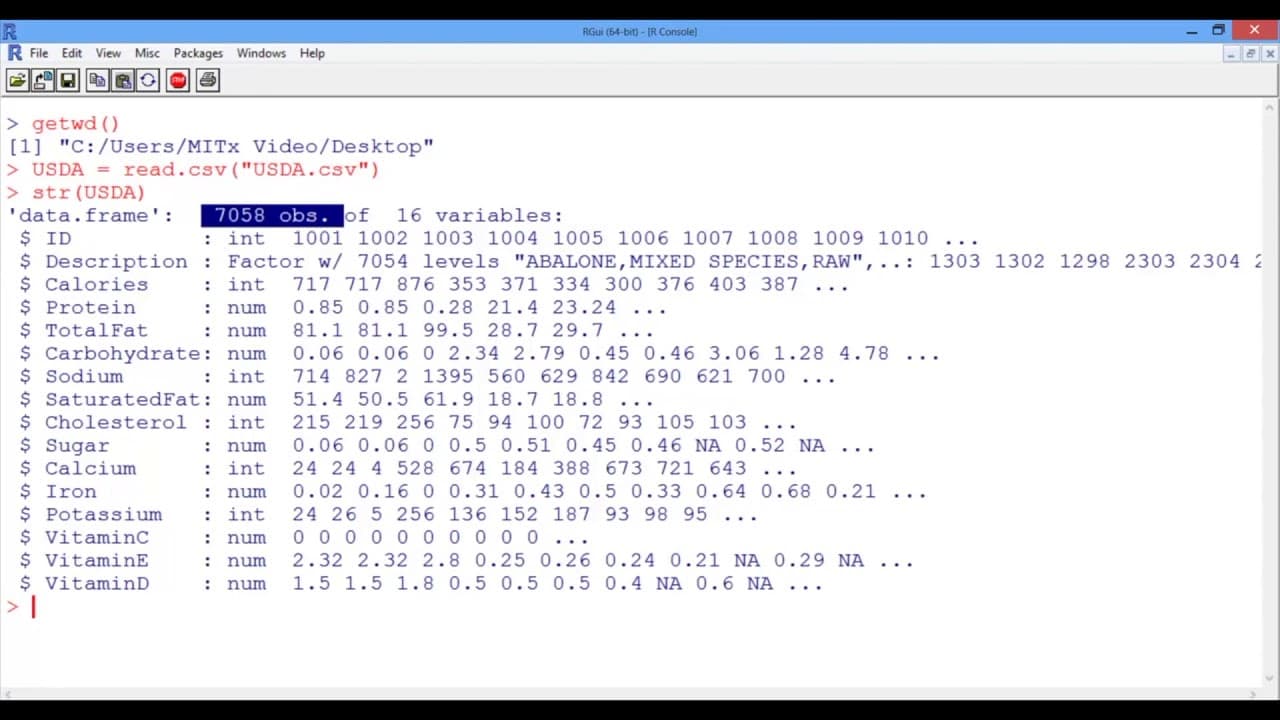
- 🤩 The structure function (str) provides an overview of the dataset, including the number of observations and variables.
- 💁 The summary function gives statistical information about the dataset, such as minimum, maximum, and mean values.
- 😋 The dataset used in the content includes information about calories, protein, fat, carbohydrates, vitamins, and minerals for various foods.
- ❓ There are 7,058 observations and 16 variables in the dataset.
- 😋 Some variables have missing entries, such as the sugar levels of 1,910 foods.
Install to Summarize YouTube Videos and Get Transcripts
Explore YouTube Video Summarizer or Get YouTube Transcript Extractor
Questions & Answers
Q: How can you clear the R console?
To clear the R console, go to the "Edit" menu and select "Clear Console." This will remove any previous output and make the console ready for new commands.
Q: How do you navigate to the working directory in R?
If you are on a Mac, go to the "Misc" menu and select "Change Working Directory." If you are on a PC, go to the "File" menu, select "Change Directory," and navigate to the folder where the dataset is saved. Then press OK.
Q: What function is used to read a dataset in R?
The read.csv function is used to read a dataset in R. It takes the name of the CSV file as input (enclosed in quotation marks) and saves the output to a data frame.
Q: How can you view the structure of a dataset in R?
The structure function (str) in R is used to view the structure of a dataset. By providing the dataset as input (e.g., str(USDA)), it displays information about the number of observations, variables, and variable descriptions.
Summary & Key Takeaways
-
The content starts by explaining the basics of the R console, including the version of R and other information.
-
It teaches how to clear the console and navigate to the working directory where the dataset is saved.
-
The content then demonstrates how to read a dataset in R using the read.csv function and provides an overview of the dataset structure.
Read in Other Languages (beta)
Share This Summary 📚
Summarize YouTube Videos and Get Video Transcripts with 1-Click
Try YouTube Summary with ChatGPT & Claude or YouTube Transcript Generator
Explore More Summaries from MIT OpenCourseWare 📚

Summarize YouTube Videos and Get Video Transcripts with 1-Click
Try YouTube Summary with ChatGPT & Claude or YouTube Transcript Generator