New Xbox One Experience: Preview Program
TL;DR
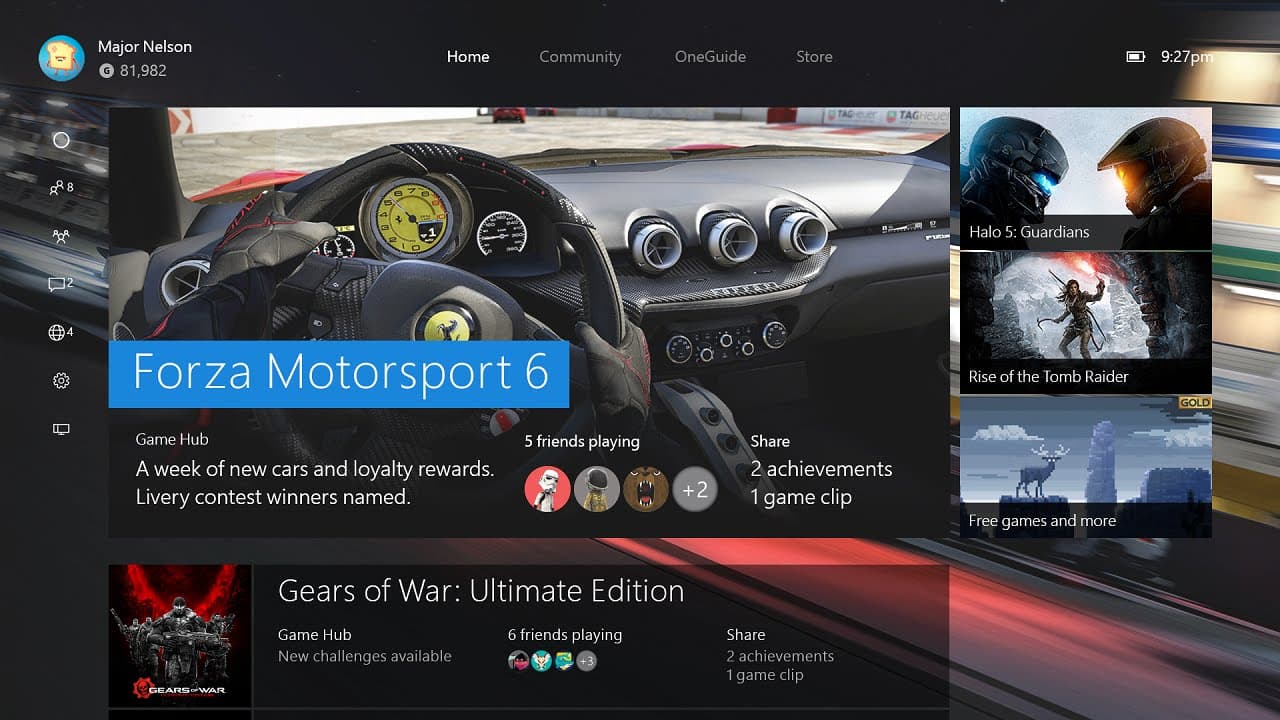
Xbox Live preview members will get their hands on the new Xbox One experience with improvements in the home screen, guide, parties, messages, notifications, and settings.
Transcript
hi it's Larry herb Xbox Live's Major Nelson here with Richard Irving from the Xbox engineering team Richard it's great to see you oh it's great to be here it's always great to have you on because you're talking about some good stuff and this is really exciting because the preview audience is gonna get their first look and hands-on with the new Xbox... Read More
Key Insights
- 🤩 The new Xbox One experience is driven by fan feedback and focuses on improving key areas such as the home screen, guide, parties, messages, notifications, and settings.
- 😴 Quick access to collections and pins on the home screen allows for faster navigation and organization of content.
- 🥳 The redesigned guide provides faster access to friends, parties, messages, and notifications, improving the overall user experience.
- 🥳 Parties and messaging have been made faster and easier to use, with the ability to invite friends directly from the friends list and manage parties in the guide.
- 🔔 Notifications are now grouped intelligently, making it easier to find specific notifications and game clips.
- 🔇 The settings area has been streamlined for faster navigation, allowing users to quickly adjust headset volume, mute the microphone, and access various settings categories.
- 🫲 The snap apps feature has been relocated to the left-hand side of the screen for a more natural and seamless multitasking experience.
Install to Summarize YouTube Videos and Get Transcripts
Explore YouTube Video Summarizer or Get YouTube Transcript Extractor
Questions & Answers
Q: What are the main improvements in the new Xbox One experience?
The main improvements include a redesigned home screen, a revamped guide for faster access to friends and parties, improved messaging and notifications, and a redesigned settings area for easier navigation.
Q: How can users quickly switch between their most recent activity and pins?
Users can now instantly switch between the most recent activity and pins by pulling the left trigger to go back to the top or pulling the right trigger to go to the pins area.
Q: How has the guide been reimagined for the Xbox One?
The guide can be accessed by scrolling left on the home screen or double-tapping the Xbox button while in a game. It provides quick access to friends, parties, messages, and notifications, with no wait times or load times.
Q: How can users invite friends to a party?
Users can invite friends to a party directly from their friends list by selecting a friend and choosing the invite option. Parties can also be created and managed from the party tab in the guide, allowing for faster and easier party creation.
Summary & Key Takeaways
-
The new home screen on Xbox One allows for quick access to user collections and pins with the ability to instantly switch between the most recent activity and pins using the trigger buttons.
-
The guide has been completely reimagined, providing faster access to friends, parties, and messages. It can be accessed by scrolling left on the home screen or double-tapping the Xbox button while in a game.
-
Parties have been made faster and easier to access. Friends can be invited to a party directly from the friends list, and a new party tab in the guide allows for quicker party creation and management.
-
The guide also includes a messages section, where users can view and reply to their messages, as well as a notifications section that intelligently groups notifications based on type and associated game.
-
The settings area has been redesigned for faster navigation, allowing users to easily adjust headset volume, mute the microphone, and access various settings categories.
Read in Other Languages (beta)
Share This Summary 📚
Summarize YouTube Videos and Get Video Transcripts with 1-Click
Try YouTube Summary with ChatGPT & Claude or YouTube Transcript Generator