Google vs Samsung Emojis: Which Are Better for You?
TL;DR
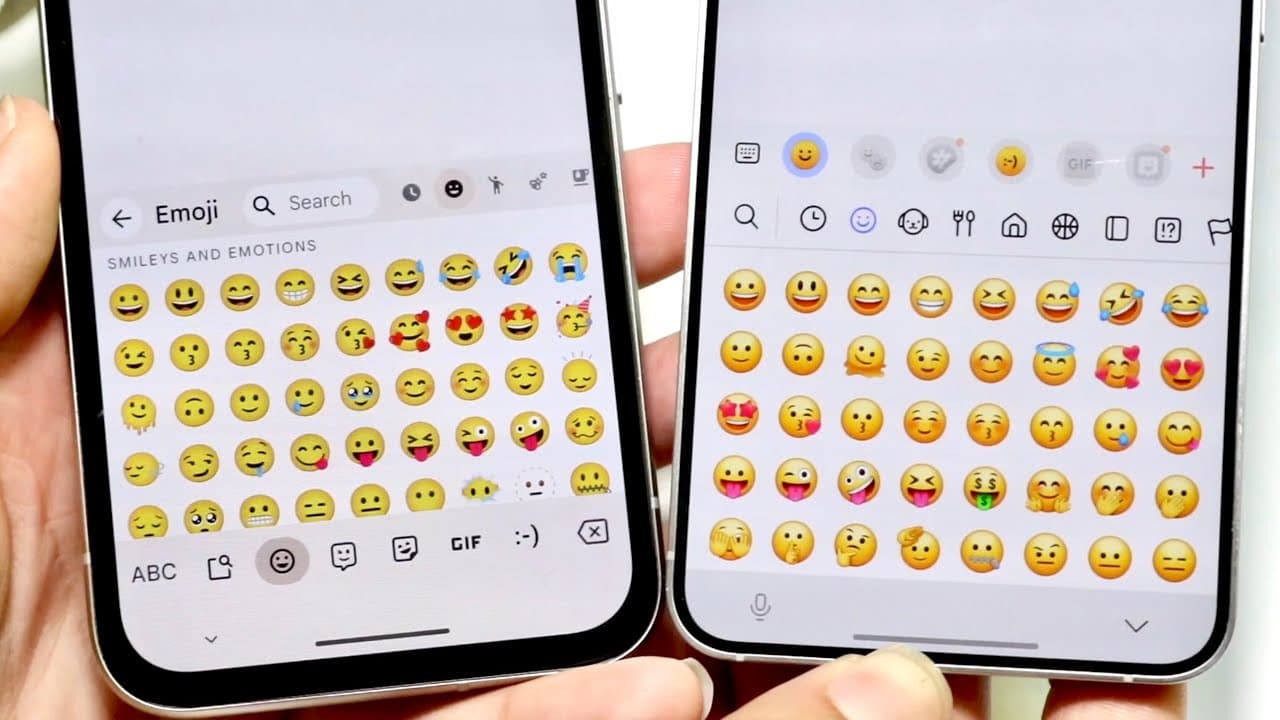
Google and Samsung emojis are quite similar in design and layout, with both platforms offering cohesive navigation and search features. While the visual representation changes when sent between devices, Google's emojis are noted for being more playful, whereas Samsung's align more closely with Apple's style. Overall, both have their strengths, but many users may not find significant differences.
Transcript
everyone it's time for us to go and take a look at some of the Google messages or Google emojis and compare them against Samsung emojis I made this video for iPhones you know Androids to compare all of them but now it's time to compare Androids and Androids now what's funny is is that the emojis that you'll basically see on both are fairly similar ... Read More
Key Insights
- 😄 Google and Samsung emojis share a cohesive layout that facilitates ease of navigation and usage.
- 👻 Both platforms allow users to quickly jump between different emoji categories, enhancing accessibility.
- ⚾ The visual representation of emojis can change based on the sender’s and recipient's platforms, adding a layer of compatibility.
- 🎨 Google emojis are perceived as more playful, while Samsung's align closely with Apple's design.
- 👨🔬 Users can utilize search features to find specific emojis quickly, improving the overall emoji-finding experience.
- 🪜 The inclusion of Bitmoji and GIF features in Google Keyboard adds value beyond standard emojis.
- 💗 The comparison highlights the growing similarities among Android platforms as opposed to the more distinct differences found between iOS and Android emojis.
Install to Summarize YouTube Videos and Get Transcripts
Explore YouTube Video Summarizer or Get YouTube Transcript Extractor
Questions & Answers
Q: What are the primary similarities between Google and Samsung emojis?
The primary similarities between Google and Samsung emojis include their structural layout and navigation. Both feature organized categories, allowing users to easily find emojis. For instance, users can access different emoji sets, like animals, through a familiar scrolling mechanism, enhancing usability across platforms.
Q: How do Google and Samsung emojis differ in appearance or design?
While both Google and Samsung emojis follow a similar structure, their design elements vary, with Google emojis appearing slightly more playful. For example, Google’s emojis may feature more vibrant colors or rounded edges, while Samsung's emojis align subtly closer to Apple's in their aesthetics.
Q: What happens to emojis when sent between different platforms?
When emojis are sent between Google, Samsung, and other platforms like iOS, they adapt to the recipient's system. This means that a Samsung emoji may display differently on a Google Pixel or an iPhone, leading to slight visual changes based on the viewing platform.
Q: Does one platform offer a wider variety of emojis?
The video suggests that Google may provide a slightly broader selection of emojis compared to Samsung. Users report finding more unique options on Google's platform, particularly within specific categories, whereas Samsung maintains a more standard emoji lineup that aligns with iOS.
Summary & Key Takeaways
-
The video conducts a side-by-side comparison of Google and Samsung emojis, highlighting their structural similarities. Both platforms exhibit a cohesive layout, making it easy to navigate through different emoji sets.
-
Despite minimal differences in design, the video emphasizes that the emojis can change appearance when sent between devices, reflecting the recipient's platform. This highlights a less significant contrast compared to the distinctions between iOS and Android emojis.
-
The availability of search functions and various emoji categories is a shared feature between both platforms, enhancing user experience. Viewers are encouraged to share opinions and engagement is prompted through likes and subscriptions.
Read in Other Languages (beta)
Share This Summary 📚
Summarize YouTube Videos and Get Video Transcripts with 1-Click
Try YouTube Summary with ChatGPT & Claude or YouTube Transcript Generator
Explore More Summaries from Simple Alpaca 📚






Summarize YouTube Videos and Get Video Transcripts with 1-Click
Try YouTube Summary with ChatGPT & Claude or YouTube Transcript Generator