How I Plan My Week With Notion (Student Edition)
TL;DR
The video explains using Notion for personal and academic productivity.
Transcript
I talk about productivity apps on this channel quite a lot but if I had to keep just one productivity app it would be a very easy decision I'd keep notion I started using notion probably about two years ago now and it is by far my most used productivity app I pretty much run my entire life from it both my personal life and my work life so this vide... Read More
Key Insights
- Notion is a versatile productivity app, essential for organizing both personal and academic life, especially for students.
- The Knowledge Bank in Notion helps capture and retain crucial information, enhancing long-term memory retention.
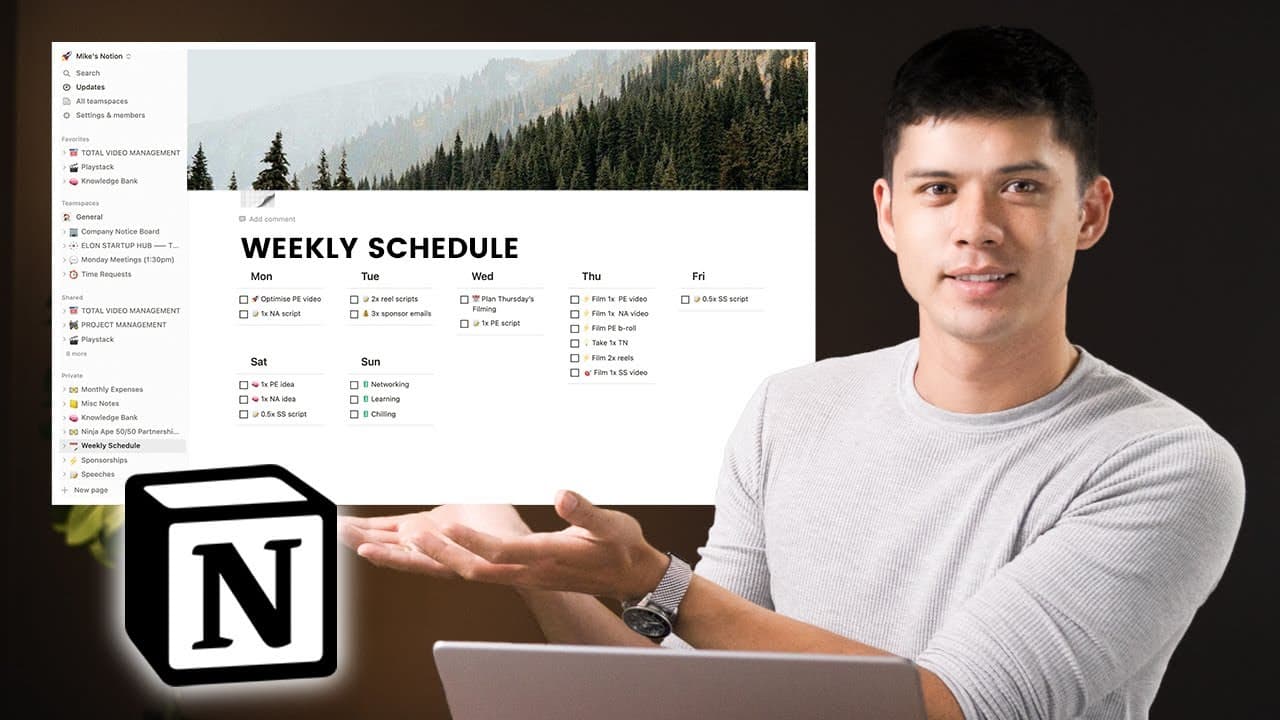
- A flexible weekly schedule in Notion allows for adaptability, balancing important tasks with unexpected events.
- Notion's drag-and-drop features, like the Kanban board, streamline project and task management effectively.
- Centralizing notes in Notion replaces multiple apps, ensuring all productivity tools are in one place for easy access.
- The Total Video Management page in Notion helps in organizing and tracking the stages of video production efficiently.
- Notion's features, like the speech tracker, assist in managing multiple assignments, deadlines, and presentations simultaneously.
- Despite two years of use, the creator continues to discover new capabilities of Notion, emphasizing its extensive potential.
Install to Summarize YouTube Videos and Get Transcripts
Explore YouTube Video Summarizer or Get YouTube Transcript Extractor
Questions & Answers
Q: How does the Knowledge Bank in Notion benefit users?
The Knowledge Bank in Notion is designed to capture the most important information from various sources like books, podcasts, and videos. By storing these key insights, users can periodically review and retain crucial knowledge, enhancing long-term memory. This system is particularly beneficial for students managing multiple subjects, providing a simple yet effective note-taking database.
Q: What makes Notion's weekly schedule flexible?
Notion's weekly schedule is designed to be ultra-flexible, allowing users to focus on the most important tasks while accommodating unexpected events. Unlike rigid schedules, it enables users to adjust their plans easily without disrupting their overall routine. This flexibility is achieved by prioritizing essential tasks and allowing for free time to handle less critical activities.
Q: How does Notion's drag-and-drop feature enhance productivity?
Notion's drag-and-drop feature, exemplified by the Kanban board, enhances productivity by simplifying task and project management. Users can visually organize tasks into different stages, such as writing, filming, and editing for video production. This method provides a clear overview of progress, making it easier to manage multiple projects simultaneously and ensure timely completion.
Q: Why does the creator prefer Notion over other productivity apps?
The creator prefers Notion over other productivity apps due to its comprehensive capabilities, allowing for the management of various tasks and projects within a single platform. Unlike apps like Trello or Evernote, Notion combines features such as note-taking, scheduling, and project management, reducing the need for multiple apps and streamlining productivity processes.
Q: How does Notion assist in managing academic assignments?
Notion assists in managing academic assignments by providing tools to track deadlines, topics, and progress. Features like the speech tracker and simple databases help students organize their workload, ensuring they are prepared for exams and assignments. This organization prevents unexpected deadlines from creeping up, allowing for efficient time management and better academic performance.
Q: What is the role of the Total Video Management page in Notion?
The Total Video Management page in Notion plays a crucial role in organizing the stages of video production. It functions like a factory production line, with tasks moving through stages such as writing, filming, editing, and scheduling. This structured approach ensures that each video production step is accounted for, facilitating a smooth workflow and timely content release.
Q: How does the creator utilize Notion for team management?
The creator utilizes Notion for team management by maintaining a Company Notice Board and organizing weekly meetings. The board includes sections for announcements, company goals, and policies, while the meeting board covers key performance indicators and content strategy. This setup ensures clear communication and efficient management of team activities and objectives.
Q: What is the significance of the course tracker in Notion?
The course tracker in Notion is significant for keeping tabs on the progress of courses or projects. Using a Kanban-style board, users can visually track the status of each course, from not started to completed. This organization helps users manage multiple projects effectively, ensuring they stay on top of their educational or professional development goals.
Summary & Key Takeaways
-
The video showcases how Notion, a productivity app, is utilized to manage various aspects of life, from personal tasks to academic responsibilities. It highlights features like the Knowledge Bank for retaining essential information and a flexible weekly schedule to accommodate unexpected events.
-
Notion's versatility is emphasized through its ability to replace multiple apps, centralizing productivity tools for easier access. The video also demonstrates using Notion's drag-and-drop features for project management, particularly in organizing video production stages.
-
The creator shares insights into using Notion for managing speeches, assignments, and deadlines, showcasing its effectiveness in academic settings. Despite extensive use, the potential of Notion continues to unfold, making it a preferred choice for productivity.
Read in Other Languages (beta)
Share This Summary 📚
Summarize YouTube Videos and Get Video Transcripts with 1-Click
Try YouTube Summary with ChatGPT & Claude or YouTube Transcript Generator
Explore More Summaries from Mike Dee 📚

Summarize YouTube Videos and Get Video Transcripts with 1-Click
Try YouTube Summary with ChatGPT & Claude or YouTube Transcript Generator