Which Mouse or Trackpad is Best for You?
TL;DR
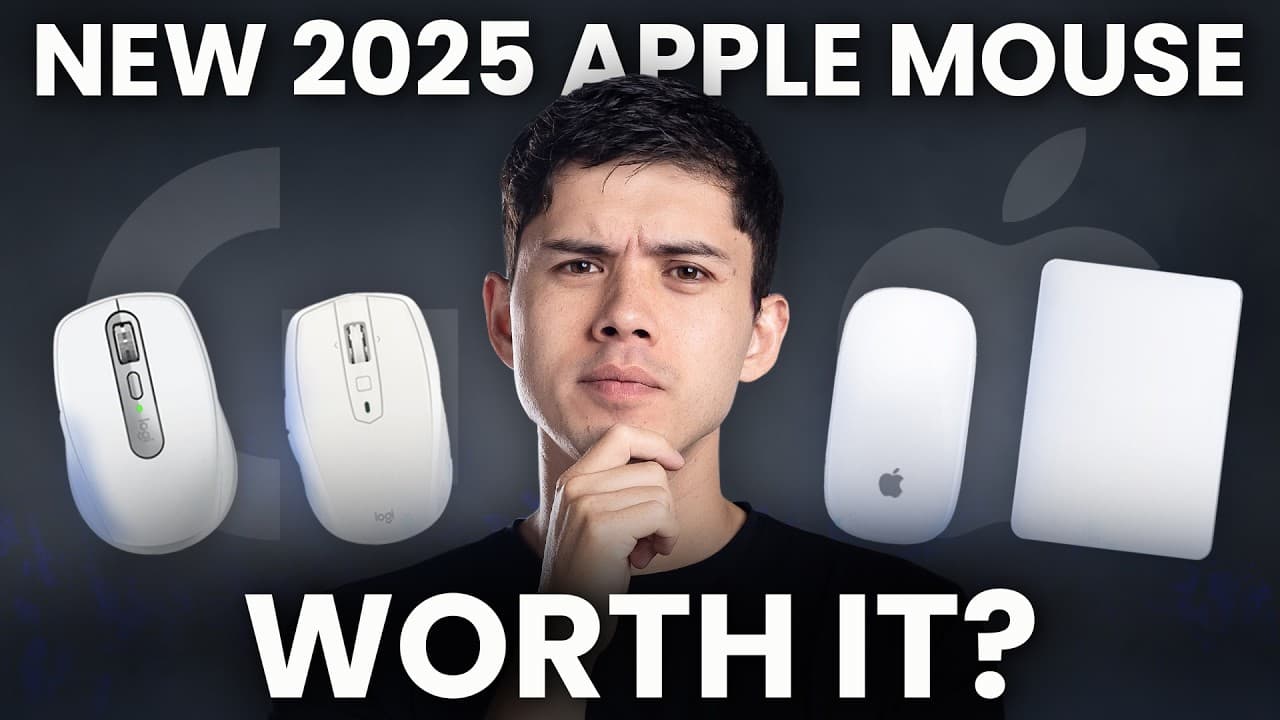
The Logitech Anywhere 2S is the standout choice among the reviewed devices due to its superior ergonomics, functionality, and aesthetics. Despite the Apple Magic Mouse's portability and gestures, its accuracy issues make it less favorable. The Apple Trackpad offers great build quality and gestures but lacks the comfort of a mouse for prolonged use.
Transcript
I bought the new Apple mouse, the new Apple Trackpad, the Logitech Anywhere 3, and the Logitech Anywhere 2S to find out which one is actually worth spending on. And right off the bat, one of these is absolutely awful. And one of them is almost perfect. I'll give you my opinion on the best product here by far. And I mean, it's not even close at the ... Read More
Key Insights
- The Apple Magic Mouse is criticized for its poor accuracy despite its portability and gesture capabilities.
- Apple Trackpad offers a high-quality build and gestures but lacks the comfort of a mouse for extended use.
- Logitech Anywhere 3 excels in battery life and surface compatibility but feels less premium than its predecessor.
- Logitech Anywhere 2S stands out for its ergonomic design, premium feel, and additional button functionality.
- The Anywhere 2S uses a micro USB port, which is outdated but manageable due to its long battery life.
- Anywhere 3’s max speed scrolling feature is beneficial for navigating long documents quickly.
- The Anywhere 2S offers more button customization options than the Anywhere 3.
- The Apple Magic Mouse's bottom charging port is a design flaw, but its infrequent charging needs mitigate this issue.
Install to Summarize YouTube Videos and Get Transcripts
Explore YouTube Video Summarizer or Get YouTube Transcript Extractor
Questions & Answers
Q: How does the Apple Magic Mouse perform in terms of accuracy?
The Apple Magic Mouse is often criticized for its lack of accuracy, especially when clicking on small icons or precise areas. Users, including the video creator, have reported that it takes longer to click accurately, making it less suitable for tasks requiring precision. Adjusting settings like pointer acceleration improves accuracy slightly, but it still falls short compared to other devices like the Logitech mice.
Q: What are the advantages of the Apple Trackpad?
The Apple Trackpad is noted for its high build quality, featuring a smooth glass surface and an aluminum base for stability. It supports a range of gestures, thanks to its larger size and force touch technology, which allows for various actions based on pressure. These features make it an excellent choice for gesture navigation, although it may lack the comfort of a traditional mouse for extended use.
Q: Why is the Logitech Anywhere 2S preferred over the Anywhere 3?
The Logitech Anywhere 2S is preferred due to its ergonomic design, premium feel, and additional button functionality. It features a more rubberized texture compared to the Anywhere 3's plasticky finish and includes extra buttons for enhanced functionality. Despite using a micro USB port, its long battery life and superior ergonomics make it a favored choice over the newer model.
Q: What features make the Logitech Anywhere 3 stand out?
The Logitech Anywhere 3 stands out for its impressive battery life of up to 70 days, compatibility with various surfaces including glass, and max speed scrolling feature. This feature allows users to switch between precise scrolling and a free-spinning mode for fast navigation of long documents. It also supports Bluetooth and USB receiver connectivity, making it versatile for different setups.
Q: How does the Apple Magic Mouse handle charging?
The Apple Magic Mouse has a charging port located at the bottom, a design choice that has been widely criticized. However, the mouse requires charging only once every one to two months, and the charging process takes just a few hours. Despite the inconvenience of the port location, the infrequent need for charging mitigates its impact on usability.
Q: What is the battery life of the Apple Trackpad?
The Apple Trackpad offers a battery life of approximately one month, similar to the Apple Magic Mouse. It charges quickly via a USB-C cable, allowing users to resume work without significant interruptions. The trackpad's battery management ensures that users rarely need to stop working to recharge, contributing to its convenience as a long-term input device.
Q: What customization options are available for the Logitech Anywhere 2S?
The Logitech Anywhere 2S offers extensive customization through the Logitech Options software. Users can program the main clicks, scroll wheel button, and side buttons for various actions. The scroll wheel allows for up, down, left, and right scrolling, and users can assign specific functions to each button, enhancing workflow efficiency and personalizing the mouse to suit individual needs.
Q: Why might someone choose the Apple Trackpad over a mouse?
Someone might choose the Apple Trackpad over a mouse for its superior gesture support and build quality. The trackpad's larger surface area and force touch technology enable a wide range of gestures, allowing for intuitive navigation and interaction with macOS. Its high-quality materials and design provide a premium feel, making it an appealing choice for users who prioritize gesture control and aesthetics.
Summary & Key Takeaways
-
The Logitech Anywhere 2S is favored for its ergonomic design, premium materials, and additional functionality compared to other devices. Despite using an outdated micro USB port, its long battery life compensates for this inconvenience.
-
The Apple Magic Mouse, although portable and gesture-friendly, suffers from accuracy issues that hinder its usability for precise tasks. Its bottom charging port is a design flaw, but infrequent charging requirements lessen its impact.
-
The Apple Trackpad is praised for its build quality and gestures but falls short in comfort for prolonged use. The Logitech Anywhere 3 offers excellent battery life and surface compatibility but lacks the premium feel of the Anywhere 2S.
Read in Other Languages (beta)
Share This Summary 📚
Summarize YouTube Videos and Get Video Transcripts with 1-Click
Try YouTube Summary with ChatGPT & Claude or YouTube Transcript Generator
Explore More Summaries from Mike Dee 📚


Summarize YouTube Videos and Get Video Transcripts with 1-Click
Try YouTube Summary with ChatGPT & Claude or YouTube Transcript Generator