Products
Features
YouTube Video Summarizer
Summarize YouTube videos
Web & PDF Highlighter
Highlight web pages & PDFs
Chat with PDF
Ask any PDF questions with AI
Ask AI Clone
Chat with your highlights & memories
Audio Transcriber
Transcribe audio files to text
Glasp Reader
Read and highlight articles
Kindle Highlight Export
Export your Kindle highlights
Idea Hatch
Hatch ideas from your highlights
Integrations
Obsidian Plugin
Notion Integration
Pocket Integration
Instapaper Integration
Medium Integration
Readwise Integration
Snipd Integration
Hypothesis Integration
Apps & Extensions
Chrome Extension
Safari Extension
Edge Add-ons
Firefox Add-ons
iOS App
Android App
Discover
Discover
Ideas
Discover new ideas and insights
Articles
Curated articles and insights
Books
Book recommendations by great minds
Posts
Essays and notes from readers
Quotes
Inspiring quotes collection
Videos
Curated videos and summaries
Explore Glasp
Glasp Newsletter
Weekly insights and updates
Glasp Talk
Interview series with great minds
Glasp Blog
Latest news and articles
Glasp Use Cases
Learn how others use Glasp
Build & Support
Glasp API
Access Glasp's API for developers
MCP Connector
Connect Glasp to Claude & ChatGPT
Community
Glasp Reddit Community
Students
Student discount and benefits
FAQs
Frequently Asked Questions
AboutPricing
DashboardLog inSign up

How To Use Autofill In Excel
August 21, 2022
by
The Organic Chemistry Tutor
YouTube video player
How To Use Autofill In Excel

TL;DR

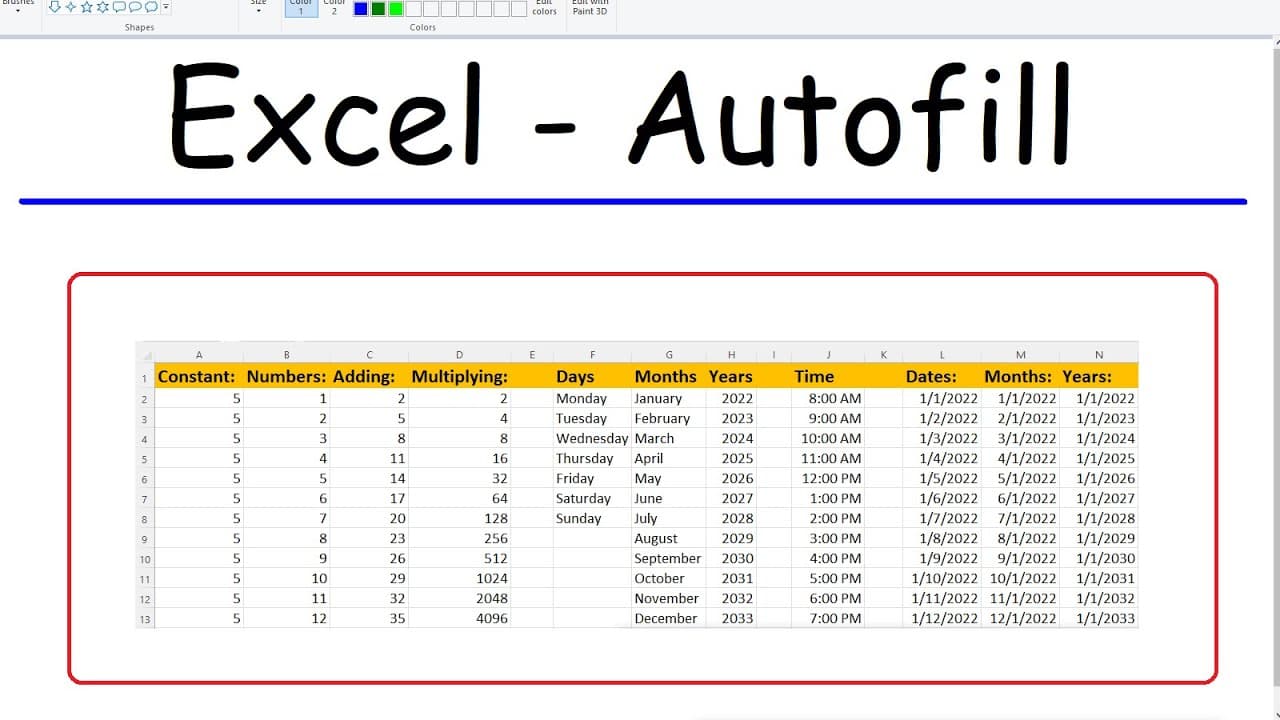
Learn how to use Excel's autofill feature to quickly generate lists, patterns, dates, times, and formulas, saving time and effort in data entry.

Transcript

in this video we're going to talk about how to use the autofill feature in excel so the first thing that you can do with this feature is you can make a list of numbers for instance let's say if we have the numbers 1 and 2 and we want to increase it in that order simply left click and drag excel will automatically follow the pattern and fill in out ... Read More

Key Insights

  • 👂 The Excel autofill feature can save time and effort by automating the generation of various types of lists, patterns, and schedules.
  • 👻 It can handle both arithmetic and geometric progressions, allowing for versatile data generation.
  • 🥳 Autofill is not limited to numbers but can also be utilized for text-based sequences, such as months, days of the week, and dates.
  • ❓ The feature is not only helpful for generating data but can also be used to easily apply formulas across multiple cells.
  • ⌛ Time-based patterns, schedules, and intervals can be efficiently created using the autofill feature.
  • ⌛ The autofill feature is particularly useful for repetitive tasks like creating time sheets, schedules, and sales reports.
  • 🍵 Excel's autofill feature also handles calculations, making it a powerful tool for automating data entry and analysis.

Install to Summarize YouTube Videos and Get Transcripts

Explore YouTube Video Summarizer or Get YouTube Transcript Extractor

Questions & Answers

Q: How can I use the autofill feature to generate lists of numbers?

To create a list, input the starting numbers and drag the fill handle to automatically generate the rest of the sequence following the pattern established.

Q: Can autofill be used for geometric sequences?

Yes, by selecting the values, right-clicking, and choosing the "growth trend" option, Excel will extend the pattern by multiplying the numbers by a common ratio.

Q: Is it possible to use autofill to populate lists of months and days of the week?

Absolutely, simply type in the first month or day and drag the fill handle to automatically fill in the rest of the sequence.

Q: How can I use autofill to generate schedules or time tables?

Input the initial time or hour, drag the fill handle to extend the pattern, and even break it down into intervals, such as 30-minute increments.

Summary & Key Takeaways

  • The autofill feature in Excel allows users to create lists of numbers and increase them by a set pattern, whether arithmetic or geometric.

  • It can also be used to easily generate lists of months, days of the week, and dates, as well as schedule and time intervals.

  • Additionally, autofill can simplify formula entry by automatically extending patterns and calculations across multiple cells.


Read in Other Languages (beta)

English

Share This Summary 📚

Summarize YouTube Videos and Get Video Transcripts with 1-Click

Download browser extensions on:

Try YouTube Summary with ChatGPT & Claude or YouTube Transcript Generator

Explore More Summaries from The Organic Chemistry Tutor 📚

Molarity Dilution Problems Solution Stoichiometry Grams, Moles, Liters Volume Calculations Chemistry thumbnail
Molarity Dilution Problems Solution Stoichiometry Grams, Moles, Liters Volume Calculations Chemistry
The Organic Chemistry Tutor
Integration By Parts Formula Derivation thumbnail
Integration By Parts Formula Derivation
The Organic Chemistry Tutor
How To Calculate Your Mortgage Payment thumbnail
How To Calculate Your Mortgage Payment
The Organic Chemistry Tutor
Simple interest and Compound Interest - SAT Math Part 35 thumbnail
Simple interest and Compound Interest - SAT Math Part 35
The Organic Chemistry Tutor
Perpendicular Lines, Slope, Rays, and Segments | Geometry thumbnail
Perpendicular Lines, Slope, Rays, and Segments | Geometry
The Organic Chemistry Tutor
Factoring Trinomials The Easy Fast Way thumbnail
Factoring Trinomials The Easy Fast Way
The Organic Chemistry Tutor

Summarize YouTube Videos and Get Video Transcripts with 1-Click

Download browser extensions on:

Try YouTube Summary with ChatGPT & Claude or YouTube Transcript Generator

Apps & Extensions

  • Chrome Extension
  • Safari Extension
  • Edge Add-ons
  • Firefox Add-ons
  • iOS App
  • Android App

Key Features

  • YouTube Video Summarizer
  • Web & PDF Summarizer
  • Web & PDF Highlighter
  • Chat with PDF
  • Ask AI Clone
  • Audio Transcriber
  • Glasp Reader
  • Kindle Highlight Export
  • Idea Hatch

Integrations

  • Obsidian Plugin
  • Notion Integration
  • Pocket Integration
  • Instapaper Integration
  • Medium Integration
  • Readwise Integration
  • Snipd Integration
  • Hypothesis Integration

More Features

  • APIs
  • MCP Connector
  • Blog & Post
  • Embed Links
  • Image Highlight
  • Personality Test
  • Quote Shots

Company

  • About us
  • Blog
  • Community
  • FAQs
  • Job Board
  • Newsletter
  • Pricing
Terms

•

Privacy

•

Guidelines

© 2026 Glasp Inc. All rights reserved.