What Is the BliKVM PCIe Card and How Does It Work?

TL;DR
The BliKVM PCIe card is an innovative solution for remote server management, utilizing a Raspberry Pi Compute Module 4. It allows users to control their servers remotely, even when powered off, enabling lights-out management, BIOS adjustments, and OS installations, making it ideal for servers lacking built-in IPMI or iDRAC functionalities.
Transcript
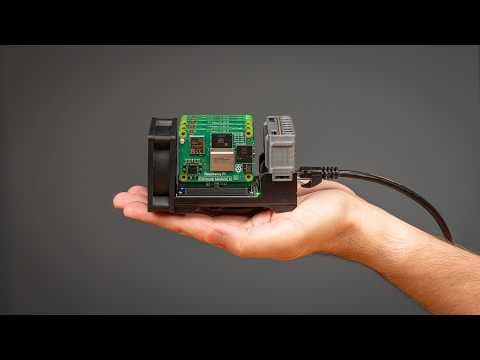
this is a computer and i'm putting this computer in this computer so i can control it from this computer or this computer this is a computer but it's also a pci express card that you install inside another computer it's called the ble-kvm pcie and if you've never built a server before you might be wondering why someone would want to put a computer ... Read More
Key Insights
- 🎮 The Bleak KVM PCIe is an IPKVM (internet protocol keyboard, video, mouse) device that provides remote control and management capabilities for servers.
- 🏛️ It is designed for servers without built-in IPMI or iDRAC functionalities, offering an affordable alternative.
- 😒 The device uses a Raspberry Pi Compute Module 4 to power the card and provide remote control features.
- 🙂 It supports features like lights out management, remote control, BIOS settings management, OS reinstallation, and more.
- ⌛ The Bleak KVM PCIe is not recommended for gaming or real-time applications due to latency issues.
- ✊ The device can be powered over Ethernet using Power over Ethernet (PoE) or with the included USB-C power input.
- ☄️ It comes with accessories like a heatsink, fan, VGA to HDMI adapter, and HDMI sync for versatility.
Install to Summarize YouTube Videos and Get Transcripts
Explore YouTube Video Summarizer or Get YouTube Transcript Extractor
Questions & Answers
Q: How does the Bleak KVM PCIe work?
The Bleak KVM PCIe uses a Raspberry Pi Compute Module 4 installed on the card to provide remote control and management capabilities. The card is mounted inside a server, and the Raspberry Pi acts as the control center for accessing and controlling the server remotely.
Q: Can the Bleak KVM PCIe be used with servers that don't have built-in IPMI or iDRAC?
Yes, the Bleak KVM PCIe is specifically designed for servers that lack built-in IPMI or iDRAC functionalities. It provides a cost-effective solution for remote control and management of such servers.
Q: What can be done remotely using the Bleak KVM PCIe?
The Bleak KVM PCIe allows for remote booting, shutdown, and control of a server, along with the ability to change BIOS settings and perform OS reinstalls. It offers full lights out management capabilities.
Q: Is the Bleak KVM PCIe suitable for gaming or real-time applications?
The Bleak KVM PCIe is not recommended for gaming or real-time applications due to latency issues. It is better suited for remote control and management tasks rather than high-performance activities.
Key Insights:
- The Bleak KVM PCIe is an IPKVM (internet protocol keyboard, video, mouse) device that provides remote control and management capabilities for servers.
- It is designed for servers without built-in IPMI or iDRAC functionalities, offering an affordable alternative.
- The device uses a Raspberry Pi Compute Module 4 to power the card and provide remote control features.
- It supports features like lights out management, remote control, BIOS settings management, OS reinstallation, and more.
- The Bleak KVM PCIe is not recommended for gaming or real-time applications due to latency issues.
- The device can be powered over Ethernet using Power over Ethernet (PoE) or with the included USB-C power input.
- It comes with accessories like a heatsink, fan, VGA to HDMI adapter, and HDMI sync for versatility.
- The Bleak KVM PCIe uses around 2-6 watts of power and supports up to 1080p at 60Hz resolution.
Summary & Key Takeaways
-
The Bleak KVM PCIe is a computer in a computer, designed to provide remote keyboard, video, and mouse (KVM) access to a server over a network.
-
It uses a Raspberry Pi Compute Module 4, mounted on the PCIe card, to power the device and control server functions even when the server is powered off.
-
The device offers features like lights out management, remote control, BIOS settings management, OS reinstallation, and more.
Read in Other Languages (beta)
Share This Summary 📚
Summarize YouTube Videos and Get Video Transcripts with 1-Click
Try YouTube Summary with ChatGPT & Claude or YouTube Transcript Generator
Explore More Summaries from Jeff Geerling 📚


Summarize YouTube Videos and Get Video Transcripts with 1-Click
Try YouTube Summary with ChatGPT & Claude or YouTube Transcript Generator