How to Fix Part or Full Excel Spreadsheet Page Not Printing
TL;DR
Learn to print entire Excel files on one page despite formatting issues.
Transcript
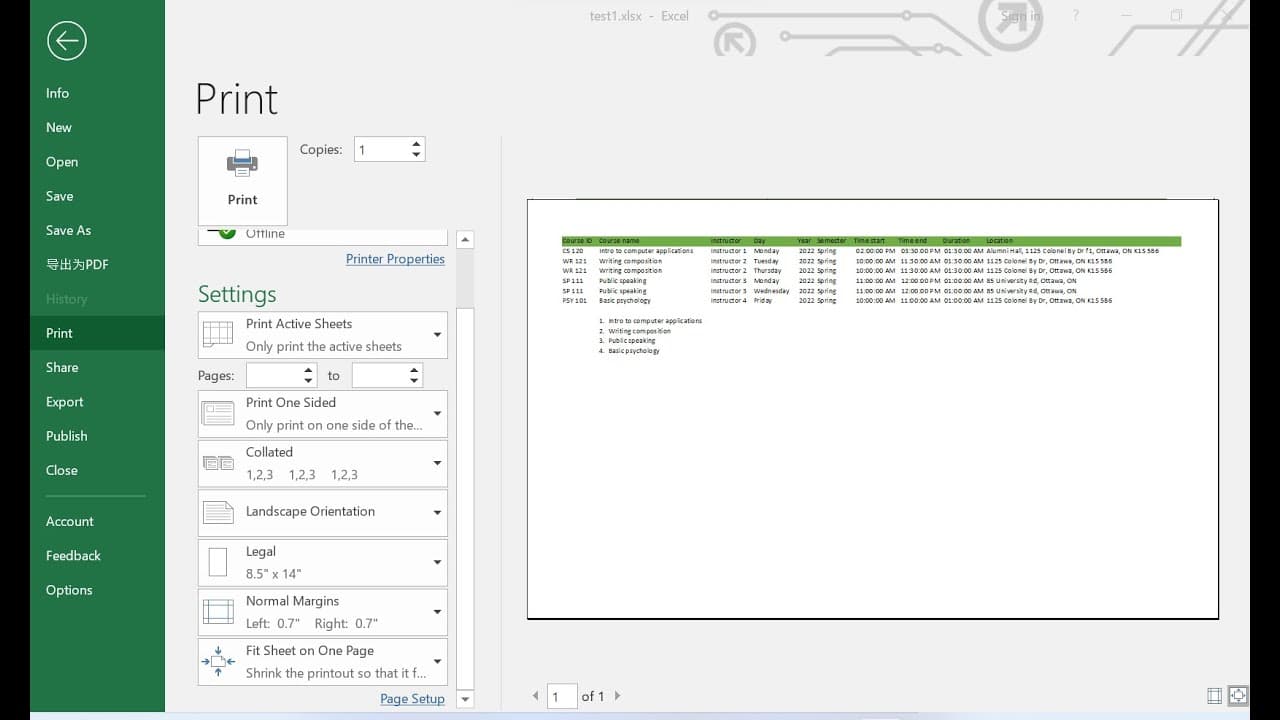
hello everyone in this video i will show you how to print excel file in one page okay so before i doing that i want to show your example for example in this excel sheet i have one two three four five okay five paragraphs under some other paragraphs so when i try to print it let me maximize it you can see it's starting at second one and we're missin... Read More
Key Insights
- 🆘 The formatting of an Excel sheet directly impacts what is printable; ensuring proper spacing helps in displaying whole paragraphs.
- 🦻 Utilizing landscape orientation not only aids in layout design but also in accommodating more data on a single printed page.
- 🌥️ The scaling feature in Excel is a powerful tool for fitting large sheets onto one page, which is particularly useful in maintaining readability despite size adjustments.
- 👣 Choosing larger paper sizes can enhance visibility when printing detailed spreadsheets, making it easier to read the printed content.
- 👻 Previewing print layouts before actual printing can save time and resources by allowing adjustments beforehand.
- 👣 Knowledge of print settings in Excel is essential for efficient printing, especially for extensive data sheets.
- 💁 Regularly checking content alignment and formatting can prevent printing mishaps and the loss of essential information.
Install to Summarize YouTube Videos and Get Transcripts
Explore YouTube Video Summarizer or Get YouTube Transcript Extractor
Questions & Answers
Q: What common problem might occur when printing an Excel file?
A common problem encountered is that not all content appears on the printed page, leading to missing paragraphs or sections. This often happens due to improper formatting, such as rows or columns not being adequately sized or spaced, which prevents the first or last part of the content from being printed.
Q: How can spacing adjustments help in printing?
Adjusting the spacing by adding extra space in the first row can make a significant difference when printing. It allows the printer to accommodate the full breadth of the document, ensuring that both the first and last paragraphs are included on the printout, thus resolving issues related to content being cut off.
Q: What changes can be made to print wider Excel sheets?
Changing the print orientation to landscape can significantly improve printing outcomes for wider Excel sheets. This orientation allows more columns to fit on a single page, and it helps mitigate the issue of essential data being pushed to a second page, ensuring a more complete presentation.
Q: What is a scaling option for fitting content on one page?
Utilizing scaling options can effectively fit an entire Excel sheet onto one page. This feature allows users to adjust the size of the printed content, such as changing from normal to 'fit sheet on one page', which reduces the font size while ensuring no data is lost, thus fitting everything visibly on one page.
Summary & Key Takeaways
-
The video demonstrates how to troubleshoot common printing issues in Excel, where not all content is visible on printed pages. It highlights the significance of adjusting spacing to ensure complete content is printed.
-
It explains how changing the print orientation to landscape can aid in accommodating wider content, pushing more information onto a single page when necessary.
-
Various scaling options are discussed, showing how to fit an entire Excel sheet onto one page by adjusting font sizes or utilizing larger paper formats for better visibility.
Read in Other Languages (beta)
Share This Summary 📚
Summarize YouTube Videos and Get Video Transcripts with 1-Click
Try YouTube Summary with ChatGPT & Claude or YouTube Transcript Generator
Explore More Summaries from E Micro Tech 📚

Summarize YouTube Videos and Get Video Transcripts with 1-Click
Try YouTube Summary with ChatGPT & Claude or YouTube Transcript Generator