How to Create an AI Content Automation System
TL;DR
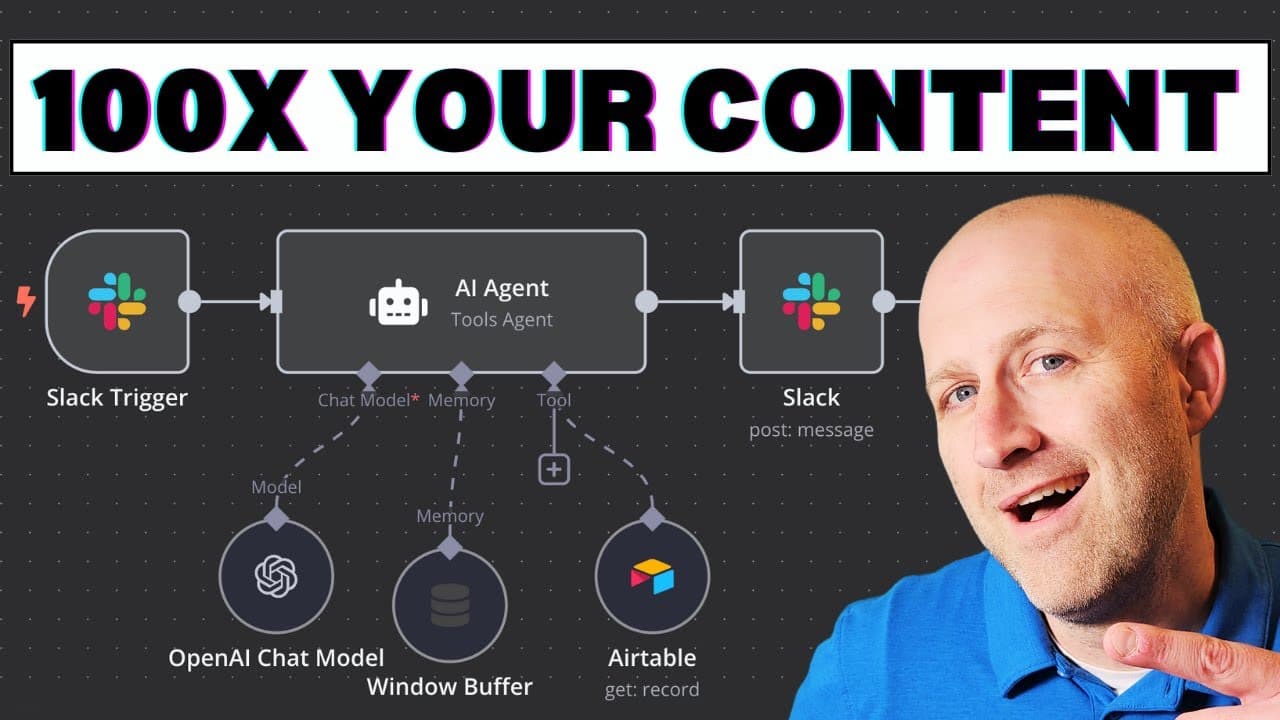
Build a fully automated AI content creation system using n8n, Slack, Airtable, and HeyGen. This system efficiently generates, manages, and publishes content via simple Slack commands, while leveraging Airtable as a central database and HeyGen for video creation. The tutorial walks you through each setup step to streamline your content workflow.
Transcript
in this video I'm going to show you a fully automated content system that generates revenue for your business we'll build this AI agent powered content system step by step in n8n with slack so you can manage the entire process naturally and will automatically store all of the content for repurposing in air table by the end of this v... Read More
Key Insights
- The video demonstrates a fully automated content system that generates and manages content using AI tools like n8n, Slack, Airtable, and HeyGen.
- Slack acts as the central communication hub, allowing users to manage content ideas, voice notes, and publishing commands naturally.
- Airtable serves as the database for storing all content, allowing the AI agent to access and repurpose existing content efficiently.
- HeyGen is used to convert text into AI-generated videos, allowing users to create content without recording it manually.
- The AI agent can search a knowledge base of transcripts using Pine Cone, generating new content from existing material.
- The system supports audio note transcription, converting spoken ideas into written content stored in Airtable.
- The video includes a detailed step-by-step guide on setting up the entire system from scratch, including API integrations and workflow configurations.
- The AI agent is programmed using a system prompt that defines its behavior, tools, and interaction methods with users.
Install to Summarize YouTube Videos and Get Transcripts
Explore YouTube Video Summarizer or Get YouTube Transcript Extractor
Questions & Answers
Q: What is the main purpose of the AI-powered content system discussed in the video?
The main purpose of the AI-powered content system is to automate the creation, management, and publishing of content using AI tools. The system leverages n8n, Slack, Airtable, and HeyGen to streamline content workflows, allowing users to generate new content from existing material, transcribe voice notes, and publish content to social media platforms efficiently.
Q: How does the system utilize Slack in the content creation process?
Slack serves as the central communication hub in the content creation process. Users interact with the AI agent through Slack, adding content ideas, transcribing voice notes, and issuing commands to publish content. The integration with Slack allows for natural and seamless communication, making it easy to manage and automate content workflows within the platform.
Q: What role does Airtable play in the AI content system?
Airtable acts as the database for storing all content within the AI content system. It allows the AI agent to access and repurpose existing content efficiently. Airtable stores content ideas, transcriptions, and generated content, providing a structured and accessible repository that supports the system's automation and scalability.
Q: How does HeyGen contribute to the content system?
HeyGen is used to convert text into AI-generated videos within the content system. This tool allows users to create video content without manually recording it, using avatars and AI voices to produce videos from text input. The integration with HeyGen enhances the system's ability to generate diverse content formats, expanding its utility and reach.
Q: What is the function of Pine Cone in the content system?
Pine Cone is used for indexing and retrieving content within the AI content system. It allows the AI agent to search a knowledge base of transcripts, enabling the generation of new content from existing material. Pine Cone's vector store database provides efficient and relevant content retrieval, improving the system's ability to create high-quality content.
Q: Can the system transcribe audio notes into written content?
Yes, the system can transcribe audio notes into written content. Users can record voice notes in Slack, which are then transcribed by the AI agent and stored in Airtable. This feature allows users to capture spontaneous content ideas and convert them into structured written content for further use and automation.
Q: What are the key components involved in setting up the AI content system?
The key components involved in setting up the AI content system include n8n for workflow automation, Slack for communication, Airtable for content storage, HeyGen for video generation, and Pine Cone for content indexing and retrieval. The setup process involves configuring API integrations, defining system prompts, and building out workflows to automate content tasks.
Q: How is the AI agent programmed to interact with users and tools?
The AI agent is programmed using a system prompt that defines its behavior, tools, and interaction methods with users. The system prompt outlines the agent's purpose, available tools, and instructions for executing tasks. It is designed to help the agent understand user commands, utilize the appropriate tools, and respond effectively, ensuring smooth and efficient content management.
Summary & Key Takeaways
-
This video tutorial guides viewers through creating an AI-powered content system using n8n, Slack, Airtable, and HeyGen. The system automates content creation, management, and publishing using various AI tools and integrations, focusing on efficiency and scalability.
-
Slack is utilized as the primary interface for interacting with the AI agent, allowing users to add content ideas, transcribe voice notes, and publish content to social media platforms seamlessly. Airtable acts as the central database for storing and retrieving content.
-
The tutorial covers the integration of Pine Cone for content indexing and retrieval, enabling the AI agent to generate new content from existing material. The video provides a comprehensive walkthrough of the setup process, including API configurations and workflow automation.
Read in Other Languages (beta)
Share This Summary 📚
Summarize YouTube Videos and Get Video Transcripts with 1-Click
Try YouTube Summary with ChatGPT & Claude or YouTube Transcript Generator
Explore More Summaries from Stephen G. Pope 📚

Summarize YouTube Videos and Get Video Transcripts with 1-Click
Try YouTube Summary with ChatGPT & Claude or YouTube Transcript Generator