iPhone Emojis Vs Google Emojis! (Which Is Better?)
TL;DR
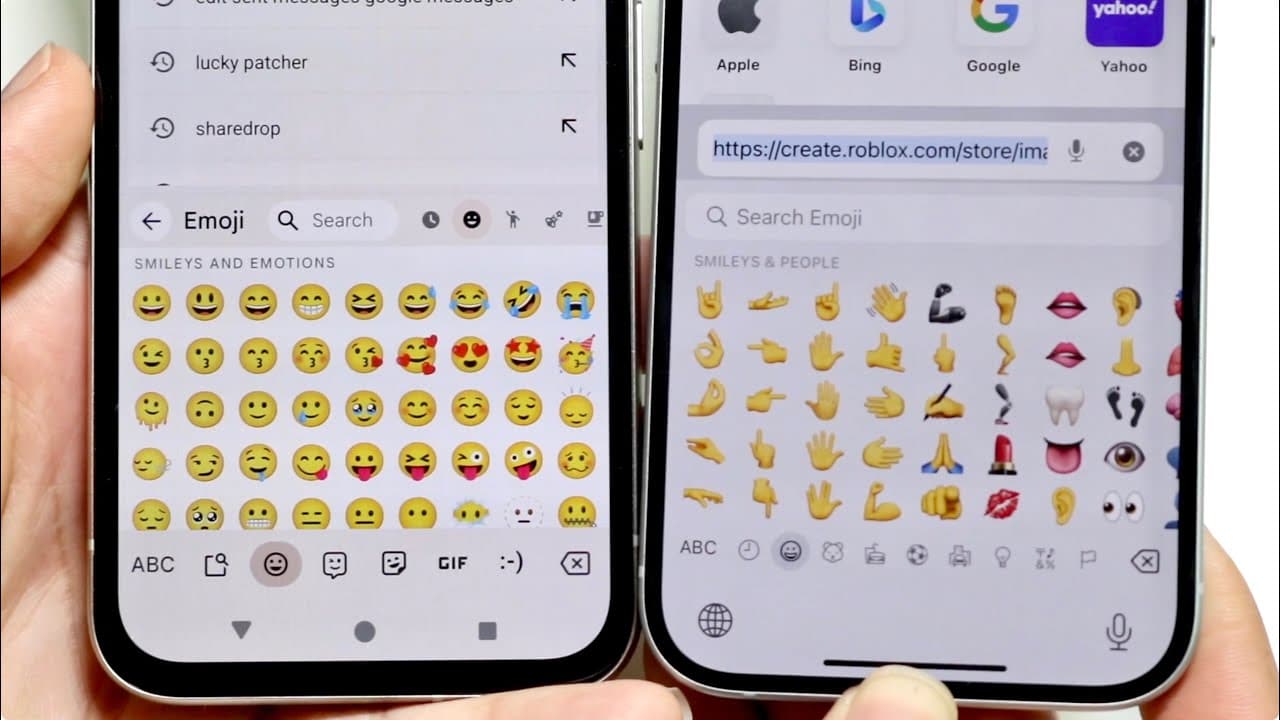
This content compares iPhone emojis with Google Pixel emojis, highlighting their differences and personal preferences.
Transcript
so I wanted to go and take a look at the iPhone emojis and compare them against the Google emojis that you see on a Google pixel and I want to go and show you what the main differences are between both of these now the big thing to keep in mind is that between both of these particular operating systems there's this like the Emojis are basically the... Read More
Key Insights
- 🎭 Both iPhone and Google Pixel emojis perform the same basic function, but their visual representations differ significantly.
- 👨🔬 The search functionality for emojis on both platforms enhances user experience, making it easy to find specific emojis.
- ✋ iPhone emojis are viewed as generally higher in quality and variety compared to Google Pixel emojis, which are regarded as decent but less refined.
- 👀 Google Pixel emojis may appear more cartoonish, while iPhone emojis often have a more polished look.
- ♿ Navigation methods for accessing emojis differ between platforms, with iPhone using side-scrolling and Google Pixel employing up-and-down scrolling.
- 👤 User preferences for emojis can be subjective, with some favoring the iPhone's aesthetic while others appreciate the Google Pixel's design.
- 👤 The differences between emojis on both platforms highlight the importance of user interface design in enhancing communication.
Install to Summarize YouTube Videos and Get Transcripts
Explore YouTube Video Summarizer or Get YouTube Transcript Extractor
Questions & Answers
Q: What are the main differences between iPhone and Google Pixel emojis?
The primary differences lie in their visual style and navigation options. iPhone emojis tend to have a more polished look, aligning with user expectations, while Google Pixel emojis appear somewhat more cartoonish. Additionally, the navigation differs, with iPhone using horizontal scrolling and Google Pixel using vertical scrolling. These aesthetic choices contribute to differing user experiences across platforms.
Q: How do users search for emojis on both platforms?
Both iPhone and Google Pixel provide a search bar for users to find emojis easily. On Google Pixel, the search bar is positioned at the top of the emoji section, allowing users to type in keywords, such as “happy,” to retrieve relevant emojis. iPhone offers a similar functionality, ensuring users can quickly access the emojis they want through a straightforward search process.
Q: In terms of emoji quality, which platform is preferred?
The content suggests that iPhone emojis are generally perceived to have higher quality and variety compared to Google Pixel emojis. The creator emphasizes that while Google Pixel emojis look good and function well, iPhone emojis offer a superior aesthetic that aligns more with user expectations, making them the preferred choice overall.
Q: Is the functionality of emojis the same across iPhone and Google Pixel?
Yes, the core functionality of emojis remains consistent across both iPhone and Google Pixel platforms; when sent, emojis will appear uniformly on the receiving device, regardless of the original user's platform. However, the difference comes in how they visually represent and access these emojis, impacting user experience but not functionality.
Summary & Key Takeaways
-
The content explores the visual differences between iPhone and Google Pixel emojis, noting that while they serve the same function, their appearances can vary significantly.
-
A comparison is made regarding how emojis are accessed on both platforms, with iPhone allowing side-to-side navigation and Google Pixel permitting up-and-down scrolling.
-
The creator shares personal opinions, ultimately favoring iPhone emojis for their quality, while acknowledging that Google Pixel emojis still perform well.
Read in Other Languages (beta)
Share This Summary 📚
Summarize YouTube Videos and Get Video Transcripts with 1-Click
Try YouTube Summary with ChatGPT & Claude or YouTube Transcript Generator
Explore More Summaries from Simple Alpaca 📚






Summarize YouTube Videos and Get Video Transcripts with 1-Click
Try YouTube Summary with ChatGPT & Claude or YouTube Transcript Generator