Splatoon - Painting Effect in Unity
TL;DR
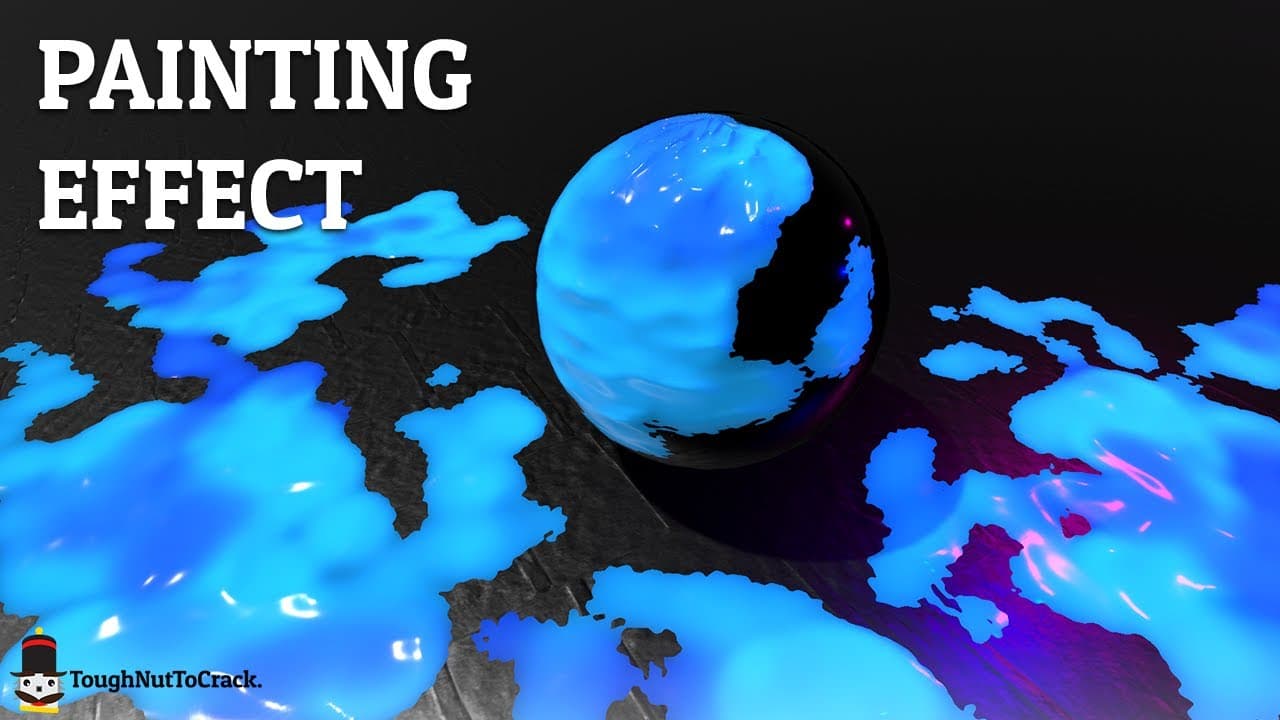
Learn different techniques for painting in video games using Unity, including painting on vertices, using light map coordinates, and painting on a texture in UV space.
Transcript
painting in video games is a very common practice more than one might think it's of the use to paint or interact with environment but also it is used to direct the player and create consistency between him and the game world today we recreate this effect on unity this effect can be achieved in many ways the most popular techniques are painting on t... Read More
Key Insights
- 🎮 Painting in video games serves both practical and aesthetic purposes.
- 🉐 Different techniques for painting in Unity have their own advantages and disadvantages.
- 👾 Painting in the UV space allows for precise control and consistency with the game world.
- 👾 Converting workspace position to UV space enables accurate placement of painted textures.
- 👨🎨 UV remapping ensures proper rendering of painted textures.
- 😒 The tutorial uses a signal distance function and a fragment shader to create the splatooning effect.
- 👨🎨 Command buffer API is used to execute rendering commands for painting on render textures.
Install to Summarize YouTube Videos and Get Transcripts
Explore YouTube Video Summarizer or Get YouTube Transcript Extractor
Questions & Answers
Q: What are the different techniques for painting in video games?
There are three popular techniques: painting on vertices of meshes, painting using light map coordinates, and painting on a texture in UV space.
Q: Why did the tutorial choose to paint in the UV space to recreate the Splatooning effect?
Painting in the UV space allows for precise control over the placement of ink and ensures consistency with the game world. It also enables the use of a fragment shader to create the desired visual effect.
Q: How does converting the workspace position to UV space help in recreating the effect?
Converting the workspace position to UV space enables the rasterizer to recreate the UV islands, ensuring accurate placement of the ink on the meshes.
Q: How does the tutorial handle UV remapping for the meshes?
The tutorial remaps the UV coordinates to fit the range of -1 to 1, as expected by the rasterizer. This ensures proper rendering of the painted textures.
Key Insights:
- Painting in video games serves both practical and aesthetic purposes.
- Different techniques for painting in Unity have their own advantages and disadvantages.
- Painting in the UV space allows for precise control and consistency with the game world.
- Converting workspace position to UV space enables accurate placement of painted textures.
- UV remapping ensures proper rendering of painted textures.
- The tutorial uses a signal distance function and a fragment shader to create the splatooning effect.
- Command buffer API is used to execute rendering commands for painting on render textures.
- The tutorial collaborates with Andre from Mix and Jam and demonstrates the effect's application in virtual reality.
Summary & Key Takeaways
-
Painting in video games serves multiple purposes, including interaction with the environment and directing the player.
-
Different techniques for painting in Unity include painting on vertices, using light map coordinates, and painting on a texture in UV space.
-
The tutorial demonstrates how to recreate the Splatooning effect by painting in the UV space and using a fragment shader to create the ink effect.
Read in Other Languages (beta)
Share This Summary 📚
Summarize YouTube Videos and Get Video Transcripts with 1-Click
Try YouTube Summary with ChatGPT & Claude or YouTube Transcript Generator
Explore More Summaries from TNTC 📚
Summarize YouTube Videos and Get Video Transcripts with 1-Click
Try YouTube Summary with ChatGPT & Claude or YouTube Transcript Generator