[JoVE Playlists] Creating, Editing and Sharing a Playlist
TL;DR
Learn to create, edit, and share playlists using JoVE.
Transcript
welcome to Jo playlist in this video we discuss how to create edit and save a playlist in under Jo playlist to create a new playlist you have two options you can either start with a blank slate using the create new playlist button in the top right corner when you click on the create new playlist button it takes you to the playlist builder in its em... Read More
Key Insights
- JoVE offers two methods to create a playlist: starting from scratch or using curated playlists from their library.
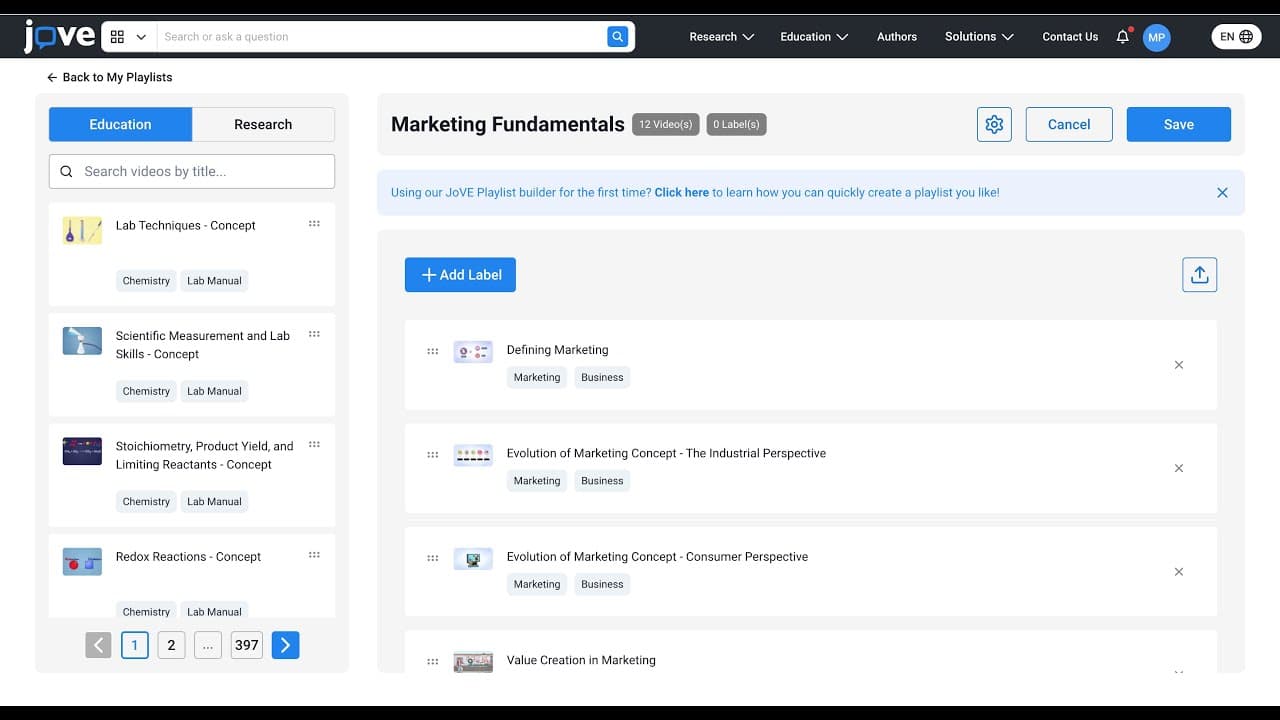
- Users can add, remove, and rearrange videos within a playlist using a simple drag-and-drop interface in the playlist builder.
- Playlists can be organized by adding labels, allowing users to categorize videos into distinct sections for better navigation.
- JoVE provides options to distribute playlists to students via a link or an LMS-compatible CC file, facilitating easy access.
- The platform allows users to edit playlist settings, including renaming and modifying content, even after saving the playlist.
- Additional features include cloning playlists, creating quizzes, and adding playlists to 'My Class' if supported by the institution.
- The 'Create Quiz' feature integrates questions from JoVE's library, enhancing the educational value of the playlist.
- Playlists can be deleted if no longer needed, ensuring users can manage their content effectively and keep their resources up-to-date.
Install to Summarize YouTube Videos and Get Transcripts
Explore YouTube Video Summarizer or Get YouTube Transcript Extractor
Questions & Answers
Q: How can you start creating a new playlist on JoVE?
To create a new playlist on JoVE, you have two options: you can either start from scratch using the 'Create New Playlist' button, which opens an empty playlist builder, or you can begin with one of JoVE's curated playlists available in the playlist library. This flexibility allows users to tailor their playlists according to their specific needs.
Q: What features does the playlist builder offer for editing?
The playlist builder on JoVE offers several editing features. Users can add new videos by dragging them from the left-hand panel, remove unwanted videos using the 'remove item' option, and rearrange videos by dragging them up or down. Additionally, labels can be added to organize videos into sections, and both videos and labels can be rearranged to suit the user's preferences.
Q: How can playlists be distributed to students?
Playlists can be distributed to students by sharing a direct link or by downloading the playlist as an LMS-compatible CC file. The CC file can be uploaded to a Learning Management System (LMS), which will automatically import all the videos, making it easy for students to access the curated content directly through their educational platform.
Q: What options are available under the 'My Playlists' section?
Under the 'My Playlists' section, users can edit existing playlists, view a full-page preview, clone playlists, and add them to 'My Class' if the institution has access to this feature. Additionally, users can create quizzes based on the playlist content, enhancing the educational experience. This section provides comprehensive tools for managing and utilizing playlists effectively.
Q: How does the 'Create Quiz' feature work?
The 'Create Quiz' feature allows users to generate quizzes based on their playlists. When activated, it loads questions from JoVE's extensive library that are mapped to the videos within the playlist. This integration provides an interactive learning experience, enabling educators to assess students' understanding of the material presented in the playlist.
Q: Can playlists be modified after they are saved?
Yes, playlists on JoVE can be modified even after they are saved. Users can change the playlist name, edit content, and adjust settings by accessing the settings icon. This flexibility ensures that playlists can be updated or refined as needed to maintain their relevance and effectiveness in delivering educational content.
Q: What is the purpose of adding labels to a playlist?
Adding labels to a playlist serves to organize the content into distinct sections, making it easier for users to navigate and understand the structure of the playlist. Labels act as headers or categories under which videos can be grouped, allowing for a more organized presentation of material, especially when dealing with extensive playlists.
Q: How can a playlist be deleted?
A playlist can be deleted by selecting the 'delete playlist' option. This action removes the playlist from the user's library, ensuring that only relevant and necessary content is retained. Deleting playlists helps maintain an organized collection of resources, preventing clutter and ensuring that users have easy access to the most pertinent material.
Summary & Key Takeaways
-
JoVE provides a comprehensive platform for creating and managing playlists, offering options to start from scratch or use curated content. Users can easily add, remove, and rearrange videos, and organize them with labels for better structure. The platform supports playlist distribution via links or LMS-compatible files.
-
The playlist builder includes features like editing existing playlists, renaming, and modifying content even after saving. Users can also clone playlists, create quizzes, and add playlists to educational platforms like 'My Class' if available. These features make JoVE a versatile tool for educators.
-
JoVE's 'Create Quiz' feature enhances playlists by incorporating questions from their library, adding educational value. Playlists can be shared with students through links or CC files, ensuring easy access. Users can delete playlists when necessary, maintaining an organized and relevant library of resources.
Read in Other Languages (beta)
Share This Summary 📚
Summarize YouTube Videos and Get Video Transcripts with 1-Click
Try YouTube Summary with ChatGPT & Claude or YouTube Transcript Generator