The Ultimate Guide to Microsoft Task Management Apps | Efficiency 365
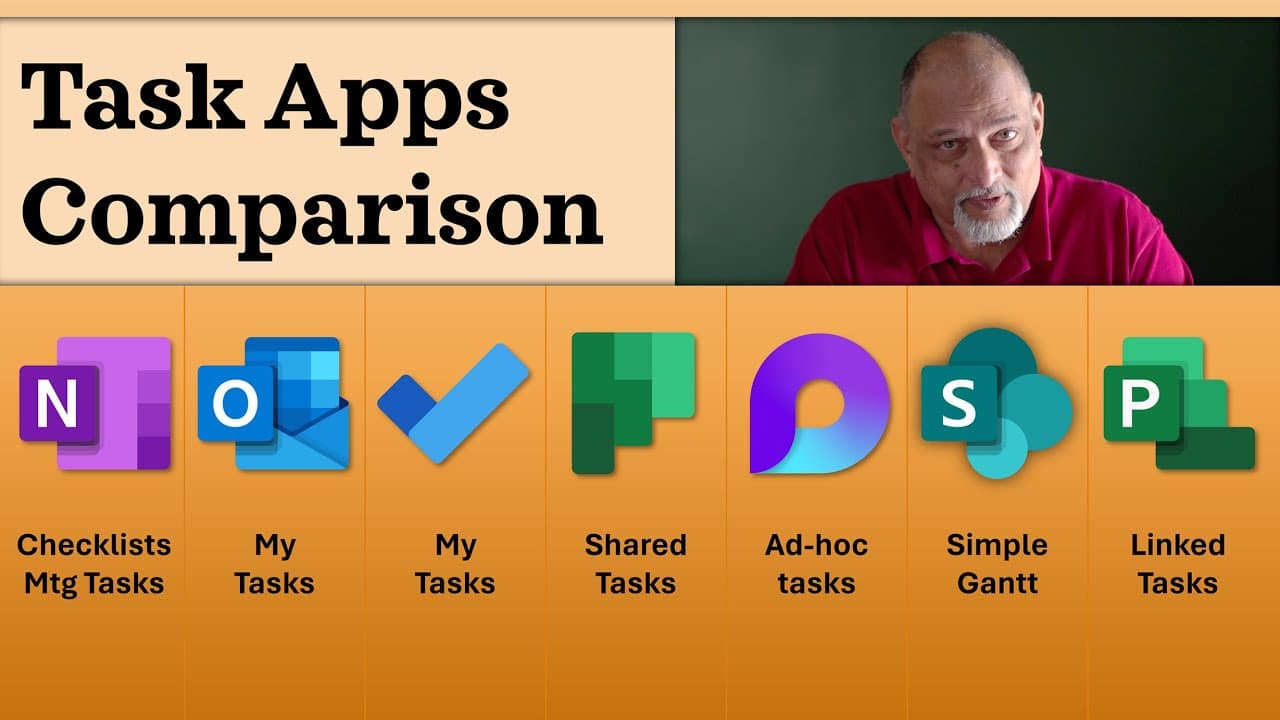
TL;DR
Microsoft Project is the best app for comprehensive task management in Microsoft context, offering extensive features and accountability.
Transcript
I have made many videos about task management already, but I still get a question which app to use when? What is the comparison between them? Strings and weakness. So here is the video. There is a comparison video amongst all apps available in Microsoft platform now. Some of you are in a hurry. I know usually the passion in YouTube community is to ... Read More
Key Insights
- 🛀 OneNote should be used for note-taking, but tasks should be integrated with Outlook for better monitoring and delegation.
- 🖤 Outlook offers a good task folder option for personal and delegated task management, although the new Outlook version lacks certain features.
- 😀 The Todo app syncs tasks with Outlook but lacks flexibility and accountability, making it suitable for personal task management.
- 😤 Planner is ideal for team coordination and long-term projects but lacks security and accountability features.
- 👊 Loop is useful for short-term coordination and execution, such as managing action items in meetings or group chats.
- 🔨 SharePoint Task List provides a powerful task management tool with advanced features and a Gantt chart view, although it's not a full-fledged project management tool.
Install to Summarize YouTube Videos and Get Transcripts
Explore YouTube Video Summarizer or Get YouTube Transcript Extractor
Questions & Answers
Q: Which app should I use to integrate tasks with OneNote for better monitoring and delegation?
The correct way to integrate tasks with OneNote is to use Outlook. You can create a task in Outlook by right-clicking on a note in OneNote and using the flag icon to set a deadline. You can also delegate tasks in Outlook using the "Assign Task" button, ensuring accountability and better task management.
Q: What are the advantages and disadvantages of using the Todo app for task management?
The Todo app allows syncing tasks with Outlook and consolidates shared tasks from different sources, such as emails and meetings. However, it lacks flexibility in terms of grouping, filtering, and sorting tasks, and there is no accountability for task delegation.
Q: How can Planner be used effectively for task management?
Planner works best for long-term coordination in a team setting. It can be used by creating a team in Microsoft Teams and adding a shared task list in one of the channels. However, keep in mind that anyone can delete tasks in Planner, so trust and accountability within the team are essential.
Q: What advantages does SharePoint Task List offer for task management?
SharePoint Task List allows for the creation of shared task lists with features like predecessors, successors, and even a Gantt chart view. It offers more advanced task management capabilities compared to other Microsoft apps, although it does not have resource allocation or load balancing functionalities.
Key Insights:
- OneNote should be used for note-taking, but tasks should be integrated with Outlook for better monitoring and delegation.
- Outlook offers a good task folder option for personal and delegated task management, although the new Outlook version lacks certain features.
- The Todo app syncs tasks with Outlook but lacks flexibility and accountability, making it suitable for personal task management.
- Planner is ideal for team coordination and long-term projects but lacks security and accountability features.
- Loop is useful for short-term coordination and execution, such as managing action items in meetings or group chats.
- SharePoint Task List provides a powerful task management tool with advanced features and a Gantt chart view, although it's not a full-fledged project management tool.
- Microsoft Project is the most comprehensive task management tool, offering extensive integration with the Microsoft platform and advanced project management features.
Summary & Key Takeaways
-
OneNote is primarily for note-taking, but it can integrate tasks with Outlook for better monitoring and delegation.
-
Outlook offers a good task folder option for creating task lists and delegating work, although the new Outlook version lacks certain features.
-
The Todo app can sync tasks with Outlook and consolidate shared tasks from various sources, but it lacks flexibility and accountability.
-
Planner is ideal for long-term coordination in a team setting, but it lacks security and accountability features.
-
Loop can be used for short-term coordination and execution, such as managing action items in meetings, but it lacks task list consolidation and accountability.
-
SharePoint Task List provides a powerful task management tool with features like predecessors, successors, and Gantt chart views.
-
Microsoft Project is the most comprehensive task management tool, offering integration with the Microsoft platform and extensive features for enterprise-wide task management.
Read in Other Languages (beta)
Share This Summary 📚
Summarize YouTube Videos and Get Video Transcripts with 1-Click
Try YouTube Summary with ChatGPT & Claude or YouTube Transcript Generator
Explore More Summaries from Efficiency 365 by Dr Nitin 📚
Summarize YouTube Videos and Get Video Transcripts with 1-Click
Try YouTube Summary with ChatGPT & Claude or YouTube Transcript Generator