How Can You Start Visual Note-Taking Effectively?
TL;DR
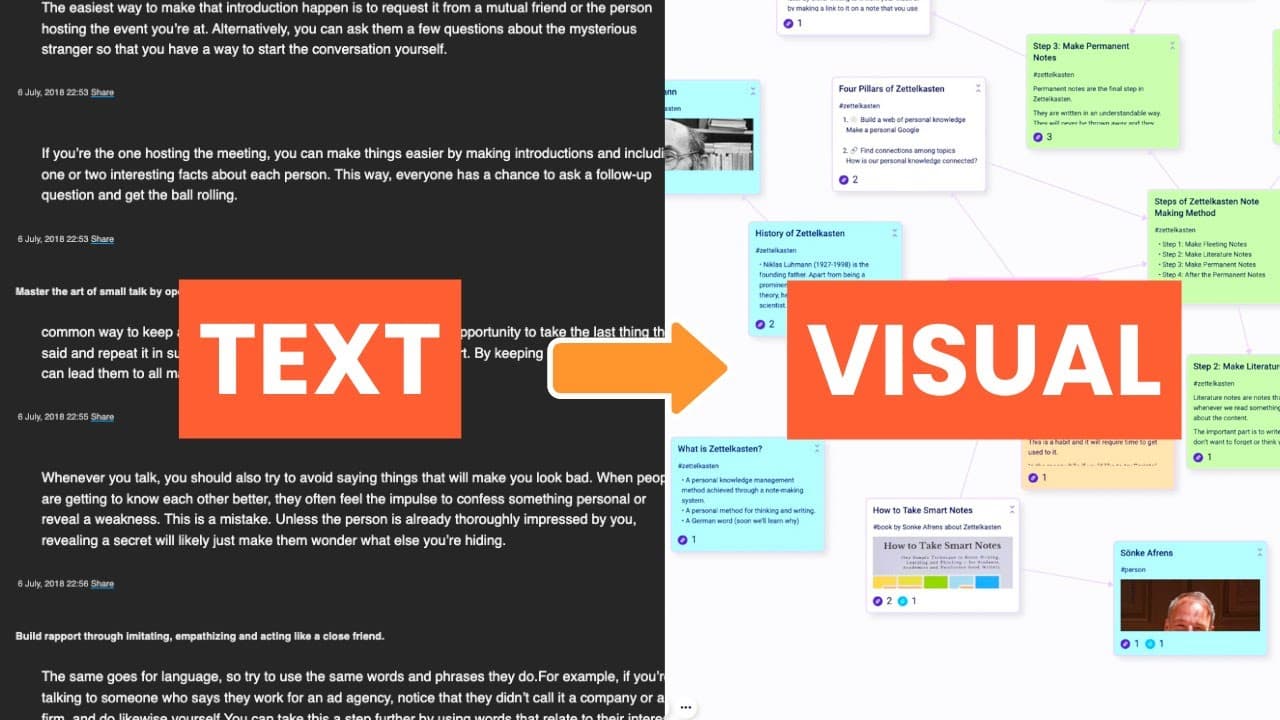
Begin visual note-taking by jotting down key ideas on a blank canvas as you learn. Expand on these ideas with sub-points, use images and colours for better organisation, and customise layouts for clarity. This approach enhances comprehension and memory retention without needing advanced drawing skills.
Transcript
visual note taking is one of the most effective learning methods it makes it easy to rearrange your ideas so you can organize them in any way you like and find connections as well as create a map of your thoughts so you can see all of them at a glance also it's just more fun and makes naughty can feel like a play it's the future of not taking visua... Read More
Key Insights
- 🛀 Visual note-taking offers a more enjoyable and effective learning experience by utilizing visuals and organization techniques.
- 🛀 Drawing skills are not required for visual note-taking, as it focuses on capturing main ideas and creating connections.
- 👻 Visual note-taking is particularly useful for students and researchers, allowing for quick referencing and organization of information.
- 😒 The use of images, videos, and color in visual notes enhances comprehension and aids memory recall.
- 🤯 Various layouts, such as mind maps, kanban boards, or outlining, can be used to organize visual notes.
- 🎵 Squinto is a visual note-taking app that allows for easy creation, organization, and recreation of visual notes.
- 🛀 Visual note-taking can be applied to different contexts, such as task management, project roadmaps, and content calendars.
Install to Summarize YouTube Videos and Get Transcripts
Explore YouTube Video Summarizer or Get YouTube Transcript Extractor
Questions & Answers
Q: How does visual note-taking help with learning?
Visual note-taking allows for a more engaging and fun learning experience, making it easier to organize and comprehend information. The visual cues provided by images and videos aid in memory recall.
Q: Do I need to be good at drawing to do visual note-taking?
No, drawing skills are not necessary for visual note-taking. The focus is on capturing main ideas, creating connections, and using visual elements as cues, which can be done through basic shapes, symbols, or even adding images from external sources.
Q: Can visual note-taking be helpful for students and researchers?
Yes, visual note-taking is especially beneficial for students and researchers. Having reading materials on the canvas allows for quick referencing and contextualization of notes. The ability to organize ideas and discover connections makes studying and research more effective.
Q: How can color be used in visual note-taking?
Colors can be utilized in various ways, such as indicating the type or hierarchy of notes. For example, different colors can be assigned to reading materials, videos, and main/sub points. Color coding aids in visual organization and improves the readability of notes.
Key Insights:
- Visual note-taking offers a more enjoyable and effective learning experience by utilizing visuals and organization techniques.
- Drawing skills are not required for visual note-taking, as it focuses on capturing main ideas and creating connections.
- Visual note-taking is particularly useful for students and researchers, allowing for quick referencing and organization of information.
- The use of images, videos, and color in visual notes enhances comprehension and aids memory recall.
- Various layouts, such as mind maps, kanban boards, or outlining, can be used to organize visual notes.
- Squinto is a visual note-taking app that allows for easy creation, organization, and recreation of visual notes.
- Visual note-taking can be applied to different contexts, such as task management, project roadmaps, and content calendars.
- The flexibility of visual note-taking makes it a versatile tool for studying, comprehending, and memorizing information.
Summary & Key Takeaways
-
Visual note-taking allows for easy rearrangement of ideas, creating connections, and providing a visual representation of thoughts.
-
Combining text-based and visual note-taking tools can make studying and understanding new concepts easier.
-
The video offers a guide on starting visual note-taking, including steps such as writing main ideas, expanding with sub-ideas, adding images and videos, using colors for organization, and arranging notes in various layouts.
Read in Other Languages (beta)
Share This Summary 📚
Summarize YouTube Videos and Get Video Transcripts with 1-Click
Try YouTube Summary with ChatGPT & Claude or YouTube Transcript Generator
Explore More Summaries from Shu Omi 📚





Summarize YouTube Videos and Get Video Transcripts with 1-Click
Try YouTube Summary with ChatGPT & Claude or YouTube Transcript Generator