Your Facebook Ads Retargeting is WRONG! Here's Why…
TL;DR
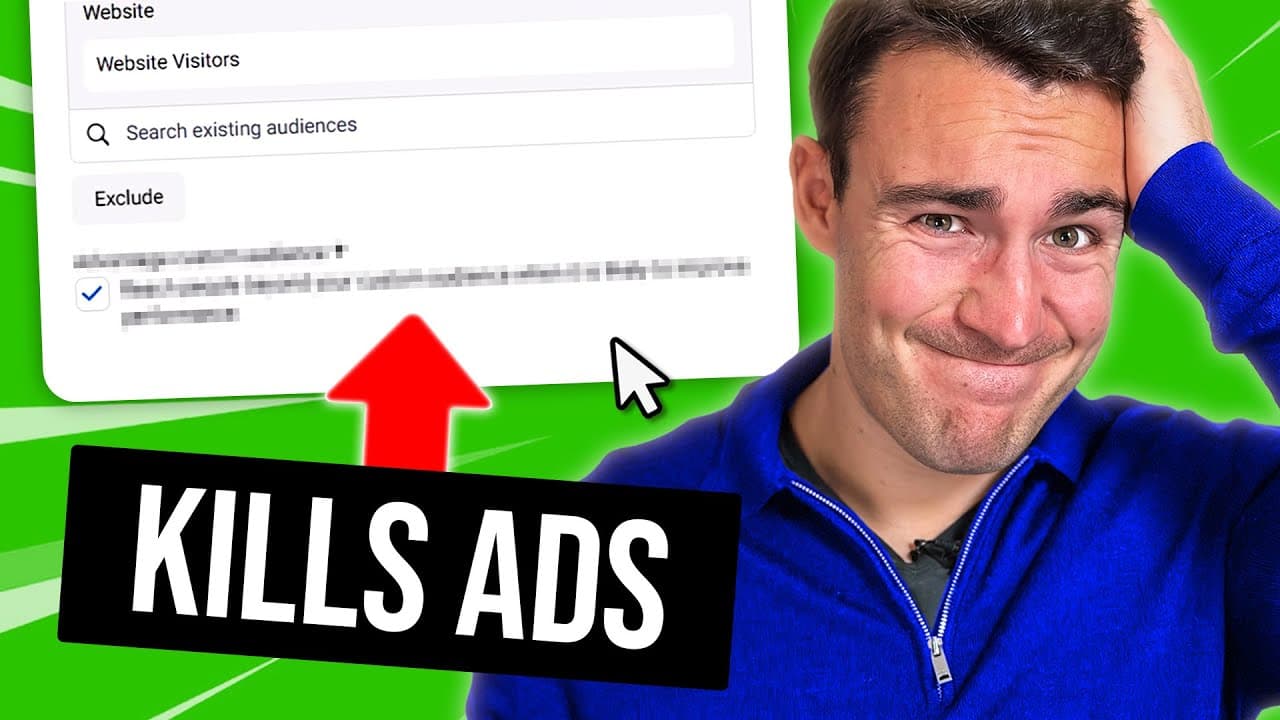
Learn to disable a default Facebook ads feature that affects retargeting.
Transcript
if you're running retargeting campaigns on Facebook right now there's a very good chance that you're doing it wrong oh so wrong and specifically there's a very good chance you're being caught out by a sneaky Facebook ads feature that should not exist that is turned on by default and that you absolutely need to make sure that you turn off I'm going ... Read More
Key Insights
- Many advertisers unknowingly use a Facebook ads feature that expands their audience beyond intended targets, impacting retargeting effectiveness.
- The 'Advantage Custom Audience' feature is automatically enabled, causing ads to reach unintended audiences, which can dilute campaign focus.
- Turning off this feature is crucial for advertisers targeting warm audiences with specific messages or offers based on previous interactions.
- Reaching cold audiences should be done through separate ad sets to maintain clarity and effectiveness in campaign performance analysis.
- Adding new warm audiences to an ad set re-enables the feature, requiring advertisers to manually disable it each time to maintain targeting precision.
- Facebook's default settings aim to increase audience size and ad spend, but this may not align with advertisers' goals for targeted campaigns.
- Advertisers should regularly check their ad settings to ensure they align with campaign objectives and avoid unnecessary budget wastage.
- Maintaining specific targeting in retargeting campaigns enhances ad relevance and conversion potential, preventing amateurish impressions.
Install to Summarize YouTube Videos and Get Transcripts
Explore YouTube Video Summarizer or Get YouTube Transcript Extractor
Questions & Answers
Q: What is the 'Advantage Custom Audience' feature in Facebook ads?
The 'Advantage Custom Audience' feature in Facebook ads automatically expands the reach of your ads beyond your specified custom audience. While this can sometimes improve performance by reaching more people, it often leads to ads being shown to unintended audiences, which can dilute the effectiveness of retargeting campaigns. Disabling this feature is recommended for precise targeting.
Q: Why should advertisers disable the 'Advantage Custom Audience' feature?
Advertisers should disable the 'Advantage Custom Audience' feature to maintain control over their ad targeting. This feature, when enabled, can show ads to people outside the intended audience, reducing the relevance and effectiveness of the campaign. By disabling it, advertisers ensure their ads are seen by people who have shown previous interest, enhancing conversion potential.
Q: How does the 'Advantage Custom Audience' feature affect retargeting campaigns?
The 'Advantage Custom Audience' feature affects retargeting campaigns by expanding the audience beyond those who have already interacted with the brand. This can lead to ads being shown to individuals who are unfamiliar with the brand, resulting in irrelevant impressions and a potential waste of ad spend. It undermines the purpose of retargeting, which is to engage with warm audiences.
Q: What should advertisers do when adding new warm audiences to an ad set?
When adding new warm audiences to an ad set, advertisers should be vigilant and check the settings to ensure the 'Advantage Custom Audience' feature is turned off. Each time a new audience is added, this feature automatically reactivates, which can lead to ads being shown to unintended audiences. Regularly checking and adjusting settings is crucial for maintaining targeting accuracy.
Q: Why does Facebook automatically enable the 'Advantage Custom Audience' feature?
Facebook automatically enables the 'Advantage Custom Audience' feature to increase the potential reach of ads, which can lead to higher ad spend. By expanding the audience, Facebook aims to improve campaign performance metrics, but this approach may not align with advertisers' goals for precise targeting, particularly in retargeting campaigns where specific audience engagement is crucial.
Q: What are the consequences of not disabling the 'Advantage Custom Audience' feature?
Not disabling the 'Advantage Custom Audience' feature can result in ads being shown to people outside the intended audience, leading to irrelevant impressions and inefficient use of the advertising budget. This can dilute the campaign's focus, reduce conversion rates, and give an amateurish impression to those who see ads not meant for them. It is essential to disable this feature for effective retargeting.
Q: How can advertisers ensure their retargeting campaigns remain effective?
Advertisers can ensure their retargeting campaigns remain effective by regularly checking and adjusting their ad settings to disable the 'Advantage Custom Audience' feature. This helps maintain precise targeting, ensuring ads reach only those who have shown prior interest. Additionally, separating cold and warm audiences into different ad sets can provide clearer performance insights and optimize ad spend.
Q: What is the importance of precise targeting in retargeting campaigns?
Precise targeting in retargeting campaigns is crucial as it ensures that ads reach individuals who have already shown interest in the brand or product, increasing the likelihood of conversion. By focusing on warm audiences, advertisers can tailor messages to resonate with their prior interactions, enhancing ad relevance and effectiveness while optimizing budget use. Disabling features that expand audience reach unnecessarily supports this precision.
Summary & Key Takeaways
-
The video highlights a common mistake in Facebook ads retargeting where a default feature expands audience reach unintentionally. Advertisers should disable this to maintain precise targeting, especially for warm audiences. The feature reactivates when new audiences are added, necessitating vigilance to ensure ads reach the intended viewers.
-
Advertisers often overlook the automatic activation of 'Advantage Custom Audience,' which can lead to ads being shown to irrelevant audiences. This undermines the purpose of retargeting by diluting the message meant for specific groups. Disabling this feature is crucial for effective and efficient ad spend.
-
The presenter emphasizes the importance of targeted retargeting campaigns by disabling a default Facebook ads feature. This ensures that ads reach only those who have shown prior interest, maintaining message relevance and avoiding wasted budget. Regular checks are necessary as the feature reactivates with any audience adjustments.
Read in Other Languages (beta)
Share This Summary 📚
Summarize YouTube Videos and Get Video Transcripts with 1-Click
Try YouTube Summary with ChatGPT & Claude or YouTube Transcript Generator
Explore More Summaries from Ben Heath 📚
Summarize YouTube Videos and Get Video Transcripts with 1-Click
Try YouTube Summary with ChatGPT & Claude or YouTube Transcript Generator