6.2.11 An Introduction to Clustering - Video 6: Getting the Data
TL;DR
Learn how to download, load, and prepare data in R for analysis.
Transcript
To download the data that we'll be working with in this video, click on the hyperlink given in the text above this video. Don't use Internet Explorer. Chrome, Safari, or Firefox should all work fine. After you click on the hyperlink, it will take you to a page that looks like this. Go ahead and copy all the text on this page by first selecting all ... Read More
Key Insights
- 😀 Downloading data for analysis in R requires using a specific hyperlink and avoiding Internet Explorer.
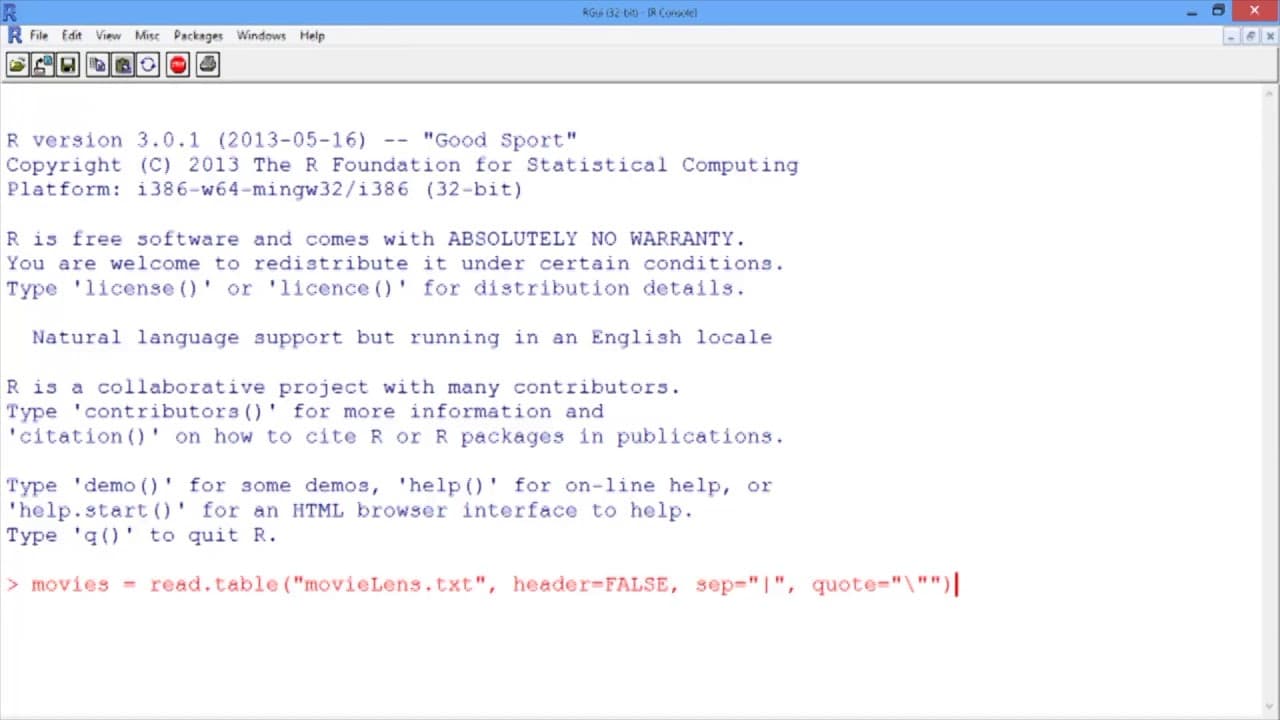
- 📁 The read.table function is used to load the downloaded text file into R, specifying the separator and ensuring proper formatting.
- 🪜 Adding column names to the dataset provides clarity and easy access to variables during analysis.
- ❓ Unnecessary variables can be removed from the dataset using the assignment to NULL method.
- 🪚 Removing duplicate entries from the dataset ensures data quality and accuracy.
- 🤩 The str function helps understand the structure of the loaded dataset, including the number of observations and variables.
- 🎥 The video focuses on preparing movie data for hierarchical clustering analysis.
Install to Summarize YouTube Videos and Get Transcripts
Explore YouTube Video Summarizer or Get YouTube Transcript Extractor
Questions & Answers
Q: What is the first step in downloading and loading data in R?
The first step is to click on the provided hyperlink to download the data, ensuring that a browser like Chrome, Safari, or Firefox is used instead of Internet Explorer.
Q: How can the downloaded text file be loaded into R?
Use the read.table function in R, specifying the name of the data set in quotes as the first argument, setting header=FALSE since the data does not have a header, and using sep="|" to indicate that the entries are separated by vertical bars.
Q: How can column names be added to the dataset?
Use the colnames function, specifying the name of the dataset and the variable names in double quotes separated by commas, and assigning it to the dataset using the equals sign.
Q: How can unnecessary variables be removed from the dataset?
To remove a variable, assign it to NULL using the dataset name and the variable name. This can be done for multiple variables that need to be removed.
Summary & Key Takeaways
-
The content provides a step-by-step guide on how to download and load data in R for analysis.
-
It explains how to copy and save text from a webpage, load the text file in R using the read.table function, and add column names to the dataset.
-
The video also demonstrates how to remove unnecessary variables and remove duplicate entries from the dataset.
Read in Other Languages (beta)
Share This Summary 📚
Summarize YouTube Videos and Get Video Transcripts with 1-Click
Try YouTube Summary with ChatGPT & Claude or YouTube Transcript Generator
Explore More Summaries from MIT OpenCourseWare 📚

Summarize YouTube Videos and Get Video Transcripts with 1-Click
Try YouTube Summary with ChatGPT & Claude or YouTube Transcript Generator