Point Clipping in Computer Graphics | CG | Computer Graphics | Lec-32 | Bhanu Priya
TL;DR
Point clipping determines if a point is inside a clipping window.
Transcript
hi students welcome back let's continue with the clipping concept in the computer graphics the next topic is the point clipping so in the previous video I explained about what exactly the clipping was and what are the applications of the clipping now let's see the point clipping so what is this point clipping and where we use this point leapin actu... Read More
Key Insights
- 😥 The concept of point clipping is essential in ensuring that only relevant points are rendered in computer graphics.
- 📋 Clipping windows are defined by minimum and maximum values for both X and Y coordinates, creating a bounded area for visibility.
- 😥 Checking conditions for point inclusion involves simple comparisons, which can be performed efficiently.
- 😥 Ensuring all conditions are true is crucial; failure in any one condition results in a point being excluded from rendering.
- 😥 Point clipping aids in optimizing graphics rendering by eliminating computations for points that won’t be displayed.
- 👾 This technique is widely applicable in various graphics applications, from games to simulations.
- 💻 Understanding the mathematical basis for clipping is fundamental for computer graphics programming and development.
Install to Summarize YouTube Videos and Get Transcripts
Explore YouTube Video Summarizer or Get YouTube Transcript Extractor
Questions & Answers
Q: What is point clipping, and why is it important in computer graphics?
Point clipping is a technique used in computer graphics to determine whether a specific point lies within a defined clipping window. It's crucial because it helps manage what parts of a graphical object are visible on the screen, enhancing performance and rendering efficiency by eliminating unnecessary calculations for points outside the window.
Q: How do you determine if a point is inside or outside the clipping window?
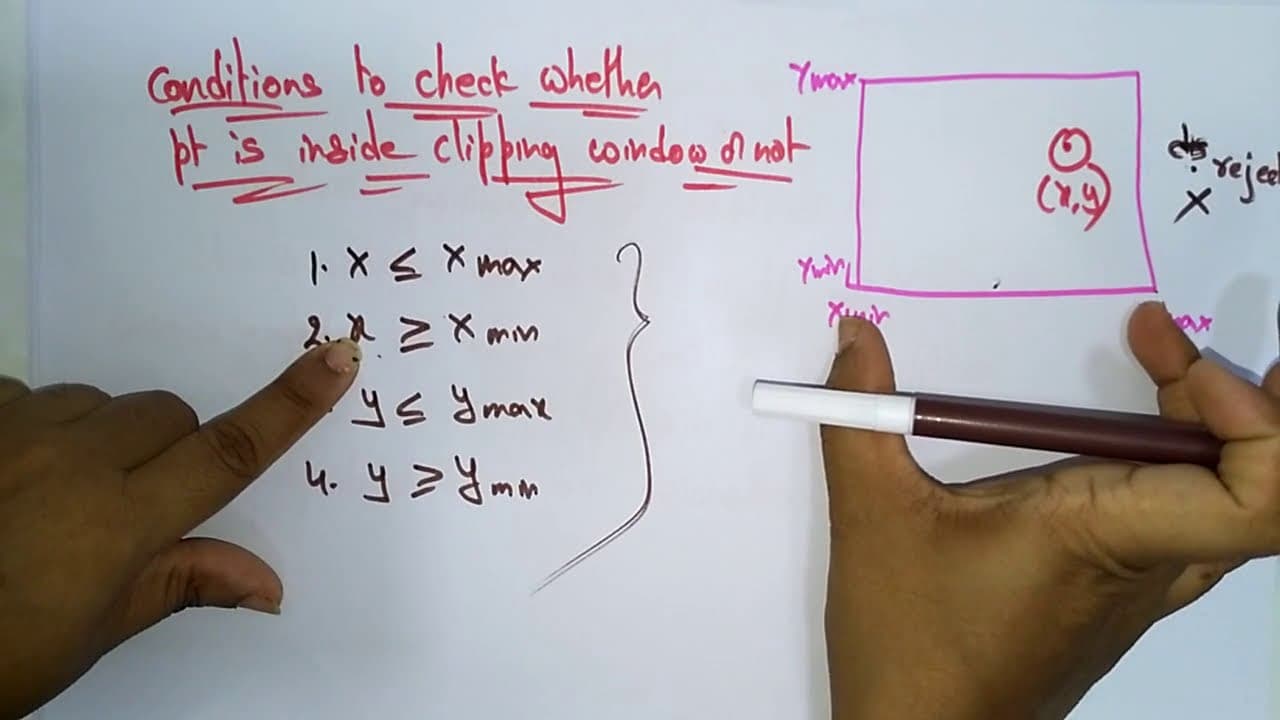
To determine a point's position relative to the clipping window, you check its coordinates against the window's bounds. The X coordinate must be between the minimum (Xmin) and maximum (Xmax), and the Y coordinate must also be within the minimum (Ymin) and maximum (Ymax). If any of these conditions fail, the point lies outside the window.
Q: What conditions need to be checked for point clipping?
The necessary conditions for point clipping involve checking that the X coordinate is greater than or equal to Xmin and less than or equal to Xmax, and similarly checking that the Y coordinate is greater than or equal to Ymin and less than or equal to Ymax. All conditions must hold true for the point to be considered inside the clipping window.
Q: What is the consequence of a point being outside the clipping window?
If a point is determined to be outside the clipping window, it is discarded and not displayed in the rendering process. This helps to focus computational resources on rendering only the visible portions of a scene, improving overall performance and visual clarity.
Summary & Key Takeaways
-
The content introduces the concept of point clipping in computer graphics, explaining its importance in determining whether a point is within a defined clipping window.
-
It outlines the necessary conditions for a point's coordinates (X, Y) to be considered inside the clipping window, emphasizing the need to check against the window's minimum and maximum values.
-
The video stresses that if any of the conditions for inclusion are false, the point is considered outside the clipping window and should not be displayed.
Read in Other Languages (beta)
Share This Summary 📚
Summarize YouTube Videos and Get Video Transcripts with 1-Click
Try YouTube Summary with ChatGPT & Claude or YouTube Transcript Generator