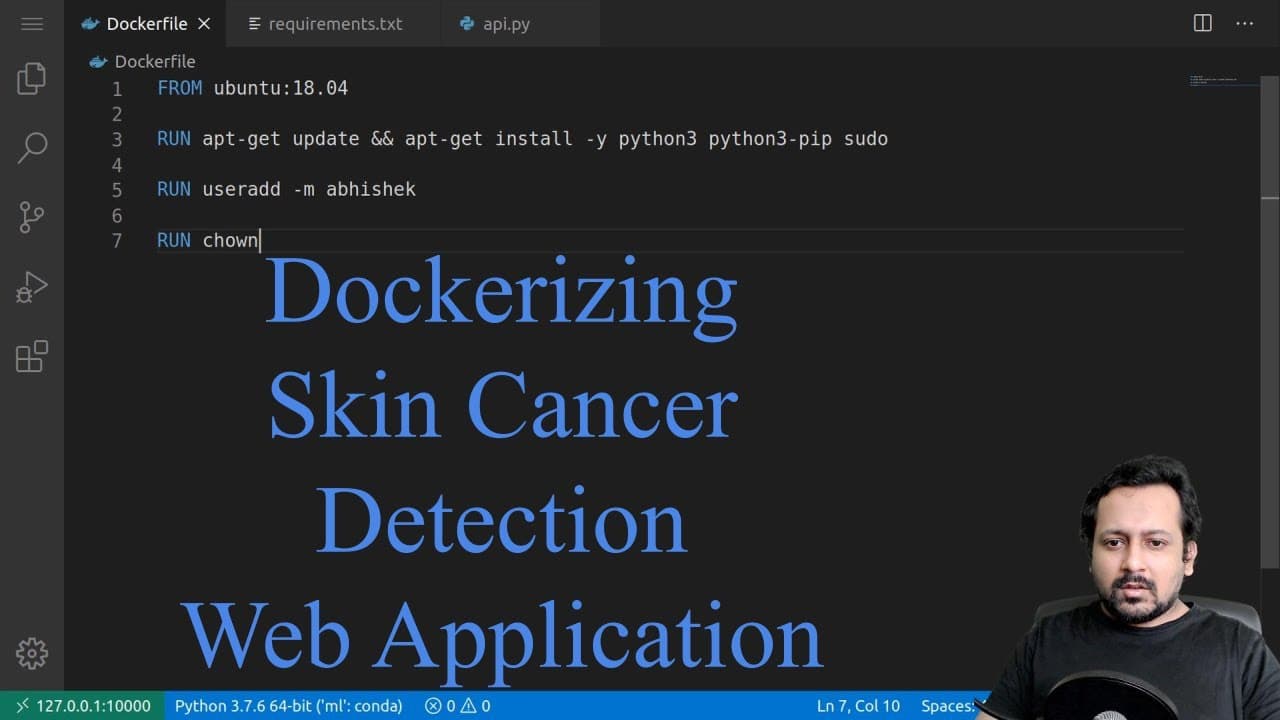
Dockerizing the skin cancer detection web application
TL;DR
Learn how to dockerize a web app for skin cancer detection, allowing it to run on any machine and easily distribute and deploy the application.
Transcript
hello everyone and welcome to this new video and in this one I'm going to tell you about something different that a lot of data scientists need to learn and that's docker and I'm not going to talk in many details but I'm going to only talk about this specific problem that we are dealing with today and that's the web app for skin cancer detection so... Read More
Key Insights
- 🕸️ Dockerization simplifies the distribution and deployment of web applications, making them platform-independent and easily scalable.
- 👻 Docker allows for creating virtual environments or containers for running applications, ensuring consistency and reducing dependency issues.
- 👂 The requirements.txt file is crucial for listing all the Python package dependencies required by the web application.
- 😫 The Dockerfile provides instructions for building the Docker image, including installing necessary packages and setting up the environment.
- 🏃 Dockerizing the web application enables running it on any machine, regardless of the operating system, and simplifies the deployment process.
- 📦 The tutorial also highlights the importance of using specific package versions in the requirements.txt file for reproducibility and compatibility purposes.
- 🎮 The video mentions the possibility of dockerizing the training part of the application in a future tutorial.
Install to Summarize YouTube Videos and Get Transcripts
Explore YouTube Video Summarizer or Get YouTube Transcript Extractor
Questions & Answers
Q: What is the purpose of dockerizing a web app?
Dockerizing a web app allows it to run on any machine and simplifies the distribution, deployment, and scalability of the application. It ensures consistency across different environments and eliminates dependency concerns.
Q: How do you install docker?
Docker can be easily installed by visiting the Docker website and following the installation instructions specific to your operating system or distribution. It generally involves running a few commands to install the necessary packages.
Q: What is the significance of the requirements.txt file?
The requirements.txt file lists all the Python packages required to run the web application. It ensures that all the necessary dependencies are installed when the application is deployed.
Q: What is included in the Dockerfile?
The Dockerfile specifies the instructions for building the Docker image. It includes commands for installing Python and other required packages, copying the application files into the container, and setting the working directory for the application.
Summary & Key Takeaways
-
The video tutorial introduces the concept of docker and focuses on dockerizing a web app for skin cancer detection.
-
Docker allows for easy distribution and deployment of applications across different machines, making it useful for deploying solutions to platforms like Beanstalk or Kubernetes.
-
The tutorial covers installing docker, creating a requirements.txt file, and building a Dockerfile to containerize the web application.
Read in Other Languages (beta)
Share This Summary 📚
Summarize YouTube Videos and Get Video Transcripts with 1-Click
Try YouTube Summary with ChatGPT & Claude or YouTube Transcript Generator
Explore More Summaries from Abhishek Thakur 📚



Summarize YouTube Videos and Get Video Transcripts with 1-Click
Try YouTube Summary with ChatGPT & Claude or YouTube Transcript Generator