Oxford Reading Buddy: How to use the class report
TL;DR
Learn how to use the class report to track student performance and progress effectively.
Transcript
how to use the class report the class status arcs show your classes performance across three measures the attainment arc shows the percentage of your class whose oxford level matches or exceeds the expectation for their year group at the current point in the school year the progress arc shows the percentage of your class who are moving through thei... Read More
Key Insights
- 🏛️ The class report provides a comprehensive view of class performance in attainment, progress, and engagement.
- 💁 Individual student dashboards offer detailed information on performance and progress levels.
- ⚾ Recommendations for level adjustments are based on quiz performance and progress indicators.
- 🧑🎓 Teachers can track student progress within specific levels and make informed decisions.
- 👋 The tool helps teachers identify students who are making good progress, struggling, or lagging behind.
- 🫠 Regular updates on class performance arcs allow for timely intervention and support.
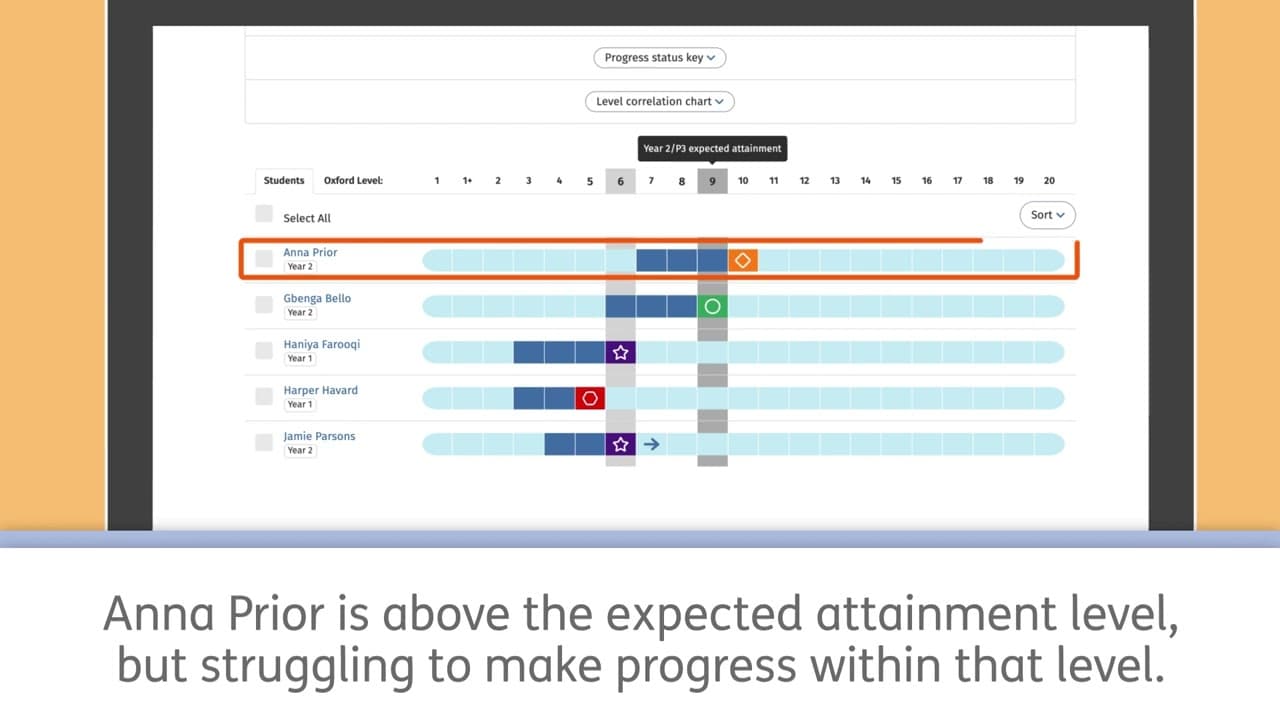
- 🧑🎓 Understanding the color codes for student progress levels is essential for effective monitoring.
Install to Summarize YouTube Videos and Get Transcripts
Explore YouTube Video Summarizer or Get YouTube Transcript Extractor
Questions & Answers
Q: What do the gray bars and blue boxes represent in the student progress monitoring tool?
The gray bars show expected attainment for each year group, and blue boxes indicate a student's previous levels and current level for comparison.
Q: How are student progress levels determined in the tool?
Student progress levels are determined based on quiz scores above 80 percent, time at level, and the expected rate of progress within their current level.
Q: What actions can teachers take based on the recommendations in the tool?
Teachers can approve a student to move up a level, continue at the current level, restart the level, or let the system automatically move the student after 14 days.
Q: How can teachers track individual student progress within a level in the tool?
Teachers can click on any level box to see detailed information on quiz performance, days at level, quiz scores, and recommendations for level adjustments.
Summary & Key Takeaways
-
The class status arcs in the student progress monitoring tool show class performance in attainment, progress, and engagement.
-
The student dashboard provides a snapshot of each student's performance and progress.
-
Detailed information on individual student progress and recommendations for level adjustments are available in the tool.
Read in Other Languages (beta)
Share This Summary 📚
Summarize YouTube Videos and Get Video Transcripts with 1-Click
Try YouTube Summary with ChatGPT & Claude or YouTube Transcript Generator
Explore More Summaries from Oxford Education 📚


Summarize YouTube Videos and Get Video Transcripts with 1-Click
Try YouTube Summary with ChatGPT & Claude or YouTube Transcript Generator