RectangleSum on GeoGebra
TL;DR
Learn how to use Geogebra to perform rectangle sums for mathematical functions and customize the settings for precision and visual appearance.
Transcript
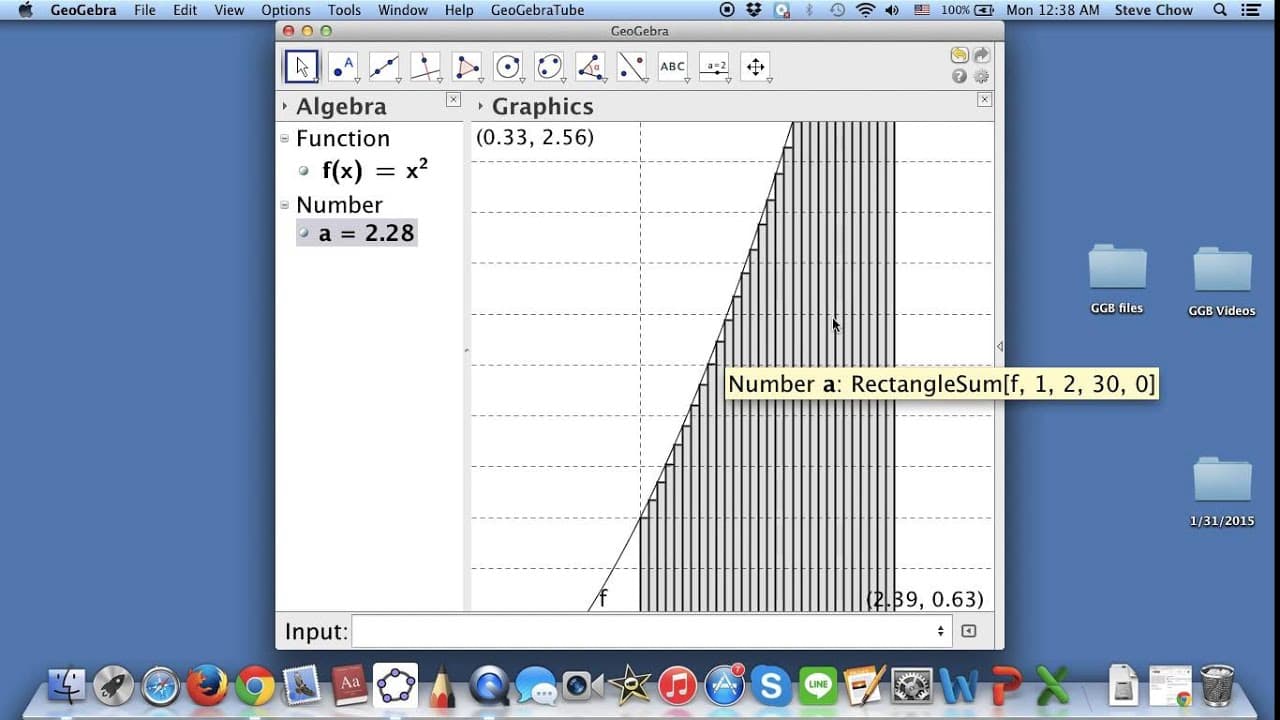
hi i wanted to show you how we can do rectangle sums on geogebra so first of all let me just enter a function right here and you may guess it i'm going to just writing like f of x is equal to x squared so here's a parabola and let me focus on the interval from one to two so let me just choose move and i'm just going to move this around and because ... Read More
Key Insights
- 🎭 Geogebra is a powerful tool for performing mathematical calculations and visualizations.
- 🍹 Rectangle sums can be performed by entering the function, interval, number of rectangles, and precision settings.
- ↔️ It is possible to adjust the settings for different types of rectangles, such as left endpoint, right endpoint, and midpoint.
- 🫥 Geogebra allows for the customization of visual properties, such as line thickness and color.
- #️⃣ The tutorial emphasizes the importance of using reasonable numbers of rectangles for educational purposes.
- 💾 By saving the created visualization as an image, it can be easily incorporated into documents or presentations.
- 🍹 Geogebra offers a template for rectangle sums, making it easy to switch between different functions.
Install to Summarize YouTube Videos and Get Transcripts
Explore YouTube Video Summarizer or Get YouTube Transcript Extractor
Questions & Answers
Q: How can Geogebra be used to perform rectangle sums?
Geogebra allows you to enter a function and specify the interval to focus on. By selecting the rectangle sum option, you can input the function, starting and end values, number of rectangles, and precision for endpoints and midpoints.
Q: Can you modify the number of rectangles and precision settings?
Yes, you can double click on the numbers and input a new value. For example, to increase the number of rectangles, double click on the value and enter the desired amount. Similarly, you can change the precision by modifying the last number.
Q: Are there any limitations on the number of rectangles to choose?
While it is possible to have a high number of rectangles, it is advised not to go overboard as it may impact the performance. It is recommended to use a reasonable amount for educational purposes.
Q: How can different types of rectangles be visualized on Geogebra?
To visualize left endpoint rectangles, use a precision of 0. For right endpoint rectangles, set the last number to 1. For midpoint rectangles, change the last number to 0.5.
Summary & Key Takeaways
-
The content provides a step-by-step guide on performing rectangle sums on Geogebra.
-
It explains how to choose a function, set the interval, select the number of rectangles, and determine the precision.
-
The tutorial also demonstrates how to adjust the settings for left endpoint, right endpoint, and midpoint rectangles.
Read in Other Languages (beta)
Share This Summary 📚
Summarize YouTube Videos and Get Video Transcripts with 1-Click
Try YouTube Summary with ChatGPT & Claude or YouTube Transcript Generator
Explore More Summaries from blackpenredpen 📚
Summarize YouTube Videos and Get Video Transcripts with 1-Click
Try YouTube Summary with ChatGPT & Claude or YouTube Transcript Generator