PS Core Learning - DPI & SA
TL;DR
Understand DPI and service awareness configurations in PS Core.
Transcript
hello everyone I welcome you to this PS4 Basics learning session where today we are going to look into how service awareness and the packet inspection Works in PS code the objective upon completion of this course you will be able to understand how service awareness principle works and we're going to see how the basic configurations of the packet in... Read More
Key Insights
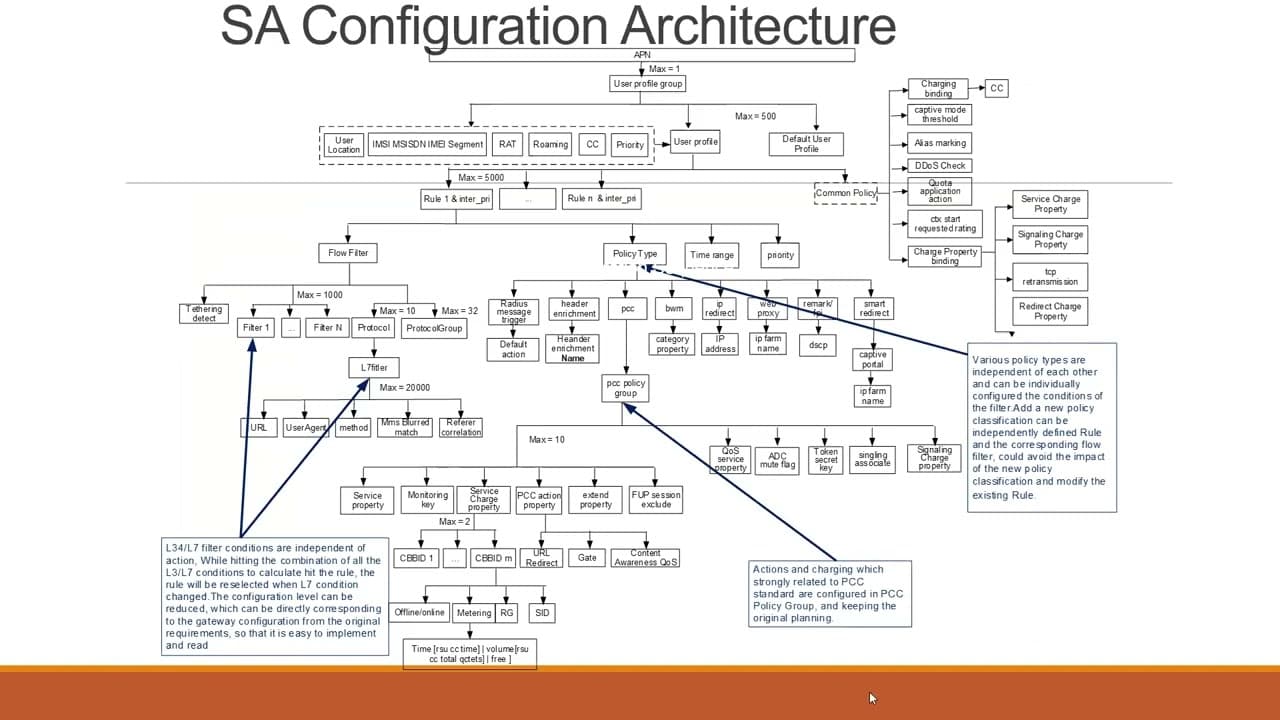
- Service awareness works by differentiating between Service-Based Inspection (SBI) and Application-Based Inspection (API), focusing on layers 3-4 and 5-7 respectively.
- User profiles are selected based on APN, with unique profiles assigned per user to manage L3/4 processing and L7 passing.
- Charging and actions on packets are determined by configured policies, which can include online or offline charging based on rating groups.
- Packet inspection involves matching incoming traffic against rules defined by IP, port, and protocol, as well as service awareness configurations for URL or HTTP-based rules.
- User profiles can be configured to switch based on location, roaming status, or RAT type, ensuring flexible policy application.
- Flow filters are composed of protocol and filter groups, which are bound to specific flow filters to manage traffic inspection.
- PCC policy groups manage charging and actions on packets, with separate properties for service charge and PCC action.
- Rule matching is based on priority, with the highest priority rule being applied when multiple rules match an incoming packet.
Install to Summarize YouTube Videos and Get Transcripts
Explore YouTube Video Summarizer or Get YouTube Transcript Extractor
Questions & Answers
Q: What is the difference between SBI and API in the context of service awareness?
Service-Based Inspection (SBI) focuses on layers 3 and 4, dealing with IP service awareness and packet inspection through filters and rules based on IP addresses, ports, and protocols like TCP, UDP, and ICMP. Application-Based Inspection (API), on the other hand, operates on layers 5-7, dealing with application service awareness and configuring rules for different URLs and applications.
Q: How are user profiles selected and applied in PS Core?
User profiles in PS Core are selected based on the Access Point Name (APN) that a user brings in during a session. Each APN is mapped to a user profile group, which can have multiple user profiles based on criteria like location, roaming status, and RAT type. The selected user profile determines the rules and policies applied to a user's session, including charging and service actions.
Q: What role do flow filters play in packet inspection?
Flow filters are critical in packet inspection as they define the criteria for matching incoming traffic. They consist of protocol and filter groups, which are mapped to specific flow filters. These filters inspect traffic based on IP addresses, ports, and protocols, determining how packets are processed and which rules and policies are applied. Flow filters help ensure that network traffic is managed efficiently and according to predefined configurations.
Q: How does the PCC policy group manage charging and actions on packets?
The PCC policy group manages charging and actions on packets by defining service charge properties and PCC action properties. The service charge property determines how a packet is charged, whether online or offline, and includes details like rating groups and service identifiers. The PCC action property specifies the actions to be taken on a packet, such as redirecting, discarding, or allowing the packet, ensuring that network policies are enforced according to business requirements.
Q: Why is rule priority important in packet inspection?
Rule priority is crucial in packet inspection because it determines which rule is applied when multiple rules match an incoming packet. Rules are matched in descending order of priority, and the rule with the highest priority is selected for application. This ensures that the most critical or specific rules are enforced, allowing for precise control over network traffic and user sessions.
Q: How can user profiles switch based on location or roaming status?
User profiles can switch based on location or roaming status through the configuration of user profile groups. Each group can have multiple profiles differentiated by criteria such as location, RAT type, or roaming status. When a user's context changes, such as moving to a different location, the system can automatically switch to the appropriate user profile, ensuring that the correct rules and policies are applied to the user's session.
Q: What are the key components of a rule in PS Core?
A rule in PS Core consists of several key components: a filter (for layer 3 and 4 criteria), a protocol or protocol group, an L7 filter (for layer 7 criteria), and a policy. The policy includes PCC policy groups, header enrichment, time range, and priority. These components work together to define how incoming traffic is matched and processed, determining the actions and charging applied to each packet.
Q: How does the system handle unmatched packets in the configuration?
Unmatched packets in the configuration are handled by default user profiles and default rules. If a packet does not match any defined user profiles or rules, the system applies a default user profile and associated default rules. This ensures that all packets are processed, even if they do not meet specific criteria, allowing for basic network management and policy enforcement in all scenarios.
Summary & Key Takeaways
-
The session covers the basics of Deep Packet Inspection (DPI) and service awareness in PS Core, explaining how these elements work together to manage network traffic and user profiles. It details the configuration of filters, rules, and policies, emphasizing the importance of matching incoming traffic to predefined rules and policies.
-
Service awareness differentiates between SBI and API, focusing on layers 3-4 and 5-7 respectively. User profiles are selected based on APN and can switch based on location or roaming status. Charging and actions on packets are determined by configured policies, which can include online or offline charging.
-
Flow filters, composed of protocol and filter groups, are crucial for traffic inspection. PCC policy groups manage charging and actions, with rule matching based on priority. The session provides a comprehensive understanding of how these configurations work together for effective network management.
Read in Other Languages (beta)
Share This Summary 📚
Summarize YouTube Videos and Get Video Transcripts with 1-Click
Try YouTube Summary with ChatGPT & Claude or YouTube Transcript Generator
Explore More Summaries from Usman Rashed 📚
Summarize YouTube Videos and Get Video Transcripts with 1-Click
Try YouTube Summary with ChatGPT & Claude or YouTube Transcript Generator