iPhone Optimized Battery Charging: How to Fix & Automate iPhone Battery Charging
TL;DR
Apple introduces Optimizer Battery Charging to improve iPhone battery life by learning and optimizing individual charging patterns.
Transcript
hmm optimize the battery charging it's pretty good concept to improve the battery life and who is this for for a nine to five workers or regular office time employees this is going to work and your phone will be ready with 100 percentage battery charge before you go to office what will you do if you have a different work schedule or you are not abl... Read More
Key Insights
- 🛟 Apple's Optimizer Battery Charging aims to improve iPhone battery life by learning and optimizing individual charging patterns.
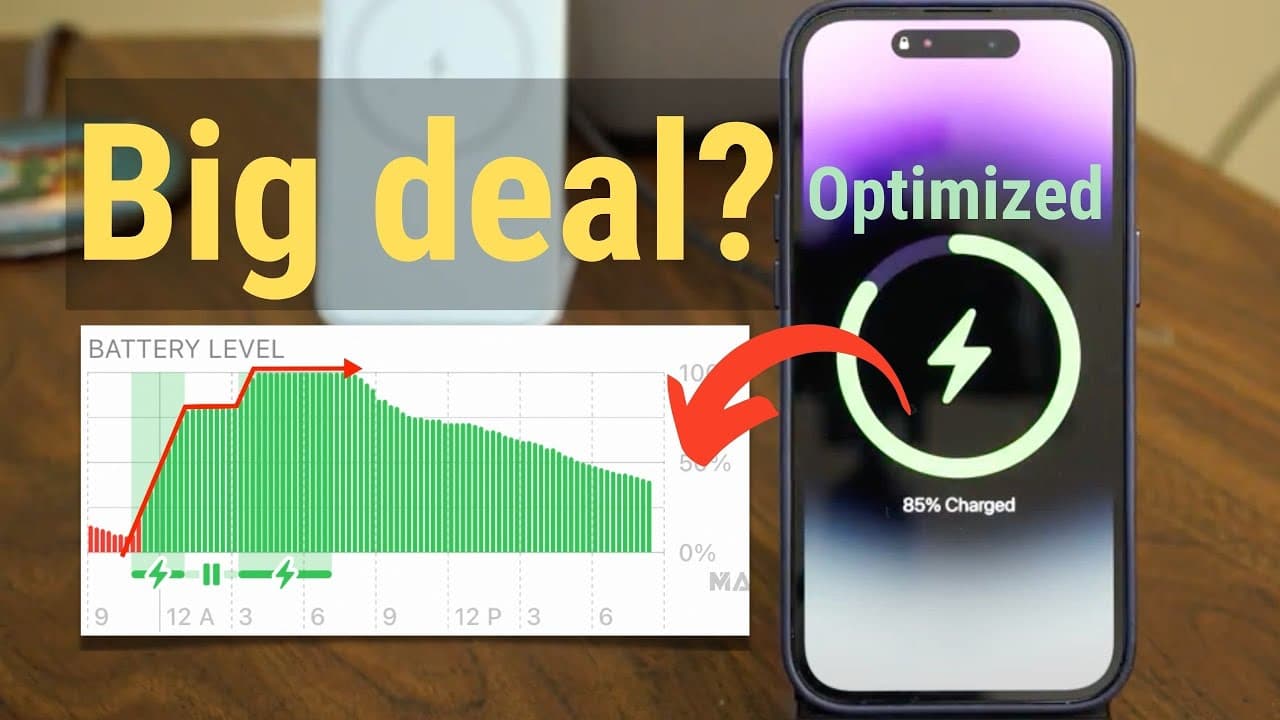
- 🈂️ The feature charges the battery immediately until it reaches 80%, then holds it there for a while before charging to 100% in the last few hours.
- 💦 Individuals with different work schedules may not benefit as much from Optimizer Battery Charging, but there is a workaround using personal automation and a compatible smart plug.
- 📱 Manually disconnecting the charger at 80% or using personal automation with a smart plug can help ensure the battery doesn't exceed 80% if desired.
- 🔋 The typical lifespan of an iPhone battery is 300-400 full cycles, and the cost of battery replacement is relatively affordable after a few years of usage.
Install to Summarize YouTube Videos and Get Transcripts
Explore YouTube Video Summarizer or Get YouTube Transcript Extractor
Questions & Answers
Q: How does Optimizer Battery Charging work?
Optimizer Battery Charging works by gradually learning users' charging patterns and optimizing the charging process for improved battery life. The iPhone charges immediately until it reaches 80%, then maintains it until a few hours before the user typically removes the phone from the charger, when it charges to 100%.
Q: Does Optimizer Battery Charging work for people with different work schedules?
Optimizer Battery Charging may not be as effective for individuals with different work schedules, as it relies on a consistent charging pattern. However, there is a workaround using personal automation and a compatible smart plug to automatically disconnect the charger at a desired battery level.
Q: Can I manually disconnect the charger to ensure the battery only reaches 80%?
Yes, you can manually disconnect the charger when the battery reaches 80% to ensure it does not charge further. However, there is also a way to automate this process using personal automation and a compatible smart plug.
Q: Is Optimizer Battery Charging necessary? Should I be worried about it?
Optimizer Battery Charging is not necessary for everyone, especially if you don't have a regular charging pattern. If you have a different work schedule or don't need to follow a specific charging routine, you can easily turn off this feature and not worry about it affecting your iPhone's battery life.
Key Insights:
- Apple's Optimizer Battery Charging aims to improve iPhone battery life by learning and optimizing individual charging patterns.
- The feature charges the battery immediately until it reaches 80%, then holds it there for a while before charging to 100% in the last few hours.
- Individuals with different work schedules may not benefit as much from Optimizer Battery Charging, but there is a workaround using personal automation and a compatible smart plug.
- Manually disconnecting the charger at 80% or using personal automation with a smart plug can help ensure the battery doesn't exceed 80% if desired.
- The typical lifespan of an iPhone battery is 300-400 full cycles, and the cost of battery replacement is relatively affordable after a few years of usage.
- Users who don't have a regular charging pattern or don't wish to bother with Optimizer Battery Charging can easily turn it off and continue charging their iPhones as usual.
Summary & Key Takeaways
-
Apple has introduced Optimizer Battery Charging to improve the battery life of iPhones by gradually learning and optimizing individual charging patterns.
-
Users are supposed to charge their phones every day at a specific time, and the iPhone will gradually learn this pattern to optimize charging.
-
Once the phone has learned the pattern, it will charge immediately until it reaches almost 80% battery power, then it will stay at 80% for the rest of the night before charging to 100% in the last few hours.
Read in Other Languages (beta)
Share This Summary 📚
Summarize YouTube Videos and Get Video Transcripts with 1-Click
Try YouTube Summary with ChatGPT & Claude or YouTube Transcript Generator