ZWCAD 2025 - The only CAD software you would ever need? | ZWCAD 2025 - New features tutorial
TL;DR
ZWCAD 2025 enhances CAD efficiency with new features and improvements.
Transcript
This channel is all about Revit and with that it's all about BIM or building information modeling. Now in the Bim Community we like to claim that CAD is history and we don't need anything except for Revit, but in reality it's not so simple. BIM is simply not just Revit. In reality it's a whole process where we&#... Read More
Key Insights
- ZWCAD 2025 is positioned as a crucial tool in the BIM ecosystem, offering significant speed and efficiency enhancements over previous versions.
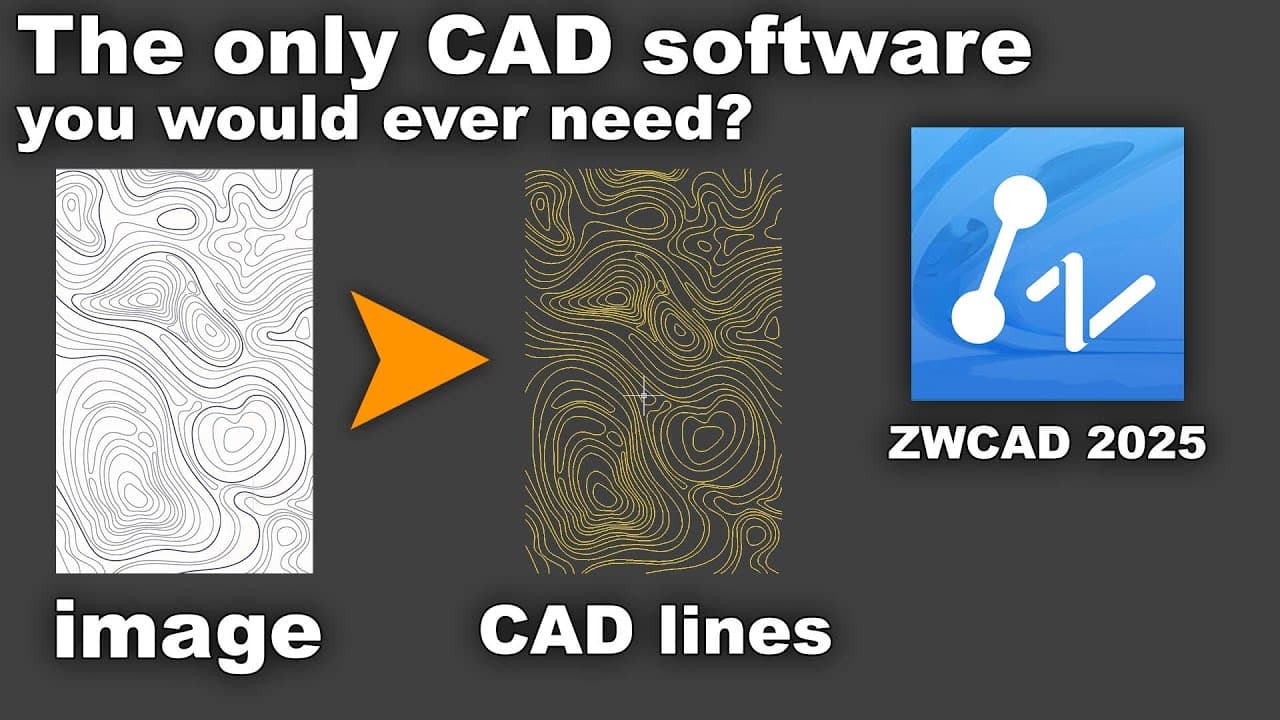
- The software excels in converting images to vector lines, providing users with accurate CAD linework from image files.
- Point Cloud management is a standout feature, allowing for efficient handling of large files and facilitating detailed 3D modeling.
- GIS functionality has been improved, enabling users to assign coordinate systems and integrate map services for better georeferencing.
- ZWCAD 2025 offers enhanced drawing flexibility and accuracy, particularly beneficial in the predesign and design development phases.
- The software supports perpetual licensing, providing a cost-effective solution and addressing concerns over software piracy.
- Visualization options in ZWCAD 2025 allow for detailed presentation adjustments, including color and elevation views of point clouds.
- The Section Panel feature aids architects in creating detailed sections and floor plans from point cloud data, streamlining the design process.
Install to Summarize YouTube Videos and Get Transcripts
Explore YouTube Video Summarizer or Get YouTube Transcript Extractor
Questions & Answers
Q: What makes ZWCAD 2025 stand out in the BIM ecosystem?
ZWCAD 2025 stands out due to its enhanced speed and efficiency, crucial for handling various CAD tasks within the BIM ecosystem. It offers advanced features like image to vector conversion and point cloud management, which are vital for integrating CAD data into BIM processes. These capabilities make it an indispensable tool for architects and designers.
Q: How does ZWCAD 2025 handle large point cloud files?
ZWCAD 2025 is designed to efficiently manage large point cloud files, a critical feature given the size and complexity of such data in the industry. The software allows for quick attachment and manipulation of point clouds, providing users with options to visualize, section, and extract vector lines from these files, thereby streamlining the design process.
Q: What enhancements have been made to the GIS functionalities in ZWCAD 2025?
The GIS functionalities in ZWCAD 2025 have been significantly enhanced to allow users to easily assign coordinate systems and integrate map services. These improvements enable precise georeferencing of designs, ensuring that architectural projects fit accurately within their geographic context. Users can also link maps and adjust coordinate settings to suit project requirements.
Q: What are the benefits of the image to vector conversion feature in ZWCAD 2025?
The image to vector conversion feature in ZWCAD 2025 allows users to transform image files into accurate CAD linework, providing a seamless integration of image data into CAD projects. This feature is particularly beneficial for designers who need to convert topographical maps or other image-based data into vector lines for further design development.
Q: How does ZWCAD 2025 address software piracy concerns?
ZWCAD 2025 addresses software piracy concerns by offering a perpetual licensing model. This approach not only provides a cost-effective solution for users but also reduces the risk of piracy by allowing users to own the software outright rather than relying on subscription-based models. This makes ZWCAD 2025 a financially attractive option for many firms.
Q: What visualization options are available in ZWCAD 2025 for point clouds?
ZWCAD 2025 provides a range of visualization options for point clouds, allowing users to adjust how data is presented. Users can choose from scan colors, object colors, normals, and elevation views, each offering a different perspective on the point cloud data. These options facilitate detailed analysis and presentation of architectural designs.
Q: How does the Section Panel feature benefit architects using ZWCAD 2025?
The Section Panel feature in ZWCAD 2025 benefits architects by enabling the creation of detailed sections and floor plans directly from point cloud data. This feature allows users to extract vector lines from specific sections of the point cloud, aiding in the development of accurate and detailed architectural drawings, which are essential for project documentation and planning.
Q: What role does ZWCAD 2025 play in the predesign and design development phases?
In the predesign and design development phases, ZWCAD 2025 offers enhanced drawing flexibility and accuracy, crucial for initial project planning and detailed design work. Its capabilities in converting images to vectors and managing large datasets like point clouds ensure that designers can efficiently develop and refine their concepts, leading to more precise and effective architectural solutions.
Summary & Key Takeaways
-
ZWCAD 2025 integrates into the BIM ecosystem, providing essential CAD functionalities with improved speed and efficiency. It supports image to vector conversion, point cloud management, and GIS enhancements, making it a versatile tool for architects and designers.
-
The software's ability to handle large point cloud files and convert images into CAD linework enhances its utility in various design phases. ZWCAD 2025 also offers perpetual licensing, addressing cost and piracy concerns.
-
With advanced visualization and sectioning capabilities, ZWCAD 2025 facilitates detailed design work. It allows users to georeference designs using GIS functions and map services, ensuring precision and accuracy in architectural projects.
Read in Other Languages (beta)
Share This Summary 📚
Summarize YouTube Videos and Get Video Transcripts with 1-Click
Try YouTube Summary with ChatGPT & Claude or YouTube Transcript Generator
Explore More Summaries from Balkan Architect 📚
Summarize YouTube Videos and Get Video Transcripts with 1-Click
Try YouTube Summary with ChatGPT & Claude or YouTube Transcript Generator