How I Organize My Phone For Productivity & Digital Minimalism
TL;DR
Learn how to organize your phone for productivity and mental clarity by minimizing clutter and focusing on utility.
Transcript
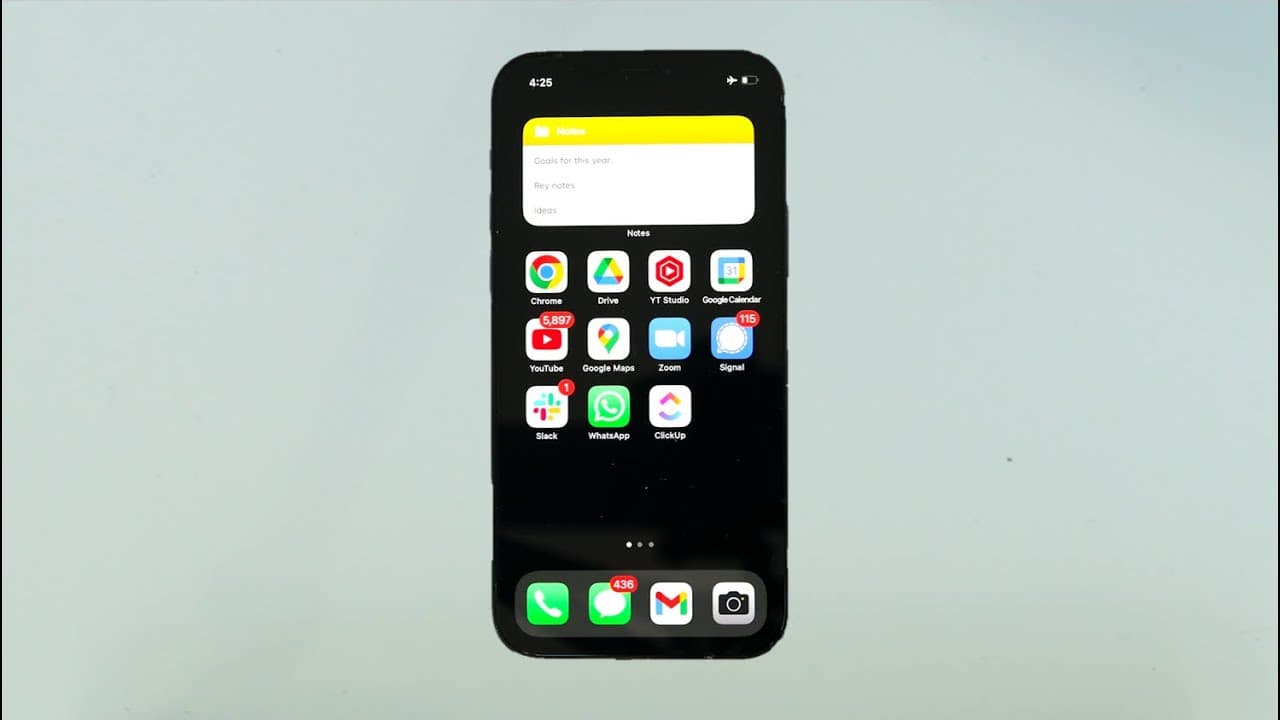
hey everyone so in this video i want to share how i organize my phone for productivity mental clarity and digital minimalism so as one of my friends recently put it your phone is almost the remote control for your life at this point the amount of time that we spend on our devices and truth is you're probably watching this video on your phone at lea... Read More
Key Insights
- 🥺 An organized and uncluttered phone can lead to reduced stress and increased productivity.
- 🥳 Minimizing notifications can help maintain focus and improve mental clarity throughout the day.
- 😀 Utility-focused apps, such as task managers and note-taking apps, can enhance productivity.
- 🖤 Choosing a black lock screen background can help conserve phone battery life.
- 😀 Different countries have varying preferences for messaging apps, with WhatsApp being more popular internationally.
- 😫 Managing unread messages and emails can be challenging but setting specific times to address them can help reduce anxiety.
- 😀 Finance apps with user-friendly interfaces and low fees can simplify investment processes.
Install to Summarize YouTube Videos and Get Transcripts
Explore YouTube Video Summarizer or Get YouTube Transcript Extractor
Questions & Answers
Q: Why is it important to have an organized phone?
An organized phone reduces stress and enhances productivity by minimizing distractions and allowing easy access to essential apps and information.
Q: Do notifications affect productivity?
Yes, frequent notifications can disrupt focus and concentration. It is advisable to turn off unnecessary notifications and prioritize essential ones.
Q: What are the advantages of using utility-focused apps?
Utility-focused apps, such as task managers and note-taking apps, help streamline productivity by keeping track of tasks, ideas, and goals in an organized manner.
Q: How can one manage phone usage while maximizing productivity?
By setting up work modes, limiting notifications, and prioritizing essential apps, one can minimize distractions and only be notified when necessary tasks or contacts require attention.
Q: Why does the speaker choose a black lock screen background?
The black lock screen background helps conserve phone battery life as it draws less energy compared to a white background.
Q: Which messaging apps does the speaker prefer?
The speaker uses Signal and WhatsApp for secure and encrypted messaging, with the latter being more popular outside the United States.
Q: How does the speaker handle unread messages and emails?
The speaker acknowledges a large number of unread messages but aims to manage his inbox once a day. Unread messages can cause anxiety, but having an unread count is often unavoidable.
Q: What finance apps does the speaker use?
The speaker uses Robinhood for quick stock price checks and Fundrise, an investment platform for real estate, due to its user-friendly interface and low fees.
Summary & Key Takeaways
-
The speaker emphasizes the importance of having an organized and uncluttered phone for stress-free living.
-
They share their own phone organization system, which is utility-focused and lacks entertainment apps.
-
The video covers topics such as notifications, lock screen, home screen, and individual apps.
Read in Other Languages (beta)
Share This Summary 📚
Summarize YouTube Videos and Get Video Transcripts with 1-Click
Try YouTube Summary with ChatGPT & Claude or YouTube Transcript Generator
Explore More Summaries from Nate O'Brien 📚






Summarize YouTube Videos and Get Video Transcripts with 1-Click
Try YouTube Summary with ChatGPT & Claude or YouTube Transcript Generator