1.4.5 R1. Understanding Food - Video 4: Creating Plots in R
TL;DR
This video provides an overview of data visualization in R, covering scatterplots, histograms, and box plots.
Transcript
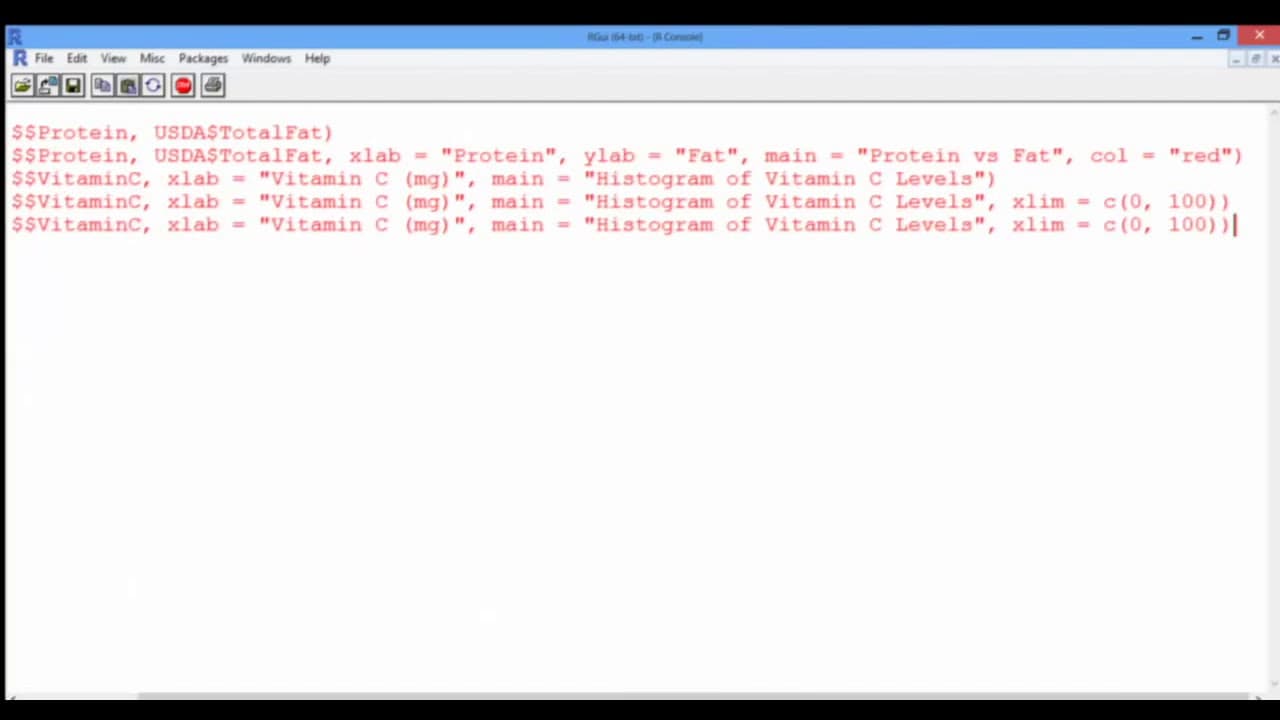
Visualization is a crucial step for initial data exploration. It helps us discern relationships, patterns, and outliers. This video will give us a starting point on how to make plots in R, but more advanced and way cooler visualization tips will be given in Week 8 of this class. Let us first create a scatterplot with Protein on the x-axis and Fat o... Read More
Key Insights
- 🆘 Visualization is a crucial step in initial data exploration, helping to discern relationships, patterns, and outliers.
- 👻 Scatterplots in R allow the comparison of two variables, such as Protein vs. Fat, providing insights into their relationship and potential correlations.
- 🫵 Histograms in R showcase the distribution of a single variable, providing a detailed view of the concentration and frequency of values within specific intervals.
- 🥘 Box plots in R visualize the distribution, median, quartiles, and outliers of a single variable, allowing for insights into the spread and skewness of the data.
Install to Summarize YouTube Videos and Get Transcripts
Explore YouTube Video Summarizer or Get YouTube Transcript Extractor
Questions & Answers
Q: Why is visualization important in data exploration?
Visualization is crucial in data exploration as it allows us to visually identify relationships, patterns, and outliers in the data, providing a better understanding of the underlying trends and insights.
Q: How can we create scatterplots in R?
Scatterplots can be created in R using the plot function. By providing the variables to be plotted (Protein and Fat) as inputs, we can visualize the relationship between the two variables, observing the general trend and identifying any potential correlations.
Q: What is the purpose of histograms in data visualization?
Histograms are used to visualize the distribution of a single variable, such as Vitamin C in this example. They allow us to understand the frequency or count of values within specific intervals, providing insights into the concentration and range of values within the variable.
Q: How can we create box plots in R?
Box plots can be created in R using the boxplot function. By inputting the variable of interest (Sugar in this case), we can visualize the distribution of the variable, including median, quartiles, and outliers. Box plots help in identifying the spread and skewness of the data.
Summary & Key Takeaways
-
The video discusses the importance of visualization in data exploration and how it helps in identifying relationships, patterns, and outliers.
-
It demonstrates how to create scatterplots in R using the plot function, allowing comparisons between two variables (Protein and Fat).
-
The video also shows how to create histograms in R with the histogram function, highlighting the distribution of a single variable (Vitamin C).
-
Additionally, it explains how to create box plots in R using the boxplot function to visualize the distribution and outliers of a single variable (Sugar).
Read in Other Languages (beta)
Share This Summary 📚
Summarize YouTube Videos and Get Video Transcripts with 1-Click
Try YouTube Summary with ChatGPT & Claude or YouTube Transcript Generator
Explore More Summaries from MIT OpenCourseWare 📚
Summarize YouTube Videos and Get Video Transcripts with 1-Click
Try YouTube Summary with ChatGPT & Claude or YouTube Transcript Generator