How to Automate Tasks with AI Agents
TL;DR
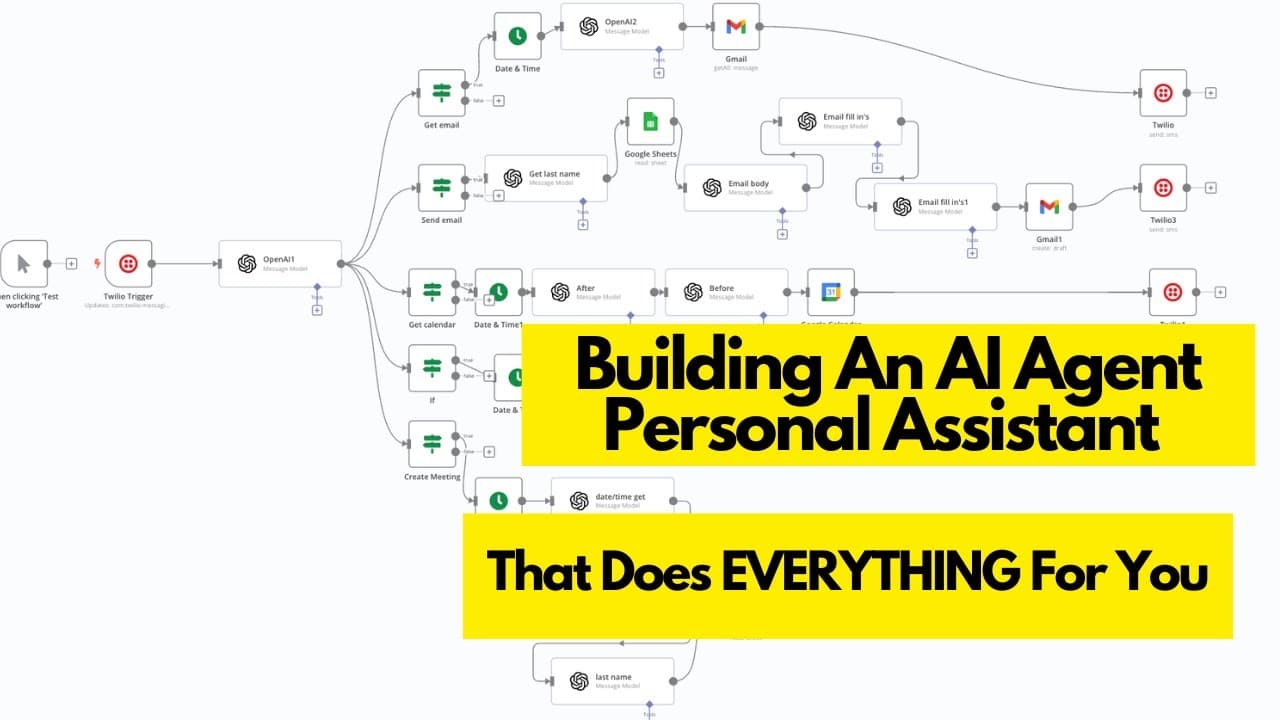
An AI agent can handle various administrative tasks like managing emails, scheduling meetings, and updating project management tools, significantly saving time and effort. By setting up a no-code AI agent on platforms like n, users can automate repetitive tasks, allowing them to focus on more strategic activities. This guide provides a step-by-step process to build and customize your AI agent.
Transcript
I'm going to show you how to set up a no code team of AI personal agents that can do just about anything like getting your calendar email inbox updating your CRM or project management tool send emails and even create meetings and events in your calendar with desired guests so by texting my agent on messenger or even having series Sunday voi... Read More
Key Insights
- AI agents can automate tasks such as managing emails, calendars, and CRM updates.
- No-code platforms like n allow users to build AI agents without programming skills.
- Voice activation can be used to interact with AI agents, enhancing accessibility.
- AI agents can create email drafts and schedule meetings based on voice commands.
- The setup process involves connecting various tools like Twilio and Google Sheets.
- Prompt engineering is crucial for AI agents to understand and execute tasks accurately.
- Integrating AI agents with existing databases allows for personalized interactions.
- AI agents can serve as cost-effective alternatives to hiring administrative assistants.
Install to Summarize YouTube Videos and Get Transcripts
Explore YouTube Video Summarizer or Get YouTube Transcript Extractor
Questions & Answers
Q: How to automate email management with AI?
Automating email management with AI involves setting up an AI agent on a no-code platform like n. The agent can retrieve emails, create drafts, and send messages based on voice commands or text inputs. By integrating tools like Twilio and Google Sheets, the AI can access and process email data, allowing users to manage their inbox efficiently without manual intervention.
Q: What is the role of prompt engineering in AI automation?
Prompt engineering is crucial in AI automation as it ensures the AI agent understands and executes tasks accurately. By providing clear, concise instructions and examples, users can train the AI to perform specific actions based on input data. Effective prompt engineering improves the agent's reliability and efficiency, enabling it to handle complex tasks with minimal errors.
Q: How can AI agents assist in scheduling meetings?
AI agents can schedule meetings by integrating with calendar tools and CRM systems. Users can issue voice commands or text inputs to the agent, specifying details like participant names and meeting times. The AI then accesses the calendar, creates events, and sends invitations to participants, streamlining the scheduling process and reducing the need for manual coordination.
Q: Why use no-code platforms for building AI agents?
No-code platforms like n allow users to build AI agents without programming expertise, making automation accessible to a broader audience. These platforms provide intuitive interfaces and pre-built modules for integrating various tools, enabling users to create customized AI solutions that automate repetitive tasks, improve efficiency, and reduce operational costs.
Q: How do AI agents integrate with existing databases?
AI agents integrate with existing databases by connecting to tools like Google Sheets or CRM systems. This integration allows the AI to access and update data, enabling personalized interactions and task automation. Users can train the AI to retrieve information, create records, or modify entries, enhancing its capability to manage business processes effectively.
Q: What are the benefits of using voice activation with AI agents?
Voice activation with AI agents provides hands-free task management, enhancing accessibility and convenience. Users can issue commands to the AI agent using voice assistants like Siri, allowing them to perform tasks while multitasking or on the go. This feature streamlines operations, reduces manual input, and improves user experience by making automation more intuitive.
Q: How can AI agents be a cost-effective alternative to hiring staff?
AI agents can perform repetitive administrative tasks, reducing the need for hiring additional staff. By automating processes like email management, scheduling, and data entry, AI agents save time and operational costs. They provide a scalable solution that can handle increased workloads without the financial burden of salaries and benefits associated with human employees.
Q: What are the key steps to set up an AI agent for task automation?
Setting up an AI agent involves selecting a no-code platform, integrating necessary tools like Twilio and Google Sheets, and configuring the agent to perform desired tasks. Users must define clear prompts and actions for the AI to execute, ensuring it can handle tasks like email retrieval, meeting scheduling, and CRM updates. Testing and refining the setup is essential for optimal performance.
Summary & Key Takeaways
-
An AI agent can streamline administrative tasks, such as email management, meeting scheduling, and CRM updates, using no-code platforms like n. This automation saves time and allows users to focus on strategic activities. The video provides a step-by-step guide to building and customizing an AI agent, emphasizing the importance of prompt engineering for accurate task execution.
-
The AI agent setup involves integrating tools like Twilio and Google Sheets, enabling voice-activated interactions for managing tasks. By connecting the AI agent to existing databases, users can personalize interactions, making the AI agent a cost-effective alternative to hiring administrative staff.
-
Voice activation with AI agents enhances accessibility, allowing users to manage tasks hands-free. The video demonstrates how to create email drafts, schedule meetings, and update project management tools using voice commands, showcasing the potential of AI agents to transform business operations and improve efficiency.
Read in Other Languages (beta)
Share This Summary 📚
Summarize YouTube Videos and Get Video Transcripts with 1-Click
Try YouTube Summary with ChatGPT & Claude or YouTube Transcript Generator
Explore More Summaries from Nick Puru 📚




Summarize YouTube Videos and Get Video Transcripts with 1-Click
Try YouTube Summary with ChatGPT & Claude or YouTube Transcript Generator