How To Use the StumbleUpon Google Chrome Toolbar
TL;DR
Learn to use StumbleUpon toolbar for browsing and sharing.
Transcript
hey everybody it's eileene from basic blog tips today I want to take a look at stumble upon it all started when my friend kissy asked me to record a screencast and then I found out that they were actually having a contest to explain stumble upon to a non- stumbler so I figured why not give it a try now first let me explain to you the key to... Read More
Key Insights
- The StumbleUpon toolbar is essential for discovering content based on your interests. It uses an algorithm to present sites that might interest you, allowing you to 'stumble' through various web pages.
- Users can interact with content by liking posts, sharing them on social media platforms like Facebook and Twitter, and reviewing them. This interaction enhances the community experience on StumbleUpon.
- Following other users on StumbleUpon allows you to see the content they have liked or shared. This feature helps in building a network of similar interests and discovering more relevant content.
- The toolbar provides options to share content directly via email, Facebook, and Twitter, making it easy to distribute interesting finds to your network outside of StumbleUpon.
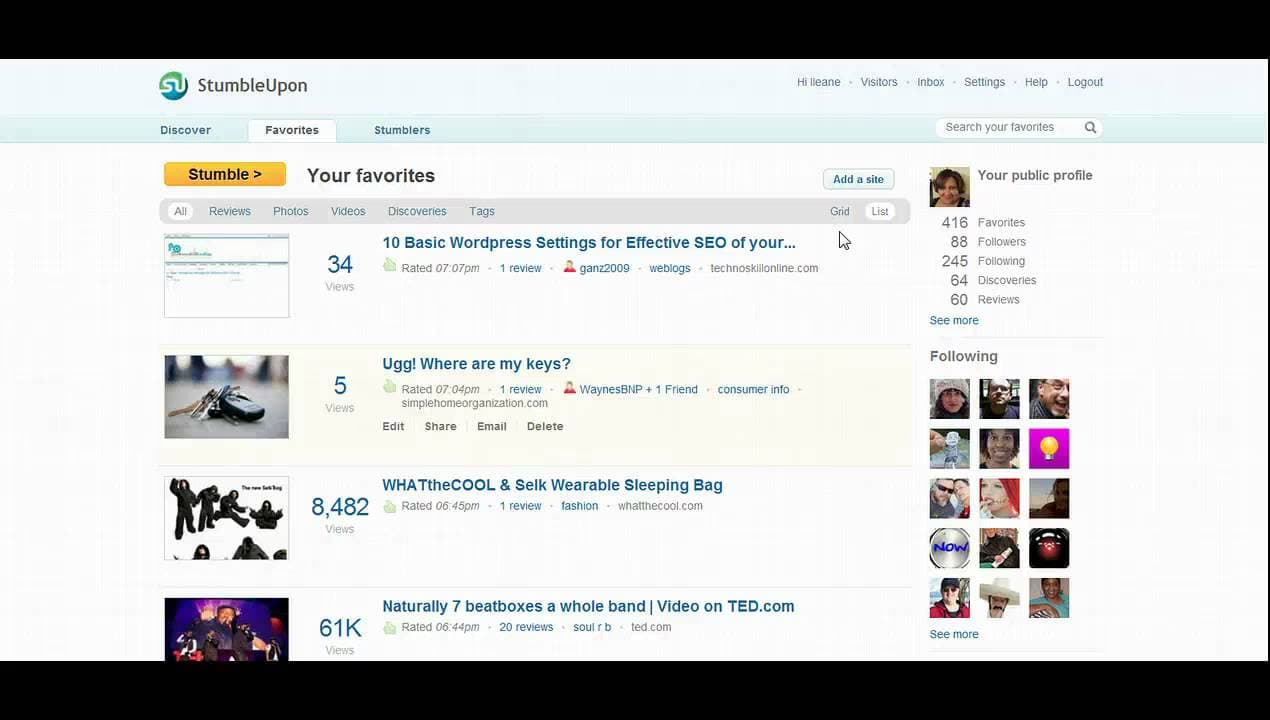
- Your StumbleUpon profile displays your activity, including liked posts, reviews, and discoveries. This transparency allows others to see your interests and engage with your content.
- Users can customize their profiles by changing background colors and adding personal preferences like favorite books and movies, making their profiles more appealing to others.
- The toolbar allows for easy navigation of liked content and profiles of followed users, enabling a seamless browsing experience without needing to open the toolbar frequently.
- The video provides a comprehensive guide to using the StumbleUpon toolbar, emphasizing the importance of customization and interaction to enhance user experience.
Install to Summarize YouTube Videos and Get Transcripts
Explore YouTube Video Summarizer or Get YouTube Transcript Extractor
Questions & Answers
Q: How does the StumbleUpon toolbar help in discovering content?
The StumbleUpon toolbar uses an algorithm to present web pages that match your interests. By clicking 'stumble,' users are directed to various sites, allowing them to explore a wide range of content. This feature is key to discovering new and interesting articles, blogs, and websites that you might not find otherwise.
Q: What are the interaction features available on StumbleUpon?
StumbleUpon offers several interaction features, including liking posts, sharing them on social media platforms like Facebook and Twitter, and writing or reading reviews. These features enable users to engage with content actively, share their opinions, and distribute interesting finds to their broader network.
Q: How can users build a network on StumbleUpon?
Users can build a network on StumbleUpon by following other users whose interests align with theirs. This allows them to see content that these users have liked or shared. Accepting shares from these users to your toolbar also facilitates the discovery of more relevant content, enhancing the overall experience.
Q: What customization options are available for StumbleUpon profiles?
StumbleUpon profiles can be customized by changing background colors and adding personal preferences such as favorite books and movies. These customization options help make profiles more attractive and personalized, allowing users to express their individuality and interests more clearly to others in the community.
Q: How can content be shared using the StumbleUpon toolbar?
Content can be shared directly from the StumbleUpon toolbar using the sharing toolbox. Users can share their discoveries via email, Facebook, and Twitter, making it easy to distribute interesting articles and websites to their network outside of StumbleUpon. This feature enhances the reach of content beyond the platform.
Q: What information is displayed on a user's StumbleUpon profile?
A user's StumbleUpon profile displays their activity, including the posts they have liked, reviews they have written, and discoveries they have added to the platform. It also shows the users they are following and who is following them. This transparency allows others to engage with their content and interests.
Q: How does the toolbar facilitate navigation on StumbleUpon?
The toolbar facilitates navigation by allowing users to easily access their liked content and the profiles of users they follow. This seamless browsing experience means users don't need to open the toolbar frequently, making it convenient to explore and interact with content and other users on the platform.
Q: What is the main focus of the video tutorial by Eileen?
The main focus of the video tutorial by Eileen is to provide a comprehensive guide on using the StumbleUpon toolbar for Google Chrome. It emphasizes the importance of interaction, network building, and profile customization to enhance the user experience. The tutorial aims to help users navigate and utilize the platform effectively.
Summary & Key Takeaways
-
The video tutorial by Eileen from Basic Blog Tips explains how to use the StumbleUpon toolbar effectively. It covers the installation process, how to stumble through content, and interact with posts through likes, shares, and reviews.
-
The tutorial highlights the importance of building a network on StumbleUpon by following other users and accepting their shares. It also emphasizes the role of customization in making profiles attractive to others.
-
Eileen demonstrates how to navigate through your StumbleUpon profile, manage your favorites, and utilize the sharing options available on the toolbar. This guide is aimed at enhancing user experience on the platform.
Read in Other Languages (beta)
Share This Summary 📚
Summarize YouTube Videos and Get Video Transcripts with 1-Click
Try YouTube Summary with ChatGPT & Claude or YouTube Transcript Generator