Overview: Get Started With Journals in Financial Consolidation and Close
TL;DR
Journals adjust account data using debits and credits for balance.
Transcript
You use journals to make adjustments to your account data. Journals provide double-sided entry using debits and credits to ensure your balance sheet stays in balance. Total debits for each currency must equal total credits. You can save unbalanced journals, but you cannot submit them for approval or post them. You can use the Data Source dime... Read More
Key Insights
- Journals in financial consolidation allow for adjustments to account data using debits and credits, ensuring balance sheets remain balanced. Total debits must equal total credits for each currency.
- Unbalanced journals can be saved but not submitted for approval or posted. Data Source dimension in Data Forms helps view pre-adjustment, adjustment, and adjusted totals.
- Journal data posts as positive or negative values based on account type. For expense accounts, debits are positive, and credits are negative.
- Auto-reversing journals automatically create a reversing entry for a selected future period, facilitating adjustments that need future reversal.
- A service administrator must open periods for journals before users can post them. Once closed, journals cannot be posted to that period.
- Journals are created for a specific point of view, including Scenario, Years, Period, View, and Consolidation. Different views allow for current period or year-to-date input.
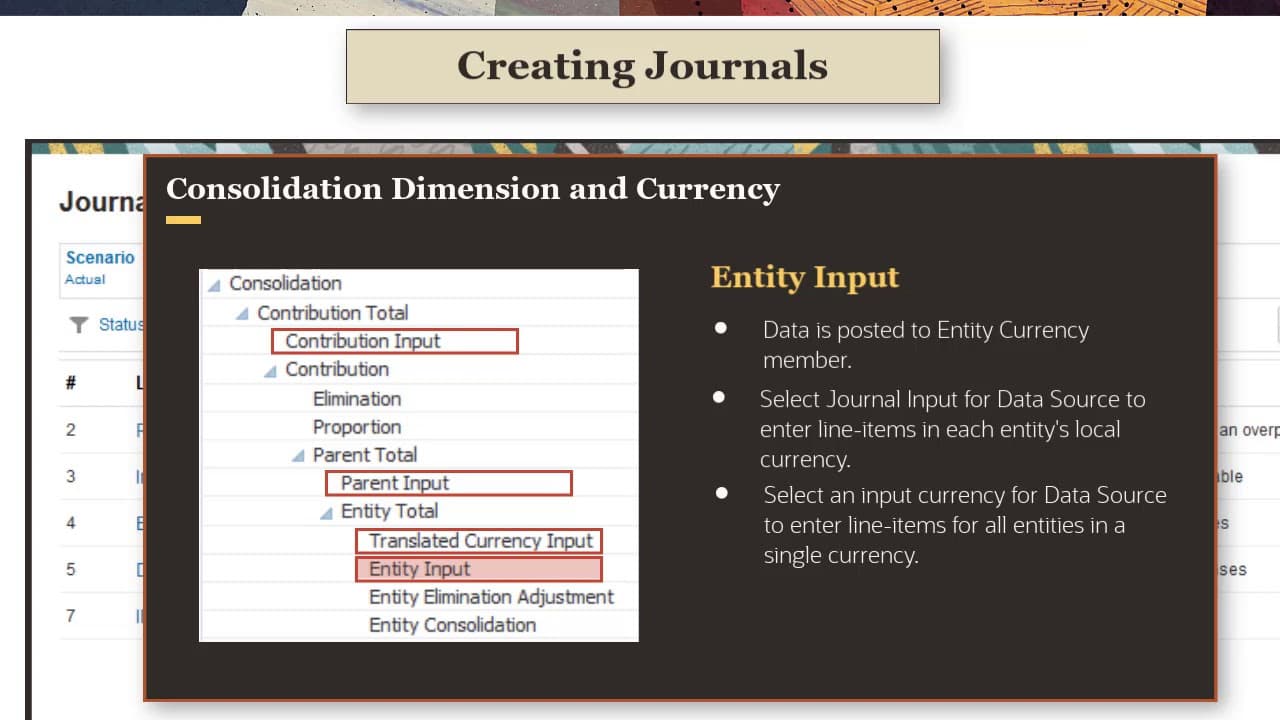
- Journal adjustments can be posted to different levels in the Consolidation dimension hierarchy, affecting currency options for the journal.
- Journal templates facilitate the reuse of similar journals across periods, and recurring templates automatically create journal instances when a period opens.
Install to Summarize YouTube Videos and Get Transcripts
Explore YouTube Video Summarizer or Get YouTube Transcript Extractor
Questions & Answers
Q: How do journals ensure balance in financial consolidation?
Journals ensure balance in financial consolidation by using double-sided entries with debits and credits. Total debits must equal total credits for each currency, maintaining a balanced balance sheet. This process helps track adjustments accurately and ensures the integrity of financial statements.
Q: What happens if a journal is unbalanced?
If a journal is unbalanced, it can be saved but not submitted for approval or posted. This restriction ensures that only balanced journals, where total debits equal total credits for each currency, can be finalized, maintaining the accuracy and reliability of financial records.
Q: What is the role of the Data Source dimension in journals?
The Data Source dimension in journals is crucial for viewing amounts prior to adjustment, the adjustment itself, and the adjusted total. It helps in tracking and managing the data flow within journals, ensuring transparency and accuracy in financial consolidation processes.
Q: How do auto-reversing journals work?
Auto-reversing journals automatically create a reversing entry for a selected future period. When posted, they generate a corresponding journal entry in the reversal period, facilitating the automatic adjustment of entries that need to be reversed in future accounting periods.
Q: What is required for users to post journals to a period?
For users to post journals to a period, a service administrator must open the period for journals. This administrative control ensures that journal entries are posted only during authorized periods, preventing unauthorized or premature postings that could affect financial accuracy.
Q: How are journals created for specific points of view?
Journals are created for specific points of view by selecting members for Scenario, Years, Period, View, and Consolidation. This setup allows for precise targeting of journal entries within the financial consolidation process, accommodating various reporting and adjustment needs.
Q: What options are available for posting journal adjustments?
Journal adjustments can be posted to different levels in the Consolidation dimension hierarchy. The selected Consolidation member determines available currency options, allowing for tailored adjustments that suit specific financial reporting and consolidation requirements.
Q: How do journal templates benefit the consolidation process?
Journal templates benefit the consolidation process by allowing the reuse of similar journal entries across periods. Recurring templates automatically create journal instances when a period opens, streamlining the process and reducing repetitive tasks, enhancing efficiency and consistency.
Summary & Key Takeaways
-
Journals in Financial Consolidation and Close are used to adjust account data, ensuring that balance sheets remain balanced through double-sided debit and credit entries. They provide flexibility in currency handling and allow for auto-reversing entries for future adjustments.
-
The process involves creating journals for specific points of view, including Scenario, Years, Period, View, and Consolidation. Journals can be saved unbalanced but cannot be submitted or posted until balanced, and require administrator approval to open periods.
-
Journal templates and recurring templates streamline the creation of similar journals across periods. Import options allow journals from ERP systems or spreadsheets to be integrated into Financial Consolidation and Close, enhancing efficiency and accuracy.
Read in Other Languages (beta)
Share This Summary 📚
Summarize YouTube Videos and Get Video Transcripts with 1-Click
Try YouTube Summary with ChatGPT & Claude or YouTube Transcript Generator
Explore More Summaries from Oracle EPM Tutorials 📚
Summarize YouTube Videos and Get Video Transcripts with 1-Click
Try YouTube Summary with ChatGPT & Claude or YouTube Transcript Generator