Extraer texto de imágenes con Transkribus
TL;DR
Learn to use Transkribus for efficient image-to-text conversion.
Transcript
Given the limitations we have seen previously in Adobe Acrobat for image to text conversion, here we are going to learn Transkribus. In addition to making fewer errors than the OCR of other tools, Transkribus has other functionalities, although here it is only possible to give an overview of the most essential ones. Once we register with Transkribu... Read More
Key Insights
- Transkribus offers superior OCR capabilities compared to other tools, minimizing errors in text extraction from images.
- Users receive 15,000 free credits upon registration, which can be used for processing and extracting text from images.
- The tutorial guides users through downloading and preparing a text document from the AECID Digital Library for use in Transkribus.
- Installation and registration on Transkribus are straightforward, allowing users to quickly set up and begin extracting text.
- Creating a collection in Transkribus helps organize documents efficiently, facilitating easier access and management.
- The software provides various document upload options, including extracting images from PDFs for text recognition.
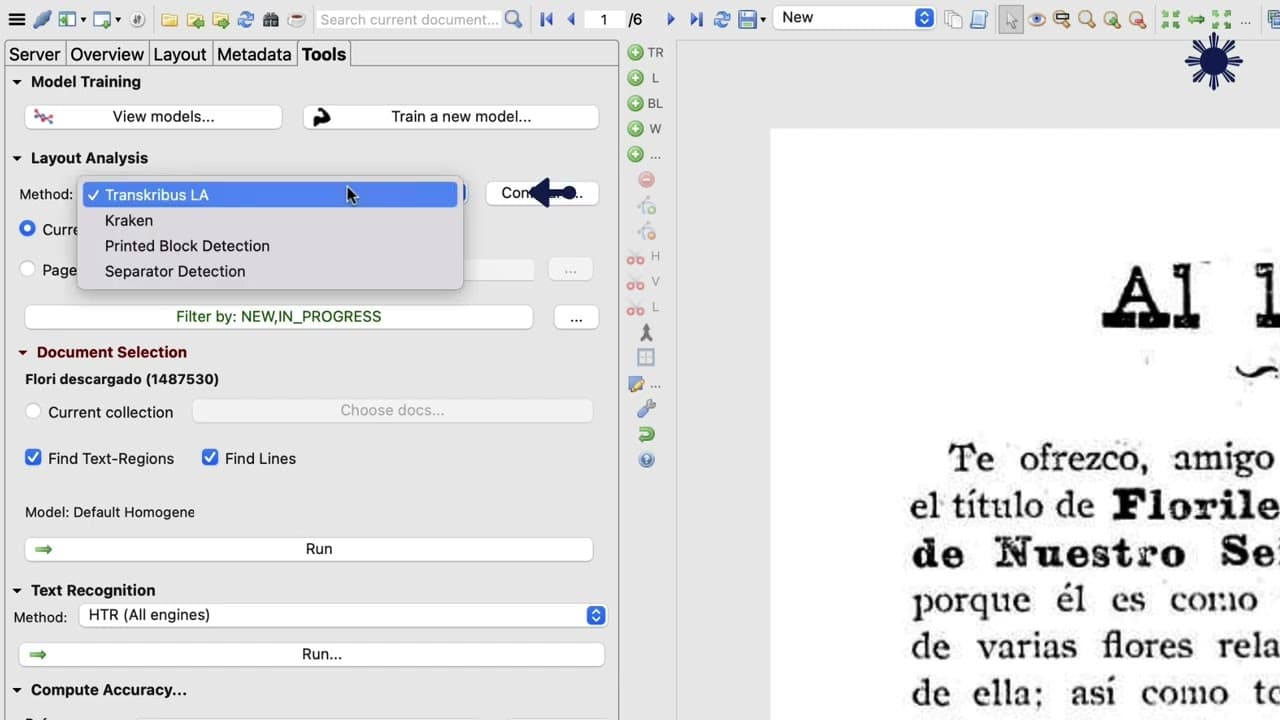
- Layout analysis in Transkribus identifies text blocks, distinguishing main text from headers or footers, enhancing accuracy.
- Text recognition models like HTR and Transkribus Print M1 can be selected for optimal language and spelling compatibility.
Install to Summarize YouTube Videos and Get Transcripts
Explore YouTube Video Summarizer or Get YouTube Transcript Extractor
Questions & Answers
Q: How does Transkribus compare to other OCR tools?
Transkribus is noted for its superior OCR capabilities, making fewer errors in text extraction from images compared to other tools. It offers advanced functionalities such as layout analysis and text block detection, which enhance its accuracy and reliability in extracting text from both printed and handwritten documents.
Q: What are the initial steps to start using Transkribus?
To begin using Transkribus, users must first register on the platform, which provides them with 15,000 free credits. They then download and install the software, after which they can create a collection for organizing documents. The setup process is straightforward, allowing users to quickly start extracting text from images.
Q: How does the layout analysis feature in Transkribus work?
Layout analysis in Transkribus is a critical feature that identifies text blocks within a document. It distinguishes the main body of text from headers, footers, and other elements, which helps in accurately recognizing and extracting text. This feature is particularly useful for documents with complex layouts, such as newspapers or books.
Q: What is the significance of the HTR model in Transkribus?
The HTR (Handwritten Text Recognition) model in Transkribus is significant for its ability to handle both printed and handwritten texts. By selecting an appropriate model like Transkribus Print M1, users can ensure compatibility with the language and spelling of the text, leading to more accurate text extraction and transcription results.
Q: How can users improve the accuracy of Transkribus transcriptions?
Users can improve the accuracy of Transkribus transcriptions by training the software. The 'Train' option allows users to teach Transkribus specific text characteristics, reducing errors in future transcriptions. This is particularly beneficial for handwritten texts, where legibility may vary, enhancing the tool's precision over time.
Q: What export options does Transkribus offer for extracted text?
Transkribus offers several export options for extracted text, including formats like TXT and PDF. After processing a document, users can choose their preferred format and receive the exported text via email. This flexibility allows for easy sharing and integration of transcribed text into other digital humanities tools and projects.
Q: What role do credits play in using Transkribus?
Credits in Transkribus are used to process and extract text from images. Upon registration, users receive 15,000 free credits, which are consumed based on the number and type of pages processed. This credit system ensures that users can manage their usage effectively, especially when dealing with large volumes of documents.
Q: How does Transkribus handle different languages in text extraction?
Transkribus handles different languages in text extraction by allowing users to select specific models that match the language and spelling of the document. Models like Transkribus Print M1 support multiple languages, including Spanish, ensuring that text extraction is accurate and aligned with the document's linguistic characteristics.
Summary & Key Takeaways
-
This tutorial covers the process of using Transkribus, a tool for converting images to text with high accuracy, surpassing other OCR tools. Users start by downloading a text from the AECID Digital Library, registering on Transkribus, and setting up the software for text extraction.
-
After setting up Transkribus, users create a collection to organize their documents. They learn to upload PDFs and use layout analysis to identify text blocks, preparing the document for efficient text extraction using the HTR model and Transkribus Print M1.
-
The tutorial emphasizes the importance of training Transkribus for improved accuracy in handwritten text transcription. Finally, users export the extracted text in formats like TXT and PDF, enabling further exploration of digital humanities tools.
Read in Other Languages (beta)
Share This Summary 📚
Summarize YouTube Videos and Get Video Transcripts with 1-Click
Try YouTube Summary with ChatGPT & Claude or YouTube Transcript Generator
Explore More Summaries from universidadurjc 📚

Summarize YouTube Videos and Get Video Transcripts with 1-Click
Try YouTube Summary with ChatGPT & Claude or YouTube Transcript Generator