iPhone vs Samsung Emojis: Which Are More Appealing?
TL;DR
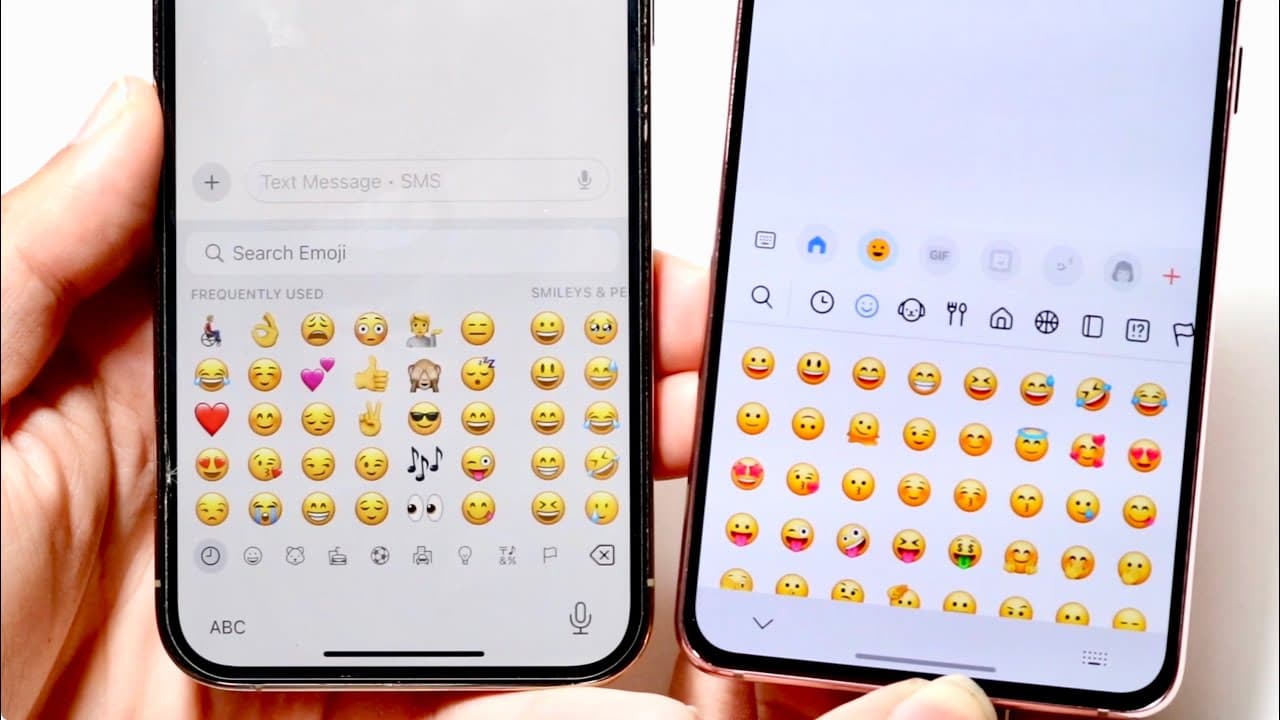
The emojis on iPhones and Samsung devices feature similar functionality, but their visual design differs significantly. iPhone emojis are often seen as less cartoonish and more serious, while Samsung's are recognized for their vibrant and playful styles. Ultimately, preference comes down to personal taste, as both platforms offer a comparable range of emojis for communication.
Transcript
so iPhones versus Samsung this is a taale as old as time and although we're not going to be comparing these phones necessarily the 12 Pro and the I Galaxy S21 I just wanted to go and kind of showcase the difference of the Emojis between these two now we're going to be using the stock keyboard on both so whatever keyboard came between both I know th... Read More
Key Insights
- 👤 The comparison highlights the ongoing rivalry between iPhone and Samsung beyond hardware to user interface elements like emojis.
- 👤 Emoji interaction methods—swiping versus tapping—can affect user experience and preference for either brand.
- 👻 Both systems display nearly all emojis, allowing for consistent communication styles among users regardless of phone brand.
- 👨🔬 User interface elements, such as categorical organization and search facilities, enhance the emoji experience on both devices.
- 👤 Visual design reflects brand identity, influencing how users perceive communication via emojis.
- 👅 Preference for emojis may vary based on personal taste; some might prefer the playful design of Samsung emojis, while others may lean towards iPhone’s simplicity.
- 🎮 The video's informal style fosters a relatable comparison, making technical content accessible to a wider audience.
Install to Summarize YouTube Videos and Get Transcripts
Explore YouTube Video Summarizer or Get YouTube Transcript Extractor
Questions & Answers
Q: How do the emoji panels differ between iPhone and Samsung?
The emoji panels on iPhone and Samsung differ in navigation; iPhone emojis swipe side to side, while Samsung's swipe up and down. Visually, Samsung's emojis appear more cartoonish, whereas iPhone’s have a more serious tone. This design choice reflects each brand's aesthetic philosophy, impacting user preference.
Q: Are there any significant functional differences in emoji search features?
Both platforms facilitate emoji searches effectively, allowing users to input terms like "smile" to find corresponding emojis. However, the layout of categories differs slightly. iPhones show categories at the bottom, while Samsung’s presentation may vary. Overall, the experience is similar, enabling swift access to emojis.
Q: Does the total number of emojis vary between iPhone and Samsung?
While both platforms contain a massive array of emojis, it’s suggested that iPhones might have a broader selection. Despite this, there is substantial overlap—most emojis from one platform are also available on the other, maintaining consistency in user communication across devices.
Q: What stylings differentiate the emojis on iPhone and Samsung?
iPhone emojis are often described as more refined and less cartoonish, opting for a classic appearance, while Samsung’s design leans towards the playful and vibrant end of the spectrum. This preference can influence user choice, particularly for those who prioritize visual aesthetics in their communication.
Summary & Key Takeaways
-
The video showcases the differences in emoji appearance and navigation between the iPhone and Samsung keyboards, emphasizing user experience.
-
Both devices offer similar emoji features, including categories and search capabilities, but their visual styling and layout differ slightly.
-
While emojis on both platforms serve the same purpose, iPhone emojis are perceived as less cartoonish and more serious compared to Samsung's vibrant designs.
Read in Other Languages (beta)
Share This Summary 📚
Summarize YouTube Videos and Get Video Transcripts with 1-Click
Try YouTube Summary with ChatGPT & Claude or YouTube Transcript Generator
Explore More Summaries from Simple Alpaca 📚






Summarize YouTube Videos and Get Video Transcripts with 1-Click
Try YouTube Summary with ChatGPT & Claude or YouTube Transcript Generator