4.2.7 An Introduction to Trees - Video 4: CART in R
TL;DR
Learn how to build a CART model in R to predict the outcome of Supreme Court cases using independent variables.
Transcript
In this video, we'll see how to build a CART model in R. Let's start by reading in the data file "stevens.csv". We'll call our data frame stevens and use the read.csv function to read in the data file "stevens.csv". Remember to navigate to the directory on your computer containing the file "stevens.csv" first. Now, let's take a look at our data usi... Read More
Key Insights
- 🫠 Building a CART model in R involves reading in a data file, splitting the data into training and testing sets, and using the rpart package to create the model.
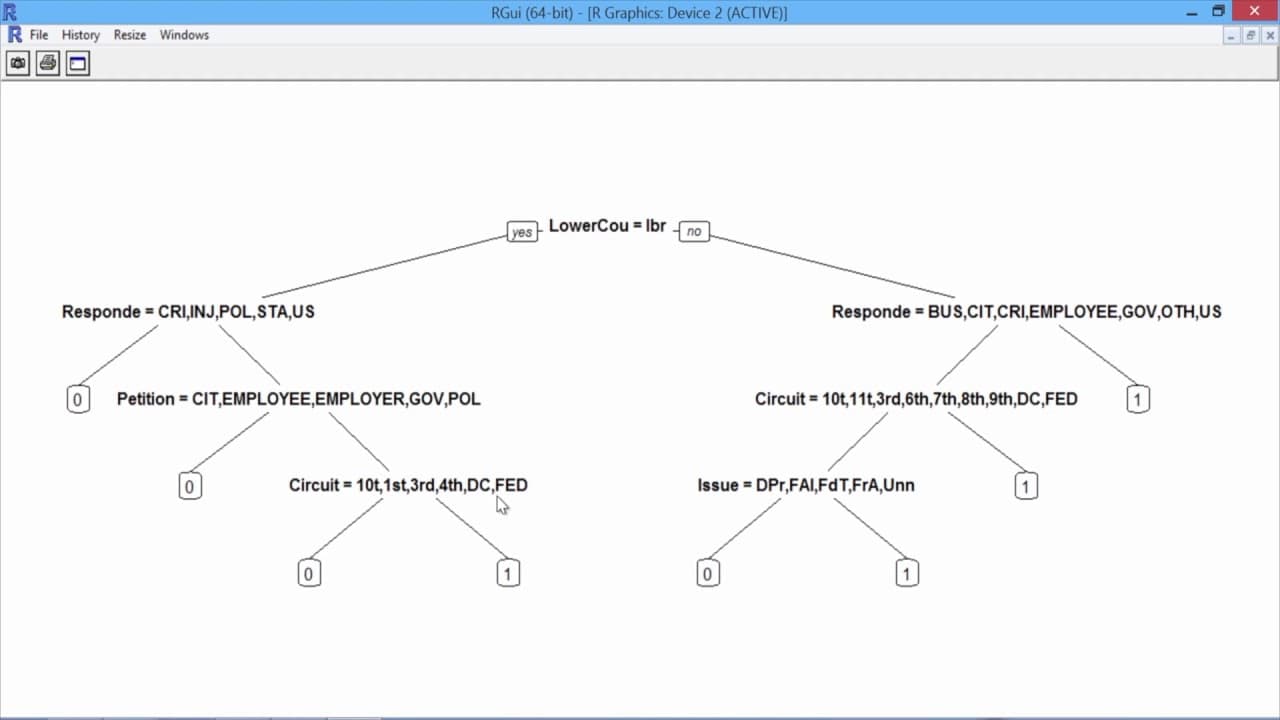
- ⚾ The resulting CART model consists of decision rules based on the independent variables, which make it highly interpretable.
- ❓ The accuracy of the CART model can be compared to other models, such as logistic regression, to evaluate its performance.
- 👻 The rpart package allows for controlling the complexity of the CART tree through arguments like minbucket.
Install to Summarize YouTube Videos and Get Transcripts
Explore YouTube Video Summarizer or Get YouTube Transcript Extractor
Questions & Answers
Q: How is the data file "stevens.csv" used in building the CART model?
The data file "stevens.csv" contains information on Supreme Court cases, and it is read into R using the read.csv function to create a data frame called "stevens". This data frame is used as the dataset for building the CART model.
Q: How is the data split into a training set and a testing set?
The data is split using the sample.split function, with 70% of the data assigned to the training set and 30% assigned to the testing set. The split is based on the outcome variable "stevens$Reverse".
Q: What is the purpose of setting the seed in the sample.split function?
Setting the seed ensures that the same random split of the data into training and testing sets is achieved each time the code is run. This allows for reproducibility of the results.
Q: What is the significance of the minbucket argument in the rpart function?
The minbucket argument specifies the minimum number of observations required in a terminal node of the CART tree. Setting it to 25 prevents the tree from overfitting the training data. Different values can be chosen depending on the desired complexity of the tree.
Q: How is the accuracy of the CART model measured?
The accuracy of the CART model is computed by creating a confusion matrix using the table function, comparing the true outcome values from the testing set with the predicted outcome values from the CART model. The accuracy is calculated as the sum of correctly predicted observations divided by the total number of observations.
Summary & Key Takeaways
-
The video demonstrates how to build a CART model in R using the data file "stevens.csv" which contains information on Supreme Court cases.
-
The data includes 566 observations with nine variables, including the independent variables such as circuit court of origin, issue area of the case, type of petitioner and respondent, lower court direction, and the dependent variable of Justice Stevens' vote.
-
The data is split into a training set and a testing set, and a CART model is built using the rpart package.
-
The resulting CART model is interpretable, with decision rules based on the independent variables, and is compared to logistic regression models in terms of accuracy and interpretability.
Read in Other Languages (beta)
Share This Summary 📚
Summarize YouTube Videos and Get Video Transcripts with 1-Click
Try YouTube Summary with ChatGPT & Claude or YouTube Transcript Generator
Explore More Summaries from MIT OpenCourseWare 📚


Summarize YouTube Videos and Get Video Transcripts with 1-Click
Try YouTube Summary with ChatGPT & Claude or YouTube Transcript Generator