iOS 11 OFFICIAL On iPAD AIR 2! (Review)
TL;DR
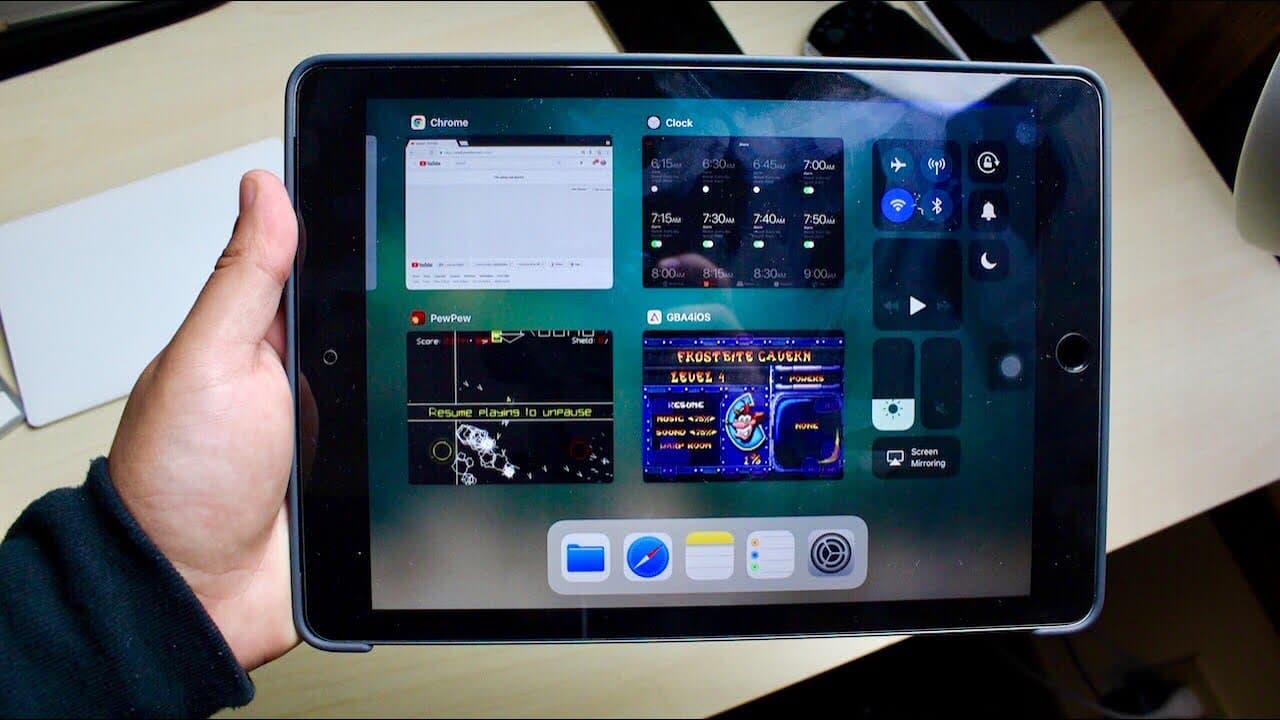
The iPad Air 2 with iOS 11 introduces enhanced multitasking and control center features.
Transcript
hey what's up everybody so I installed I was 11 the official version on my iPad air 2 so let's just take a look at it dude I'm done talking let's just get into it for those of you who aren't familiar with iOS 11 it's a pretty cool upgrade I'm not going to lie I'm gonna run through some of the basic features though the biggest feature I can name off... Read More
Key Insights
- 😀 iOS 11 introduces a more intuitive multitasking interface for the iPad, improving app accessibility.
- 👤 The Control Center is redesigned for quicker navigation, enhancing user experience.
- 💦 Users can now utilize the drag-and-drop functionality to streamline tasks across different applications.
- 👻 The update allows the iPad to function more like a desktop, catering to productivity-focused users.
- 🐎 Overall system performance and speed are reported to be consistent and efficient in iOS 11.
- 🧑🎓 Students are particularly advised to upgrade, given the features beneficial for academic tasks.
- 🫵 The video encourages user engagement, highlighting the creator’s openness to viewer questions and feedback.
Install to Summarize YouTube Videos and Get Transcripts
Explore YouTube Video Summarizer or Get YouTube Transcript Extractor
Questions & Answers
Q: What are the major enhancements in iOS 11 for the iPad Air 2?
iOS 11 brings significant improvements including a new multitasking interface, enhanced Control Center, and the ability to drag and drop files between apps. The multitasking view is more integrated, making it easier for users to access their favorite applications and settings without disrupting their workflow.
Q: How does the new Control Center differ from previous versions?
The Control Center in iOS 11 allows for a more seamless interaction compared to prior versions. Instead of disrupting multitasking, users can swipe up from any app to access settings like brightness and music controls simultaneously, providing a better and more efficient user experience.
Q: What benefits does the drag-and-drop feature offer?
The drag-and-drop feature significantly enhances productivity by allowing users to transfer files between apps seamlessly. For example, users can drag images from Safari directly into a document or email, making it convenient for tasks that involve content sharing or organization.
Q: How does the reviewer feel about using the iPad for schoolwork?
The reviewer feels that the iPad, particularly with iOS 11, becomes a viable option for students. They appreciate the ability to run multiple apps simultaneously, such as having notes open while doing homework, thus positioning the iPad as a practical alternative to a laptop.
Summary & Key Takeaways
-
The video showcases the major features of iOS 11 on the iPad Air 2, particularly highlighting the updated multitasking capabilities that allow users to access apps more easily.
-
The enhanced Control Center allows for quicker access to settings, making it more user-friendly and efficient, especially with app organization.
-
Overall, the reviewer expresses satisfaction with the update, suggesting that iOS 11 transforms the iPad into a more standalone device suitable for tasks like homework or productivity.
Read in Other Languages (beta)
Share This Summary 📚
Summarize YouTube Videos and Get Video Transcripts with 1-Click
Try YouTube Summary with ChatGPT & Claude or YouTube Transcript Generator
Explore More Summaries from Simple Alpaca 📚






Summarize YouTube Videos and Get Video Transcripts with 1-Click
Try YouTube Summary with ChatGPT & Claude or YouTube Transcript Generator