Krita Stable Diffusion Inpainting
TL;DR
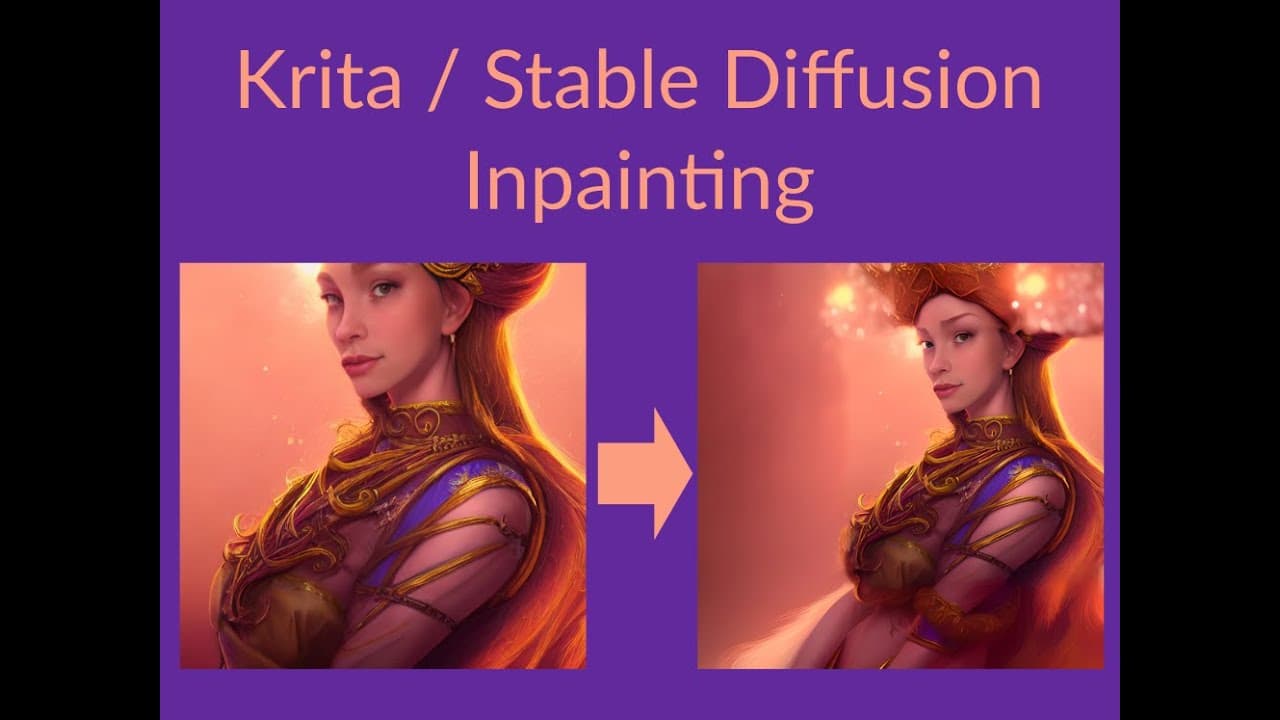
Demonstration of Krita's inpainting using Stable Diffusion.
Transcript
hello today i'll be showing a demonstration of how to use thin painting in krita with stable diffusion this up here is the version i downloaded if you install it the instructions are there i'm not i wanted to provide technical support but if i can figure it out i think you can too i have to closely read their their guidance and then... Read More
Key Insights
- The tutorial demonstrates how to use Stable Diffusion for inpainting in Krita, focusing on correcting image imperfections.
- The process involves using specific settings like the DDIM sampler, CFG scale, and denoising strength to achieve desired results.
- Inpainting is done by painting over areas with white, which the plugin recognizes as regions to be modified.
- Multiple trials are conducted to choose the best output, demonstrating the iterative nature of digital art correction.
- Repositioning and scaling characters in Krita are shown, highlighting the flexibility of the tool for composition adjustments.
- The tutorial emphasizes the importance of blending and feathering to achieve seamless integration of inpainted areas.
- Different denoising strengths are tested to maintain image integrity while allowing for artistic modifications.
- The tutorial concludes with upscaling the final image to enhance detail, showcasing Krita's capabilities in refining digital art.
Install to Summarize YouTube Videos and Get Transcripts
Explore YouTube Video Summarizer or Get YouTube Transcript Extractor
Questions & Answers
Q: What is the primary focus of the tutorial?
The primary focus of the tutorial is to demonstrate the use of Stable Diffusion for inpainting in Krita. The tutorial walks through the process of correcting image imperfections such as misaligned features and incomplete compositions, using specific settings and techniques to achieve the desired artistic outcomes.
Q: How does the inpainting process work in Krita with Stable Diffusion?
Inpainting in Krita with Stable Diffusion involves painting over areas with white to indicate regions that need modification. The plugin recognizes these areas and uses inpainting techniques to correct imperfections. The process requires specific settings like denoising strength and CFG scale to achieve the best results, often involving multiple trials to select the most satisfactory output.
Q: What settings are crucial for successful inpainting in this tutorial?
Key settings for successful inpainting in the tutorial include the DDIM sampler, CFG scale, and denoising strength. The CFG scale is set to eight, and denoising strength is adjusted to ensure effective modification of the white-painted areas. These settings are crucial for achieving the desired artistic outcomes and maintaining image quality.
Q: Why is blending important in the inpainting process?
Blending is crucial in the inpainting process to ensure a seamless integration of modified areas into the original artwork. The tutorial emphasizes using techniques like feathering and adjusting brush opacity to avoid hard lines and make the inpainted areas blend naturally with the surrounding image. This results in a more cohesive and visually appealing final product.
Q: What challenges are highlighted in the tutorial regarding inpainting?
The tutorial highlights challenges such as achieving symmetry in facial features, avoiding artifacts, and ensuring that modifications do not disrupt the overall composition. It also mentions the difficulty of rendering certain elements, like hands, accurately. These challenges require iterative trials and adjustments to settings to overcome and achieve the desired artistic outcomes.
Q: How is repositioning and scaling used in the tutorial?
Repositioning and scaling are used in the tutorial to adjust the composition of the artwork. By duplicating layers and using Krita's transformation tools, the tutorial shows how to reposition characters and scale them to fit the desired framing. This process helps in achieving a balanced composition and aligning the subject with key points of interest in the artwork.
Q: What role does upscaling play in the final steps of the tutorial?
Upscaling plays a crucial role in the final steps of the tutorial by enhancing the detail and definition of the final image. The tutorial uses Krita's built-in upscaling feature to refine the artwork, resulting in a higher quality image with finer details. This step is important for achieving a polished and professional-looking final product.
Q: What is the significance of iterative trials in this tutorial?
Iterative trials are significant in the tutorial as they allow for experimentation and selection of the best possible outcome. By conducting multiple trials with different settings, the tutorial demonstrates the importance of testing various options to achieve the desired artistic results. This iterative approach ensures that the final image meets the creator's vision and quality standards.
Summary & Key Takeaways
-
The video tutorial showcases the process of using Stable Diffusion for inpainting in Krita, focusing on correcting image imperfections such as misaligned eyes and incomplete head features. It highlights the importance of using specific settings and iterative trials to achieve the desired artistic outcomes.
-
Key steps include painting over areas with white to indicate regions for inpainting, adjusting denoising strength, and repositioning and scaling characters for better composition. The tutorial emphasizes blending techniques to ensure seamless integration of modified areas into the original artwork.
-
The tutorial concludes with the upscaling of the final image to enhance detail, demonstrating Krita's capabilities in refining digital art. The iterative nature of the process is highlighted, showcasing the flexibility and potential of using Krita with Stable Diffusion for digital art correction and enhancement.
Read in Other Languages (beta)
Share This Summary 📚
Summarize YouTube Videos and Get Video Transcripts with 1-Click
Try YouTube Summary with ChatGPT & Claude or YouTube Transcript Generator