My Complete Notion Setup to Maximise Productivity
TL;DR
Consolidating productivity tools into Notion enhances workflow efficiency.
Transcript
so i've watched dozens of videos on notion but i'll be honest i was a bit hesitant to switch over i could clearly see that it's an incredibly powerful software and would help massively with productivity but i already had productivity tools and systems set up that i'd spent the last 10 years or so building but the problem was that i was using so man... Read More
Key Insights
- The speaker transitioned from using multiple tools like Excel, Evernote, and Trello to Notion, consolidating all productivity systems into one platform.
- Notion's flexibility allows the speaker to maintain a dynamic schedule, accommodating unexpected changes without disrupting the workflow.
- A custom YouTube video tracker in Notion helps manage video production stages, from scripting to publishing, with checklists ensuring no steps are missed.
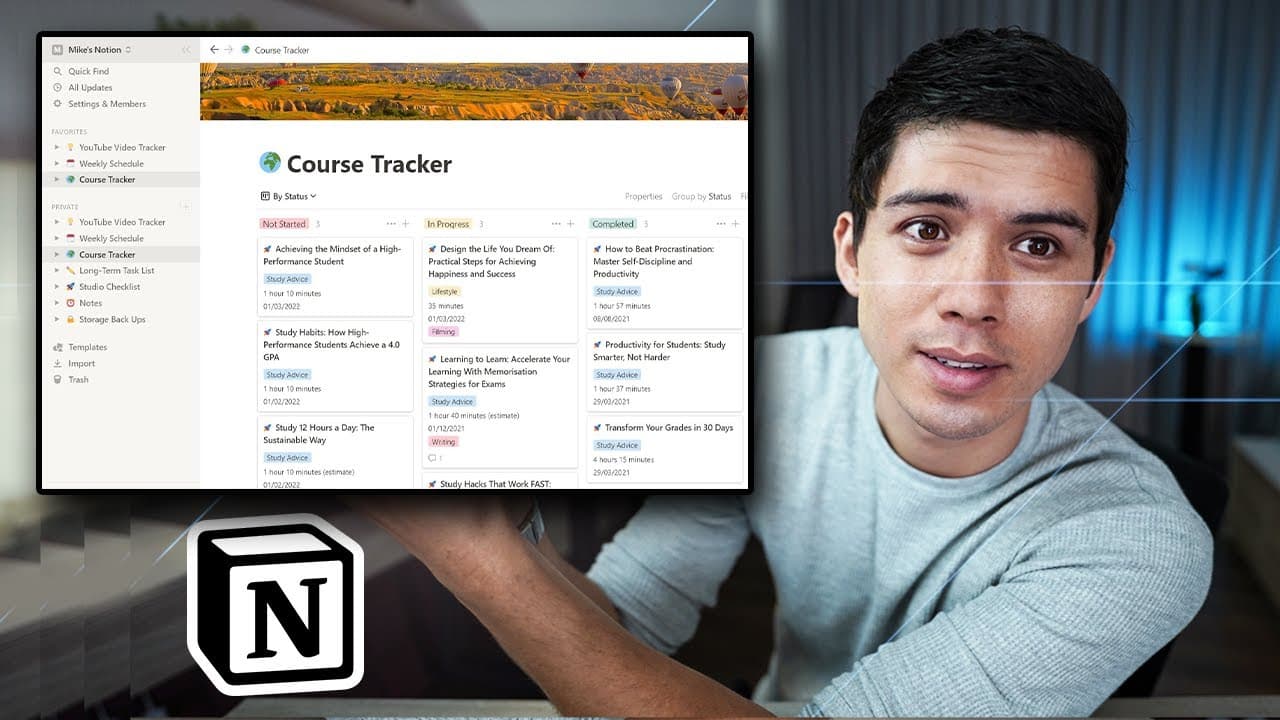
- The course tracker in Notion mirrors the YouTube tracker, organizing courses by production stages and priority, enhancing project management.
- Long-term task management in Notion uses a priority system, ensuring high-priority tasks are addressed promptly while allowing flexibility for less urgent tasks.
- Notion's general notes section centralizes important links and information, streamlining access and communication, especially for frequently requested data.
- The luggage list and storage backup pages in Notion enhance personal organization, ensuring all essential items and data are systematically managed.
- Notion's customization options can be both a productivity enhancer and a potential distraction, requiring balance to optimize its use effectively.
Install to Summarize YouTube Videos and Get Transcripts
Explore YouTube Video Summarizer or Get YouTube Transcript Extractor
Questions & Answers
Q: Why did the speaker decide to switch to Notion?
The speaker switched to Notion to consolidate multiple productivity tools into one platform, aiming for a streamlined workflow. Despite initial hesitation due to a decade of using other software, the transition resulted in enhanced productivity and organization, proving to be one of the best decisions for efficiency in 2021.
Q: How does the speaker use Notion for managing their YouTube channel?
The speaker uses Notion to track YouTube video production stages, from script writing to publishing. A custom tracker includes columns for video status, type, and schedule. Checklists within each video entry ensure critical tasks, like sponsorship acknowledgments and end cards, are not overlooked, optimizing the production process.
Q: What is the significance of the course tracker in Notion?
The course tracker in Notion organizes courses by their production stages, similar to the YouTube tracker. It categorizes courses as not started, in progress, or completed, helping manage project timelines and priorities. This system enables efficient tracking and completion of educational content, even amid external constraints like lockdowns.
Q: How does Notion help with task prioritization?
Notion aids in task prioritization by allowing tasks to be categorized as low, medium, or high priority. This system ensures that critical tasks with deadlines are addressed promptly, while less urgent tasks remain flexible. Reminders for high-priority tasks further enhance time management and deadline adherence.
Q: What role does Notion play in personal organization for the speaker?
Notion plays a significant role in personal organization by housing a luggage list and storage backup system. The luggage list allows for efficient packing with features like drag-and-drop and item-specific notes. The storage backup page ensures all essential data is systematically saved, providing peace of mind and quick recovery in case of data loss.
Q: What are the potential drawbacks of using Notion?
While Notion offers extensive customization, it can also lead to potential drawbacks like time wastage. Users might spend excessive time tweaking the system instead of focusing on productivity. Finding a balance between customization and efficiency is crucial to maximize Notion's benefits without falling into the trap of over-optimization.
Q: How does Notion enhance communication and information access?
Notion enhances communication and information access by centralizing important links and data in the general notes section. Frequently requested information, like course links, is readily available, streamlining communication and reducing time spent searching for data. This feature supports efficient information sharing and task execution.
Q: What are the speaker's future plans for using Notion?
The speaker plans to expand their use of Notion over the next year by integrating their team into the platform. This expansion aims to further streamline the production process and workflow, leveraging Notion's capabilities for collaborative efficiency. The speaker anticipates significant growth and refinement of their productivity system.
Summary & Key Takeaways
-
The speaker shares their experience of transitioning to Notion, consolidating various productivity tools into one streamlined system, enhancing efficiency.
-
Notion's flexibility and customization allow the speaker to maintain a dynamic schedule and manage YouTube video production effectively.
-
Through a detailed setup, Notion aids in managing courses, tasks, notes, and personal data, showcasing its versatility and impact on productivity.
Read in Other Languages (beta)
Share This Summary 📚
Summarize YouTube Videos and Get Video Transcripts with 1-Click
Try YouTube Summary with ChatGPT & Claude or YouTube Transcript Generator
Explore More Summaries from Mike Dee 📚


Summarize YouTube Videos and Get Video Transcripts with 1-Click
Try YouTube Summary with ChatGPT & Claude or YouTube Transcript Generator