ExpressLRS definitive getting started guide
TL;DR
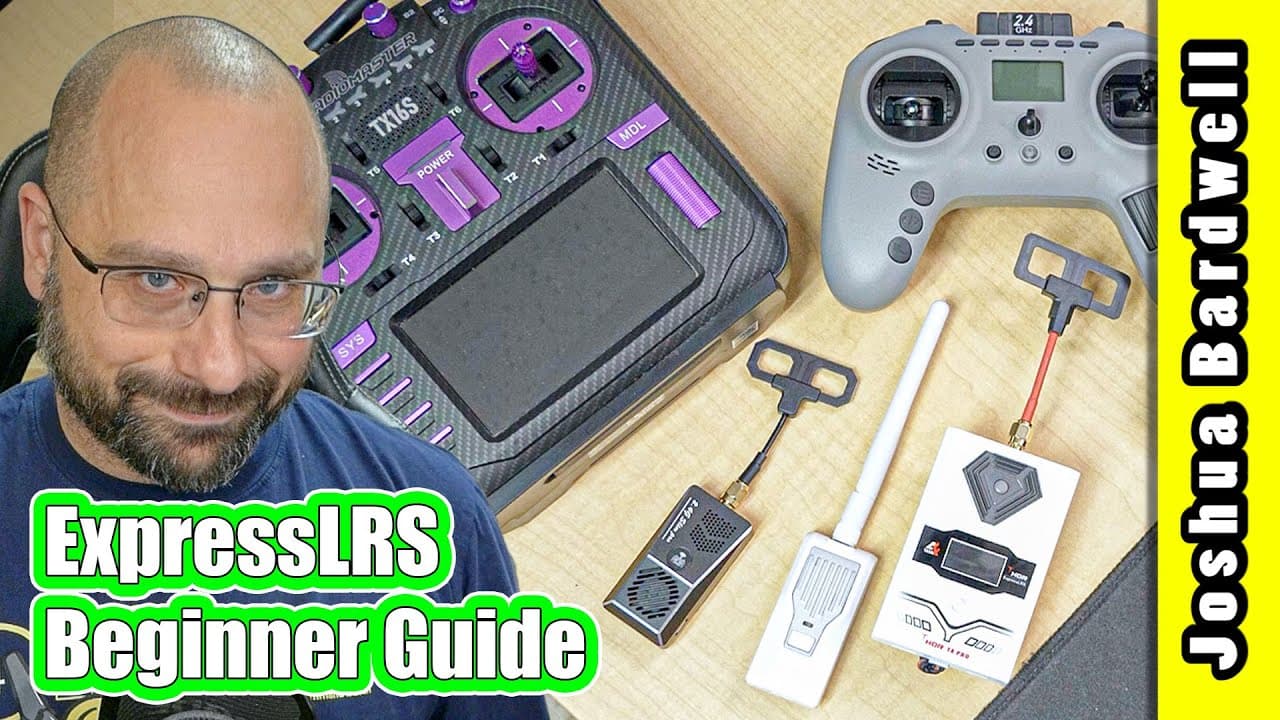
This video provides a comprehensive guide for beginners on how to set up and use Express LRS, a high-performance, low-latency, long-range control link for FPV drones.
Transcript
this video is intended to be the definitive guide for getting started with express lrs today and if it feels like i kind of just made a video about getting started with express lrs yeah that was like a year ago and it was how to flash freesky r9 receivers to expressly rs because nobody was making their own express lrs hardware but a lot has changed... Read More
Key Insights
- 🚁 Express LRS is a high-performance, low-latency, long-range control link that offers modern features like telemetry and lua scripts.
- 📡 Express LRS is developed by an open-source team, which allows for multiple vendors to create compatible hardware, making it widely available and inexpensive.
- 💻 Express LRS can be configured and flashed using the Express LRS Configurator software, which is necessary to set options and update firmware.
- 🌐 Express LRS offers different methods for flashing firmware, including edge TX passthrough, UART, and Wi-Fi, with Wi-Fi being the most convenient and easy option.
- 📶 Express LRS allows for different packet rates, providing the option of low latency or long-range control depending on your needs.
- 🔄 Express LRS requires the use of a binding phrase, which is unique to your devices and allows them to bind together.
- 📲 Express LRS can be configured and managed using the Express LRS Lua script, which allows for customization of settings and options.
- 🔓 Express LRS provides the option to use Wi-Fi connectivity for flashing and managing devices, making it even more convenient and accessible.
Install to Summarize YouTube Videos and Get Transcripts
Explore YouTube Video Summarizer or Get YouTube Transcript Extractor
Questions & Answers
Q: What are the advantages of using Express LRS over other control links like Crossfire or Ghost?
One of the main advantages of Express LRS is its affordability, as it is developed by an open-source team, allowing multiple manufacturers to create compatible hardware. Additionally, Express LRS offers high performance, low latency, and long-range capabilities comparable to other control links on the market.
Q: Can Express LRS modules and receivers be easily updated and configured without the need for advanced technical knowledge?
Yes, the video provides step-by-step instructions on how to download and install the Express LRS configurator, identify the hardware, flash the firmware, and bind the modules and receivers. The tutorial aims to simplify the process for beginners and make it accessible to those with limited technical knowledge.
Q: What are the different methods available for flashing Express LRS firmware?
The video demonstrates three methods for flashing Express LRS firmware: edge TX pass-through (for modules with built-in Express LRS), UART (for external modules), and Wi-Fi (via a Wi-Fi network created by the module or by connecting to the home Wi-Fi network).
Q: How can users adjust the packet rate and telemetry settings in Express LRS?
The video explains how users can adjust the packet rate to balance latency and range according to their preferences. It also discusses the telemetry ratio and advises users on changing it if they experience sensor loss during flights. These settings can be adjusted within the ExpressLRS Lua script or through modules with screens and joysticks.
Summary & Key Takeaways
-
Express LRS is a modern control link that offers high performance, low latency, and long-range capabilities for FPV drones.
-
Developed by an open-source team, Express LRS is compatible with hardware from various manufacturers, making it widely available and affordable.
-
The video demonstrates how to configure and flash the firmware on Express LRS modules and receivers, as well as how to set up binding and adjust important settings.
Read in Other Languages (beta)
Share This Summary 📚
Summarize YouTube Videos and Get Video Transcripts with 1-Click
Try YouTube Summary with ChatGPT & Claude or YouTube Transcript Generator
Explore More Summaries from Joshua Bardwell 📚
Summarize YouTube Videos and Get Video Transcripts with 1-Click
Try YouTube Summary with ChatGPT & Claude or YouTube Transcript Generator