Adobe Illustration Tutorial: Filling in Flats
TL;DR
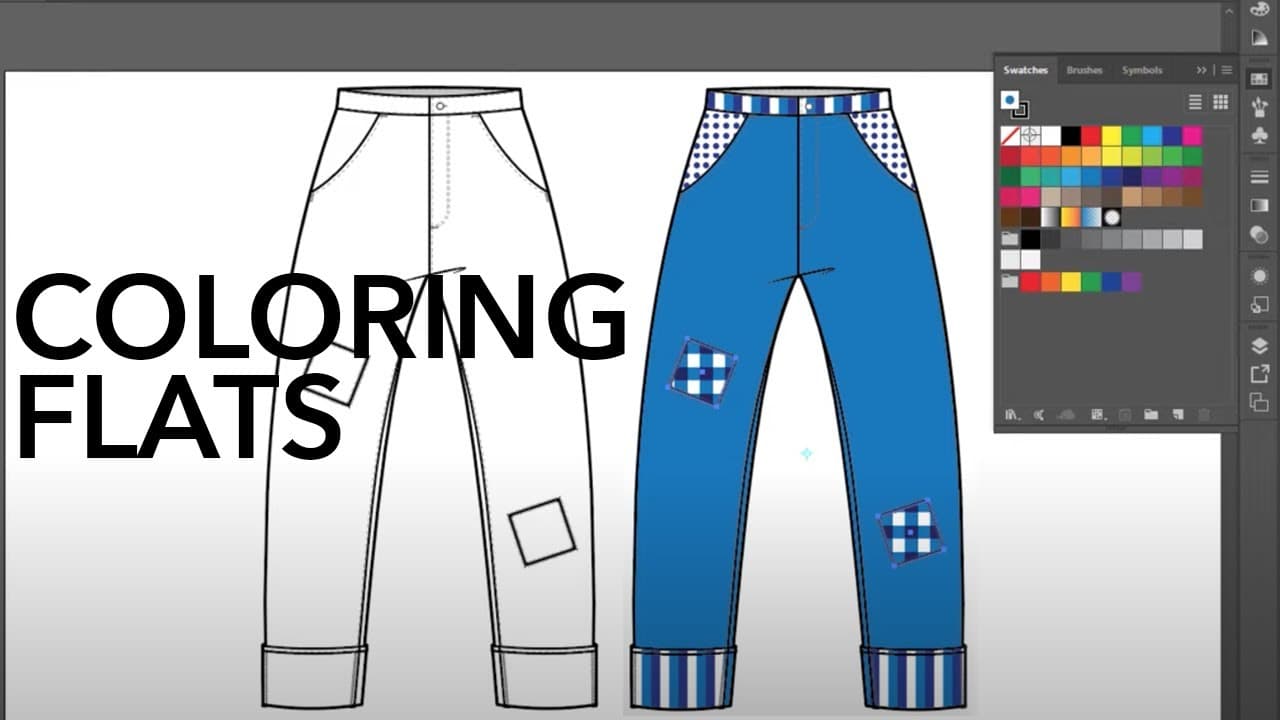
Learn how to create simple patterns in Adobe Illustrator by drawing swatches and applying them to flat designs.
Transcript
hi gang it's Robyn Schneider and I'm glad to be back as a guest lecturer on Zoe Hong's channel this week we're going to cover making some basic patterns in Adobe Illustrator and filling flats so let's get started we're going to start by making three simple patterns and we're gonna do them by drawing little swatches and dragging them into the swatch... Read More
Key Insights
- 🔨 Adobe Illustrator offers various tools and techniques for creating patterns, including the rectangle shape tool, ellipse tool, and swatches panel.
- ⚖️ To create seamless patterns, it is important to remove the stroke from the shapes and ensure that the patterns are properly scaled.
- 🫓 Patterns can be applied to flat designs by selecting specific areas and choosing the desired pattern from the swatches panel.
- 👻 The recolor artwork feature allows for easy customization of colors in the patterns.
Install to Summarize YouTube Videos and Get Transcripts
Explore YouTube Video Summarizer or Get YouTube Transcript Extractor
Questions & Answers
Q: How can I create a polka dot pattern in Adobe Illustrator?
To create a polka dot pattern, draw a rectangle using the rectangle shape tool, then draw an ellipse using the ellipse tool and place it in the center of the rectangle. Fill the ellipse with the desired color and remove the stroke. Drag the pattern into the swatches panel to create the polka dot pattern.
Q: How do I create a stripe pattern in Adobe Illustrator?
Start by drawing a small rectangle using the rectangle tool. Duplicate the rectangle by holding the alt and shift keys and dragging it to create multiple stripes. Fill each stripe with the desired colors and remove the stroke. Drag the pattern into the swatches panel to create the stripe pattern.
Q: What is the process of creating a check pattern in Adobe Illustrator?
Draw a square using the rectangle tool and duplicate it by holding the shift and alt keys and dragging it horizontally and vertically to create a grid of squares. Fill the squares with two different colors, making sure to remove the stroke. Drag the pattern into the swatches panel to create the check pattern.
Q: How can I apply the created patterns to a flat design in Adobe Illustrator?
Select different areas of the flat design using the white arrow tool. Then, choose the desired pattern from the swatches panel and apply it to the selected areas. Use the scale tool to adjust the size of the patterns if needed.
Summary & Key Takeaways
-
The video tutorial demonstrates how to create three basic patterns (polka dot, stripe, and check) in Adobe Illustrator by drawing shapes and filling them with colors.
-
Each pattern is created using different tools and techniques, such as the rectangle shape tool, ellipse tool, and the swatches panel.
-
The patterns are then applied to a flat design of children's pants, with different areas of the pants filled with each pattern.
Read in Other Languages (beta)
Share This Summary 📚
Summarize YouTube Videos and Get Video Transcripts with 1-Click
Try YouTube Summary with ChatGPT & Claude or YouTube Transcript Generator
Explore More Summaries from Zoe Hong 📚




Summarize YouTube Videos and Get Video Transcripts with 1-Click
Try YouTube Summary with ChatGPT & Claude or YouTube Transcript Generator