Blend Trees - Unity Official Tutorials
TL;DR
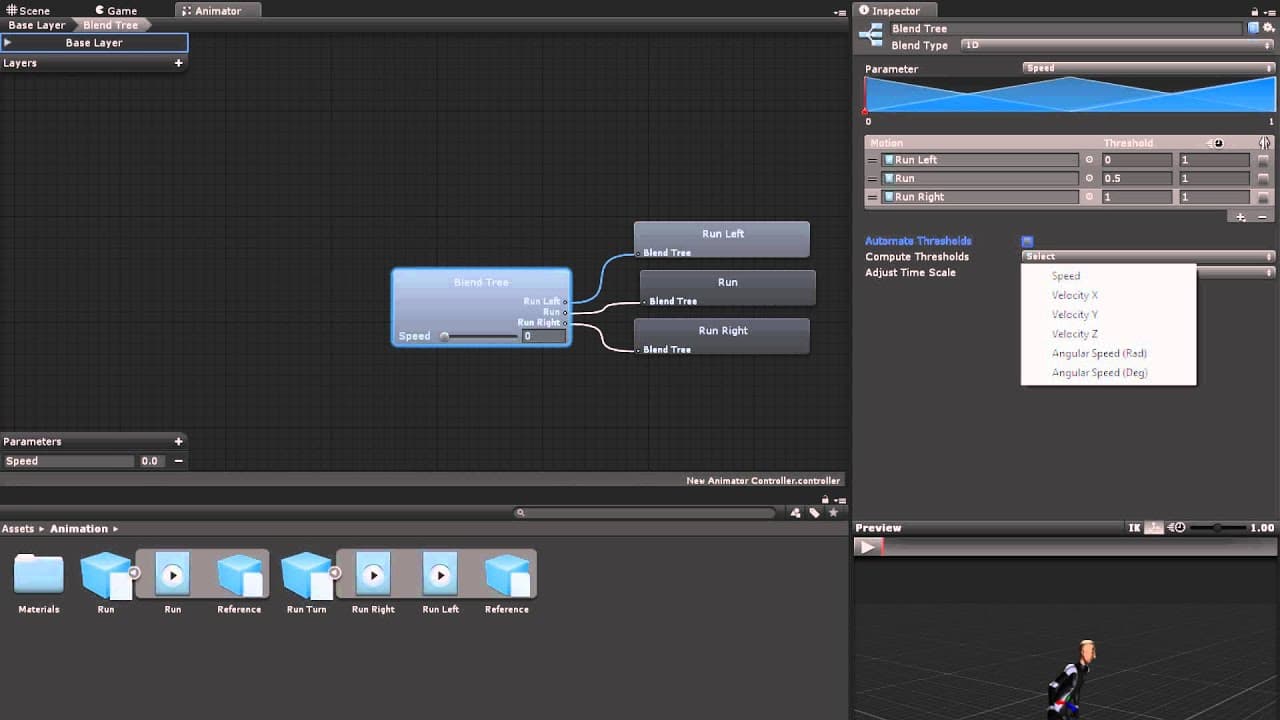
Blend trees allow for a combination of animations, such as different running directions or walking and running at different speeds, through the use of parameters and thresholds.
Transcript
Sometimes when animating you want a mix of two or more animations. For example if you have animations for running left, running forward and running right you might want animations for running only slightly to the left or right. Another common example is having walking and running animations but wanting the character to be able to move at different ... Read More
Key Insights
- 🎨 Blend trees are a useful tool in animation to combine multiple animations seamlessly, allowing for more flexibility and variety in character movements.
- 🖱️ To create a blend tree, right-click in the animator window and choose "Create State - From New Blend Tree" to access the blend tree editor.
- 🔍 Blend trees have properties like names and blend type, with one-dimensional blend trees using a single parameter to blend animations based on specific values.
- ➕ Motions can be added to blend trees using motion fields, which represent individual animations that can be dragged from the project panel or selected from a list.
- 🎚️ Each motion field within a blend tree has properties like threshold (value of the parameter that triggers the animation), time scale (animation speed), and mirroring.
- 🔄 The order of motions within a blend tree can be changed by dragging them, and a visual diagram helps to visualize where animations are placed on the parameter scale.
- 🔀 Two-dimensional blend trees blend animations based on two parameters, with three types available: 2D Simple Directional, 2D Freeform Directional, and 2D Freeform Cartesian.
- 📊 When creating 2D blend trees, animator parameters are chosen to represent the X and Y axes, and motions can be positioned manually or computed based on thresholds.
Install to Summarize YouTube Videos and Get Transcripts
Explore YouTube Video Summarizer or Get YouTube Transcript Extractor
Questions & Answers
Q: How do blend trees allow for a mix of animations in game character movements?
Blend trees allow for a mix of animations by using parameters and thresholds to determine the blend between different animations. These parameters can control factors such as direction, speed, or angular speed, allowing for smoother and more versatile character movements.
Q: What are the properties of a motion field in a blend tree?
A motion field in a blend tree has three properties: 1) threshold, which represents the value of the parameter for a blend using only that animation; 2) time scale, which affects the speed of the animation; and 3) mirroring, which determines whether the animation is mirrored left to right.
Q: How can the order of motions be changed in a blend tree?
In a blend tree, motions can be reordered by dragging them around using the handle on the left of the motion property. This allows for customization and fine-tuning of the animation blend.
Q: What do the options "Automate Thresholds," "Compute Thresholds," and "Adjust Time Scale" do in a blend tree?
If "Automate Thresholds" is checked, the thresholds for each animation will be set and cannot be changed. If "Compute Thresholds" is selected, the thresholds will be automatically calculated based on the chosen root motion property. "Adjust Time Scale" can be used to make the speed of each animation consistent.
Q: How do two-dimensional blend trees differ from one-dimensional blend trees?
Two-dimensional blend trees blend animations based on two parameters, such as direction and speed, instead of just one. This allows for more complex and nuanced character movements. They can be either simple directional, freeform directional, or freeform Cartesian depending on the relationship between the parameters and the animations being blended.
Summary & Key Takeaways
-
Blend trees are used in animation to combine multiple animations based on different parameters.
-
One-dimensional blend trees use a single parameter to control the blend of animations.
-
Two-dimensional blend trees blend animations based on two parameters, such as direction or speed.
Read in Other Languages (beta)
Share This Summary 📚
Summarize YouTube Videos and Get Video Transcripts with 1-Click
Try YouTube Summary with ChatGPT & Claude or YouTube Transcript Generator
Explore More Summaries from Unity 📚
Summarize YouTube Videos and Get Video Transcripts with 1-Click
Try YouTube Summary with ChatGPT & Claude or YouTube Transcript Generator