1.4.6 R1. Understanding Food - Video 5: Adding Variables
TL;DR
Learn how to add new variables to a data frame in R by comparing values in a vector to the average and converting logical values to numerical.
Transcript
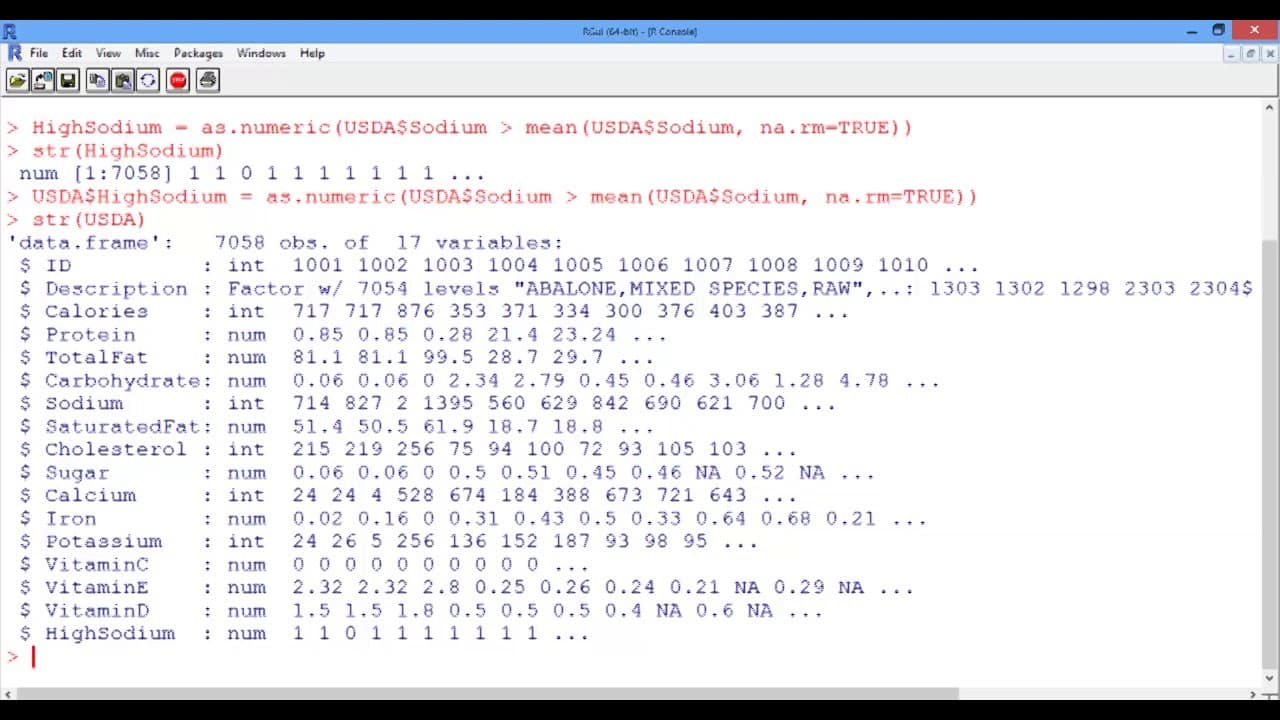
In this video, we will see how we can add a new variable to our data frame. Suppose that we want to add a variable to our USDA data frame that takes a value 1 if the food has higher sodium than average, and 0 if the food has lower sodium than average. Let's do this step by step. To check if the first food in the dataset has a higher amount of sodiu... Read More
Key Insights
- 😘 Comparing values in a vector to the average can help identify if each value is higher or lower than average.
- 💦 Converting logical values to numerical values is useful when working with data frames.
- 🦖 The dollar notation in R is used to associate variables with data frames.
- 👻 Adding variables to a data frame allows for further analysis and finding relationships between variables.
Install to Summarize YouTube Videos and Get Transcripts
Explore YouTube Video Summarizer or Get YouTube Transcript Extractor
Questions & Answers
Q: How can we determine if a food item has higher sodium content than average in R?
To determine if a food item has higher sodium content than average, you can compare the value in the Sodium vector to the mean of the Sodium vector using the greater-than sign. If it is higher, the result will be TRUE.
Q: How can we convert logical values to numerical values in R?
To convert logical values (TRUE and FALSE) to numerical values (1 and 0) in R, you can use the as.numeric function. Enclose the logical expression in as.numeric, and the values will be changed accordingly.
Q: How can we add a new variable to a data frame in R?
To add a new variable to a data frame in R, use the dollar notation. Associate the new variable with the data frame using the dollar sign followed by the variable name. This will add the new variable to the data frame.
Q: Can we add multiple variables to a data frame at once in R?
Yes, you can add multiple variables to a data frame at once in R. Simply repeat the process of comparing values, converting logical values to numerical, and using the dollar notation for each variable you want to add.
Summary & Key Takeaways
-
The video demonstrates how to add a variable to a data frame in R by comparing the values in a vector to the average sodium content.
-
It shows step-by-step instructions on checking if individual foods have higher or lower sodium content than average.
-
The logical values are then converted to numerical values, and the new variable is added to the data frame.
Read in Other Languages (beta)
Share This Summary 📚
Summarize YouTube Videos and Get Video Transcripts with 1-Click
Try YouTube Summary with ChatGPT & Claude or YouTube Transcript Generator
Explore More Summaries from MIT OpenCourseWare 📚


Summarize YouTube Videos and Get Video Transcripts with 1-Click
Try YouTube Summary with ChatGPT & Claude or YouTube Transcript Generator