Home automation using NodeMCU and Blynk App - IOT based Project
TL;DR
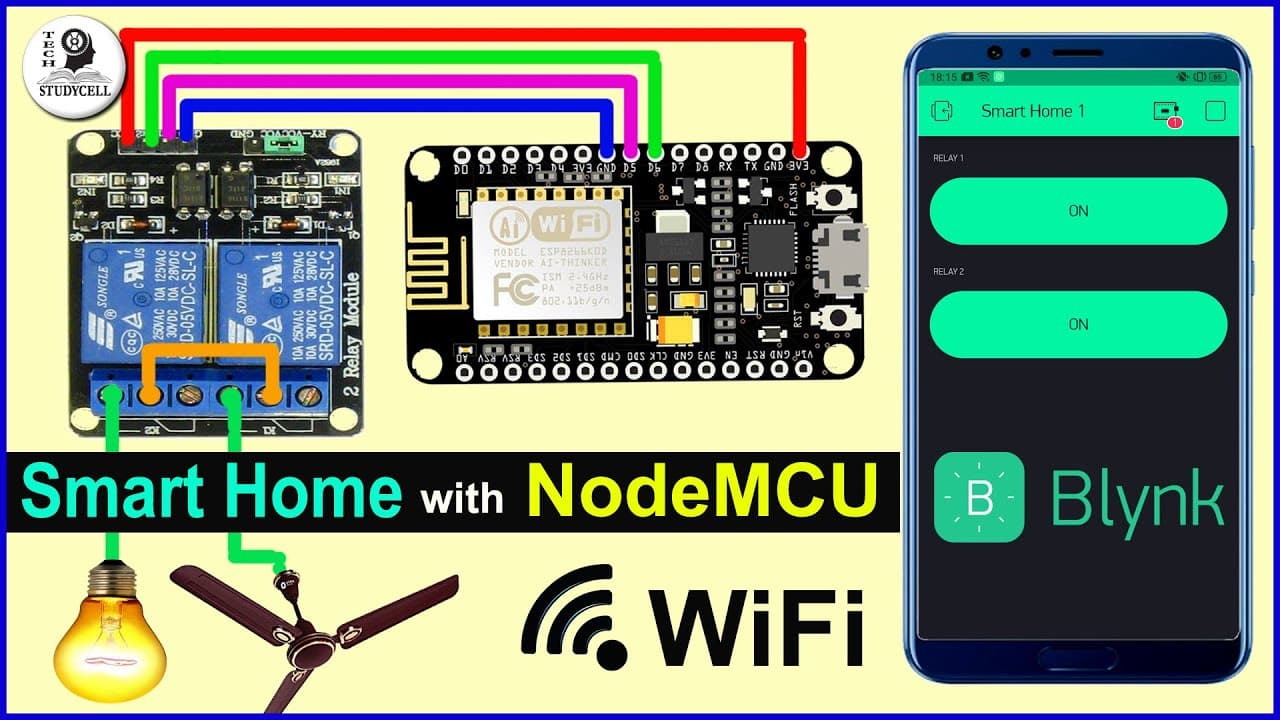
This video tutorial demonstrates how to use a relay module and a NodeMCU board, along with the Blynk app, to control home appliances from a smartphone through the internet.
Transcript
Hello friends, welcome to TechStudyCell. Today we will make a simple home automation project, where we can control multiple home appliances from the smartphone through the internet. To make this home automation project, we just need a relay module and a NodeMCU board. We will use the Blynk app to control the relay module. As you can see, I can easi... Read More
Key Insights
- 🏠 Home automation: The video provides a simple home automation project using a relay module and NodeMCU board, allowing control of multiple home appliances from a smartphone through the internet.
- 💡 Simple circuit design: The circuit diagram shown in the video is straightforward, with the relay module connected to the 5V supply and controlled by pins D1 and D2 on the NodeMCU board.
- 📱 Blynk app for control: The video demonstrates the use of the Blynk app to control the relay module. The app can be downloaded from the Google Play Store and allows users to create switches to control different home appliances.
- 🔑 Auth Token: The Blynk app sends an Auth Token to the registered email, which needs to be copied and pasted into the Arduino sketch for communication between the NodeMCU board and the app.
- 📲 Easy control from anywhere: With the Blynk app and internet connection on the smartphone, users can easily control the connected appliances from anywhere, providing convenience and flexibility.
- 🔌 Expandable to more appliances: The circuit design can be expanded to connect more than just two appliances. Additional relay modules can be connected to pins D5, D6, D7, and D8 on the NodeMCU board.
- 📥 Downloadable resources: The website easyelectronicsproject.com provides downloadable circuit diagrams and other details for the project, making it easy for viewers to replicate the circuit.
- 📋 Future project: The video mentions a future project where a PCB will be designed to control multiple relays using the same circuit. Viewers are encouraged to subscribe for updates on this upcoming video.
Install to Summarize YouTube Videos and Get Transcripts
Explore YouTube Video Summarizer or Get YouTube Transcript Extractor
Questions & Answers
Q: How does the home automation project work?
The home automation project uses a relay module and a NodeMCU board to control home appliances. The relay module is connected to the NodeMCU board, which is then controlled using the Blynk app. By tapping on virtual buttons in the Blynk app, users can send commands to the relay module, turning appliances on or off.
Q: Can the home appliances be controlled remotely?
Yes, with the Blynk app and an internet connection, the home appliances can be controlled remotely. As long as the smartphone has internet access, users can control their appliances from anywhere.
Q: What is the advantage of using the Blynk app for home automation?
The Blynk app provides a convenient and user-friendly interface for controlling home appliances. It allows users to create virtual buttons that send commands to the relay module, making it easy to turn appliances on or off with a simple tap on the smartphone screen.
Q: Can multiple appliances be controlled with this circuit?
Yes, the circuit can control multiple appliances. In addition to the 2-channel relay module used in the video, it is possible to connect 4-channel or 6-channel relay modules to the NodeMCU board, using additional pins for control.
Q: What is needed to set up the home automation project?
To set up the home automation project, you will need a relay module, a NodeMCU board, and the Blynk app. The circuit diagram and Arduino sketch are provided in the video for reference.
Q: Is programming knowledge required for this project?
Some basic programming knowledge is required to upload the Arduino sketch to the NodeMCU board. However, the tutorial provides step-by-step instructions and the required code, making it accessible even for beginners.
Q: Can this project be expanded to control more than two appliances?
Yes, the project can be expanded to control more appliances. By using a larger relay module and connecting it to additional pins on the NodeMCU board, it is possible to control a greater number of appliances through the same circuit and Blynk app setup.
Summary & Key Takeaways
-
The video shows how to connect a relay module and a NodeMCU board to create a simple home automation circuit.
-
The tutorial explains how to use the Blynk app to control the relay module and provides the circuit diagram and Arduino sketch.
-
The project allows users to control home appliances, such as lamps, from anywhere using their smartphone and an internet connection.
Read in Other Languages (beta)
Share This Summary 📚
Summarize YouTube Videos and Get Video Transcripts with 1-Click
Try YouTube Summary with ChatGPT & Claude or YouTube Transcript Generator
Explore More Summaries from Tech StudyCell 📚
Summarize YouTube Videos and Get Video Transcripts with 1-Click
Try YouTube Summary with ChatGPT & Claude or YouTube Transcript Generator