14.2.2 SRAM
TL;DR
SRAMs are organized as an array of bit cells, each consisting of two inverters to store a single bit of information.
Transcript
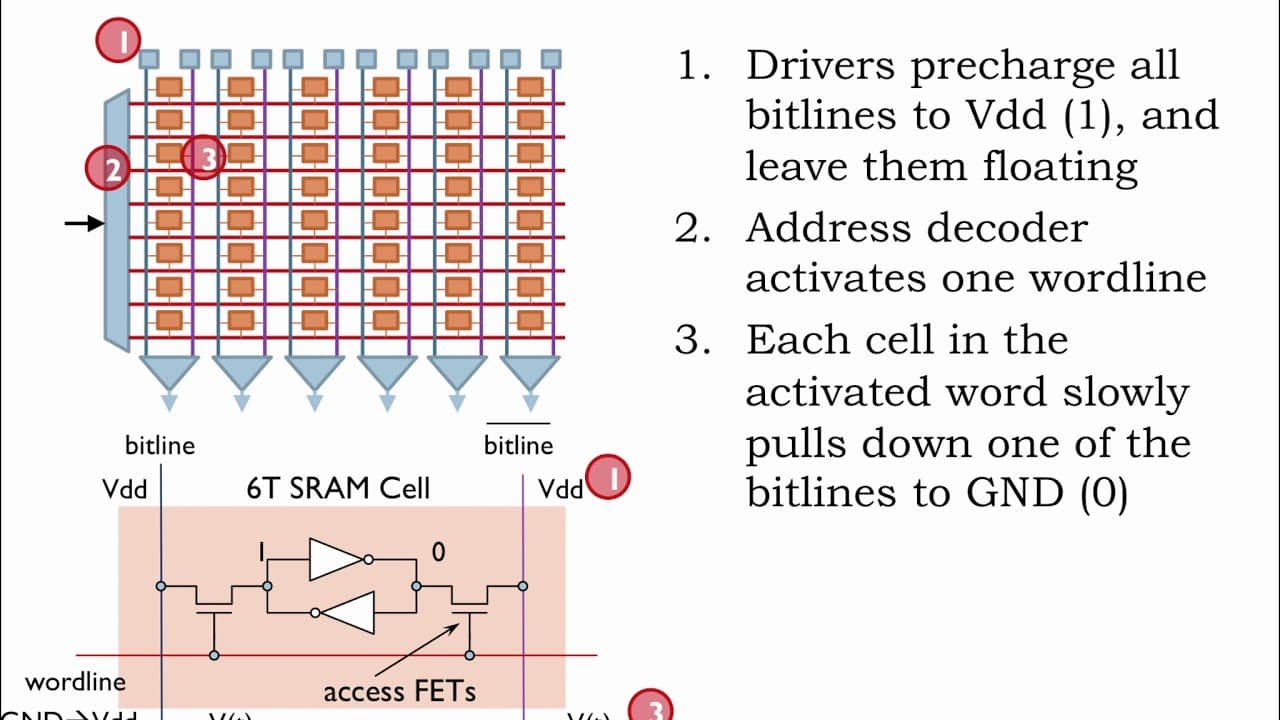
SRAMs are organized as an array of memory locations, where a memory access is either reading or writing all the bits in a single location. Here we see the component layout for a 8-location SRAM array where each location hold 6 bits of data. You can see that the individual bit cells are organized as 8 rows (one row per location) by 6 columns (one co... Read More
Key Insights
- 🫦 SRAMs are organized as an array of memory locations, each consisting of bit cells.
- 🫦 Bit cells store a single bit of information using two CMOS inverters in a positive feedback loop.
- 🫠 Read and write operations in SRAMs are performed via the bitlines and access FETs.
- 🕵️ Sense amplifiers are used to detect small voltage differences for accurate data reading.
- 🫠 Adding multiple read/write ports to SRAMs increases the overall size and area requirements.
- 🎨 The design of SRAMs requires expertise in analog behavior and careful balancing of MOSFET sizes.
- 🫠 SRAMs can be enhanced to support multiple read/write ports with additional wordlines and bitlines.
Install to Summarize YouTube Videos and Get Transcripts
Explore YouTube Video Summarizer or Get YouTube Transcript Extractor
Questions & Answers
Q: How are SRAMs organized?
SRAMs are organized as an array of memory locations, with each location holding a certain number of bits.
Q: How are read and write operations performed in SRAMs?
Read operations involve enabling a specific row of bit cells by setting the corresponding wordline high, while write operations involve driving the appropriate bitlines to the desired values.
Q: How do sense amplifiers help in reading data from SRAMs?
Sense amplifiers are used to quickly detect the small voltage difference developing between the two bitlines, making it easier to determine the correct digital output.
Q: Can SRAMs support multiple read/write ports?
Yes, SRAMs can be augmented to support multiple read/write ports by adding additional sets of wordlines, bitlines, drivers, and sense amps.
Summary & Key Takeaways
-
SRAMs are organized as an array of memory locations, with each location storing a certain number of bits.
-
The circuitry around the periphery of the array is used for address decoding and supporting read and write operations.
-
The heart of the SRAM is the bit cell, which consists of two CMOS inverters wired in a positive feedback loop to create a bistable storage element.
Read in Other Languages (beta)
Share This Summary 📚
Summarize YouTube Videos and Get Video Transcripts with 1-Click
Try YouTube Summary with ChatGPT & Claude or YouTube Transcript Generator
Explore More Summaries from MIT OpenCourseWare 📚



Summarize YouTube Videos and Get Video Transcripts with 1-Click
Try YouTube Summary with ChatGPT & Claude or YouTube Transcript Generator