How to Build a Social Media Content Calendar
TL;DR
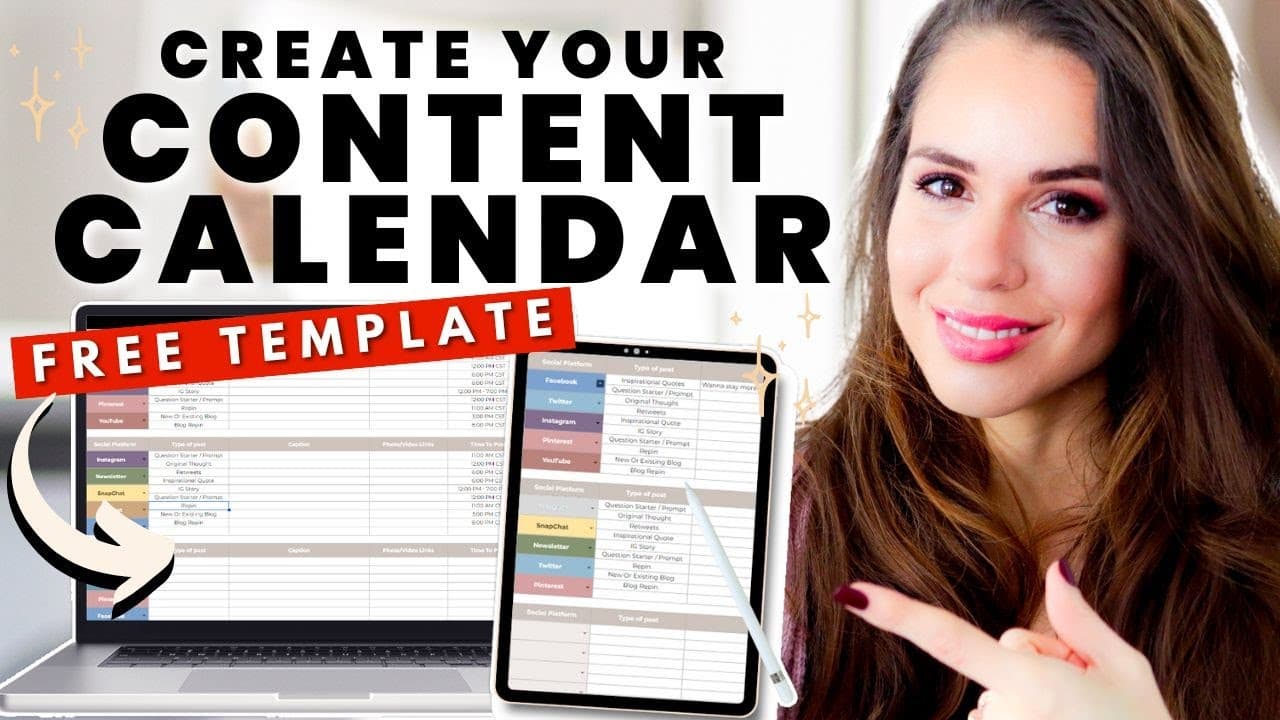
Creating a content calendar helps maintain consistency in social media posting. Start by planning one month ahead, selecting platforms, and determining content types. Use tools like Canva for visuals and scheduling tools like CoSchedule or Trello for organization. Customize your calendar to fit your workflow and reduce stress.
Transcript
if you've ever struggled with staying consistent with your content creation you need a Content calendar my friend and in today's episode I have a brand new super hot template that I'm going to walk you through so that you get started with that first super important step let's get into it all right Familia so here we are inside our content calendar ... Read More
Key Insights
- A content calendar is essential for consistent social media posting.
- Start planning content one month in advance for better organization.
- Select social media platforms that align with your content strategy.
- Content buckets help categorize and organize different post types.
- Use tools like Canva to create visuals efficiently.
- Scheduling tools like CoSchedule and Trello enhance content organization.
- Customize the content calendar to fit your unique workflow.
- Begin with one long-form platform and one or two community platforms.
Install to Summarize YouTube Videos and Get Transcripts
Explore YouTube Video Summarizer or Get YouTube Transcript Extractor
Questions & Answers
Q: How to start creating a content calendar?
Begin by planning content one month in advance. Select the social media platforms you will use and determine the types of content you want to create for each platform. Use content buckets to categorize your content types, making it easier to organize and plan your posts.
Q: What are content buckets?
Content buckets are categories used to organize different types of social media posts. They help in planning and ensuring a variety of content is shared. Examples include inspirational quotes, question starters, memes, and short-form videos, tailored to the specific platform's audience engagement trends.
Q: Why use a content calendar for social media?
A content calendar helps maintain consistency, organization, and strategic planning in social media posting. It allows you to plan content ahead, align with promotional schedules, and manage the frequency of posts across different platforms, ultimately reducing stress and improving content delivery.
Q: What tools can assist in content calendar creation?
Tools like Canva can be used for creating visuals, while scheduling tools like CoSchedule and Trello help organize and automate posting. These tools streamline the content creation process, enabling you to focus on strategy and engagement rather than manual posting.
Q: How to choose the right platforms for content posting?
Select platforms based on where your target audience is most active and where your content type performs best. Begin with one long-form platform to build authority and supplement with one or two community platforms to engage and interact with your audience effectively.
Q: What is the role of visuals in a content calendar?
Visuals capture attention and enhance engagement on social media. Creating visuals using tools like Canva can make your content more appealing and shareable. They should align with your brand and message, complementing the text content to effectively communicate with your audience.
Q: How often should content be posted on social media?
Post frequency depends on the platform and your audience's engagement patterns. For example, Facebook might see 1-3 posts per day, while Twitter could handle 6-10. It's important to balance frequency with quality, ensuring each post adds value and maintains audience interest.
Q: How can a content calendar reduce stress?
A content calendar provides a structured approach to content creation and posting, reducing last-minute rushes and ensuring a steady flow of content. By planning ahead and organizing content types and posting schedules, you can manage your workload more efficiently and focus on strategic growth.
Summary & Key Takeaways
-
Creating a content calendar is crucial for maintaining consistency in social media posting. Begin by planning one month ahead and selecting platforms that align with your strategy. Determine content types using content buckets and use tools like Canva for visuals.
-
Organize your content with scheduling tools such as CoSchedule or Trello. Customize your content calendar to fit your workflow, ensuring it reduces stress rather than adding to it.
-
Start with one long-form platform to establish authority and supplement with one or two community platforms for interaction. This approach helps manage content creation without overwhelming you.
Read in Other Languages (beta)
Share This Summary 📚
Summarize YouTube Videos and Get Video Transcripts with 1-Click
Try YouTube Summary with ChatGPT & Claude or YouTube Transcript Generator
Explore More Summaries from Kimberly Ann Jimenez 📚



Summarize YouTube Videos and Get Video Transcripts with 1-Click
Try YouTube Summary with ChatGPT & Claude or YouTube Transcript Generator