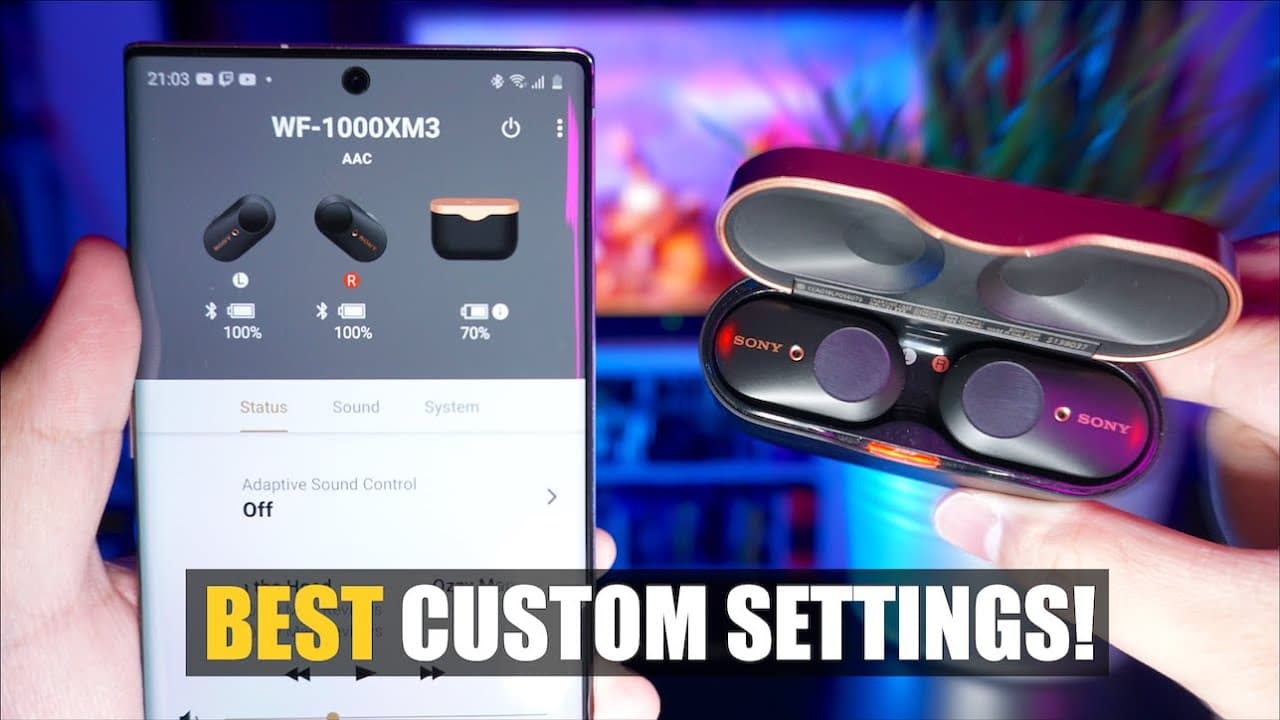
LATEST Sony WF-1000XM3 Best Settings Walkthrough | App Version 7.0.1
TL;DR
A new app update enhances features for Sony XM3 earbuds.
Transcript
if what's up guys it's me again coming back to you with another video now some of you may recall that I've already made several best custom settings videos for these only xm3 earbuds but recently the Sony headphones collective got an update to version 7.0 point one and that update brought with it a brand new app interface and has even added some ne... Read More
Key Insights
- 😀 The revamped app separates functionalities into tabs, improving accessibility for users navigating various settings.
- 👂 Adaptive sound control reacts dynamically to user movements, enhancing situational awareness, especially in urban settings.
- 👂 Users can customize settings for ambient sound based on their regular environments, ensuring safer audio experiences.
- 👻 The equalizer feature allows for extensive customization of sound profiles, catering to individual preferences in audio quality.
- 🐕🦺 360 Reality Audio offers a revolutionary listening experience, but requires specific streaming service subscriptions for full implementation.
- 👻 Customization extends to touch controls, allowing users to modify sensor functions for more convenient operation.
- 😀 The app prioritizes user experience, with battery-saving features and notifications tailored to enhancing usability.
Install to Summarize YouTube Videos and Get Transcripts
Explore YouTube Video Summarizer or Get YouTube Transcript Extractor
Questions & Answers
Q: How has the interface of the Sony Headphones Connect app changed with the update?
The updated interface presents features in separate, clearly labeled tabs, contrasting with the previous single list format. This organization allows users to directly access features such as status, sound settings, and system settings without excessive scrolling, enhancing usability and efficiency.
Q: What is adaptive sound control, and how does it benefit users?
Adaptive sound control adjusts the earbuds' ambient sound levels based on user activity detected through the phone's GPS. It enhances the listening experience by ensuring sufficient noise cancellation or transparency based on whether a user is stationary, walking, or running, promoting safety and awareness of surroundings.
Q: Can users manually set ambient sound levels for specific locations?
Yes, the app allows users to either let it learn frequently visited locations via GPS or manually register locations on a map. This feature ensures that personalized ambient sound levels can be automatically applied when users arrive at those specific locations, tailoring the listening experience to their needs.
Q: What are the advantages of 360 Reality Audio, and how can one access it?
360 Reality Audio provides a spatial listening experience, making audio immersive by positioning sounds in a 360-degree field. To access this, users must subscribe to premium streaming services like Tidal, Deezer, or Nugs.net, where optimized content can be enjoyed fully, enhancing overall audio quality and experience.
Summary & Key Takeaways
-
The Sony Headphones Connect app has received a significant update, improving its interface and user-friendliness by organizing features into clear tabs, making navigation easier for users.
-
The update introduces advanced adaptive sound control, allowing users to customize sound settings based on movement and location, automatically adjusting noise cancellation levels for different environments.
-
Other enhancements include improved sound quality settings, 360 Reality Audio capabilities, and customizable touch sensor functions, ensuring users have a personalized audio experience.
Read in Other Languages (beta)
Share This Summary 📚
Summarize YouTube Videos and Get Video Transcripts with 1-Click
Try YouTube Summary with ChatGPT & Claude or YouTube Transcript Generator
Explore More Summaries from Aaron X Loud and Wireless 📚





Summarize YouTube Videos and Get Video Transcripts with 1-Click
Try YouTube Summary with ChatGPT & Claude or YouTube Transcript Generator