7.4.4 R7. Visualization - Video 3: Bar Charts in R
TL;DR
This video tutorial explains how to create a bar plot using the ggplot2 library in R, including formatting and ordering features.
Transcript
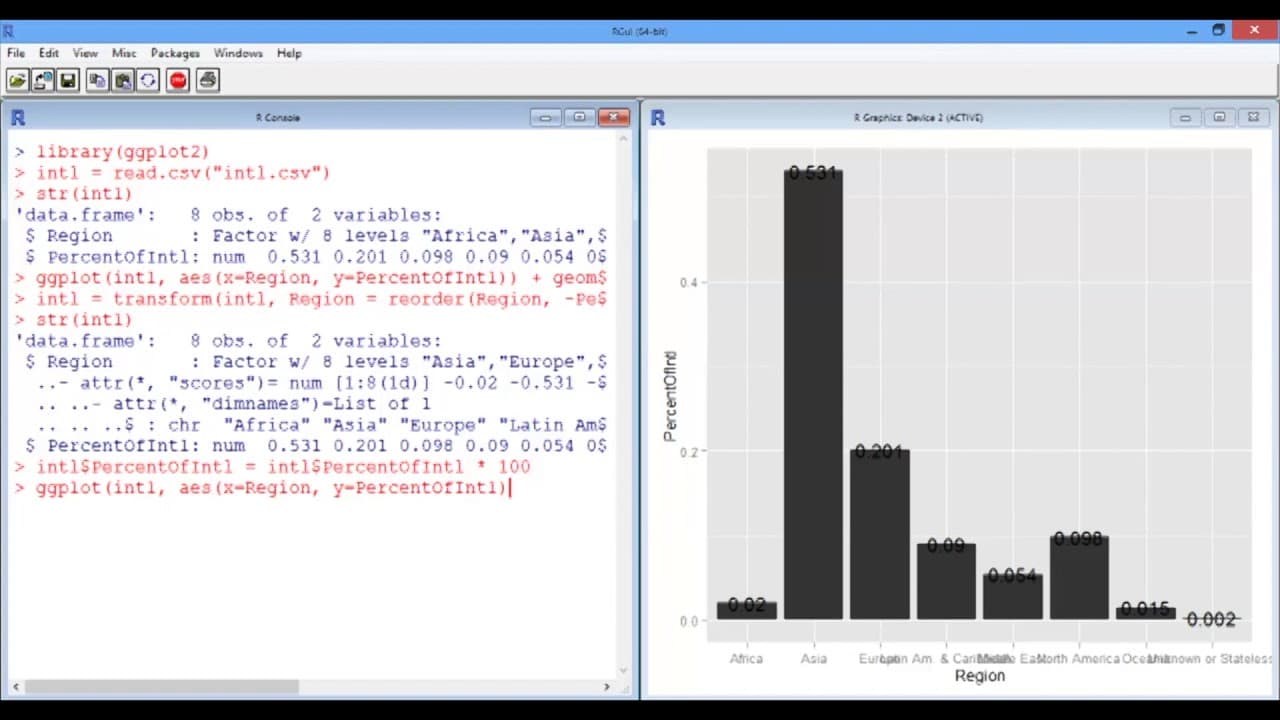
Okay, so now we're going to start with a simple bar plot of the MIT international student data. So first, let's load the ggplot library, ggplot2, and load the data frame. So intl = read.csv("intl.csv"). Now, the structure of this date frame is very simple. There are two columns, two variables. The first one, the region, and the second one is the pe... Read More
Key Insights
- 📚 Creating a bar plot in R using the ggplot2 library involves loading the library, loading the data frame, and specifying the variables for the x and y axes.
- 🤢 The "geom_bar" function is used to create the bars in the plot, and the "geom_text" function can be used to add labels to the bars.
- 💁♂️ The "reorder" function can be used to order the bars based on a specific variable, and multiplying the y-axis values by 100 can convert them to percentage form.
Install to Summarize YouTube Videos and Get Transcripts
Explore YouTube Video Summarizer or Get YouTube Transcript Extractor
Questions & Answers
Q: How can I create a bar plot in R using the ggplot library?
To create a bar plot, you need to load the ggplot2 library and load your data frame. Specify the variables for the x and y axes, and use the "geom_bar" geometry. You can add labels using the "geom_text" function.
Q: How can I order the bars in the plot based on a specific variable?
You can use the "reorder" function to order the bars based on a specific variable. For example, if you want to order the bars in descending order of the percentage of international students, you can use the command "Region = reorder(Region, -PercentOfIntl)".
Q: How can I format the y-axis values to be between 0 and 100 instead of 0 and 1?
You can multiply the values on the y-axis by 100 to convert them from decimal form to percentage form. You can use the command "intl$PercentOfIntl = intl$PercentOfIntl * 100" to do this.
Q: How can I customize the appearance of the plot, such as the color of the bars and the rotation of the x-axis labels?
To customize the appearance, you can use the "fill" argument in the "geom_bar" function to specify the color of the bars. You can use the "theme" function to modify the axis labels, such as removing the word "Region" from the x-axis and rotating the labels using the "axis.text.x" argument.
Summary & Key Takeaways
-
The video demonstrates how to create a bar plot using the ggplot2 library in R, loading the data frame and specifying the variables.
-
It shows how to customize the plot, including adding labels to the bars and formatting the axes.
-
The tutorial also covers how to reorder the bars in the plot based on a specific variable and how to multiply the values on the y-axis for better readability.
Read in Other Languages (beta)
Share This Summary 📚
Summarize YouTube Videos and Get Video Transcripts with 1-Click
Try YouTube Summary with ChatGPT & Claude or YouTube Transcript Generator
Explore More Summaries from MIT OpenCourseWare 📚

Summarize YouTube Videos and Get Video Transcripts with 1-Click
Try YouTube Summary with ChatGPT & Claude or YouTube Transcript Generator