Tabular DI | Data Interpretation | Monthly Rent | Reasoning | Part - 24 | Bharath Kumar
TL;DR
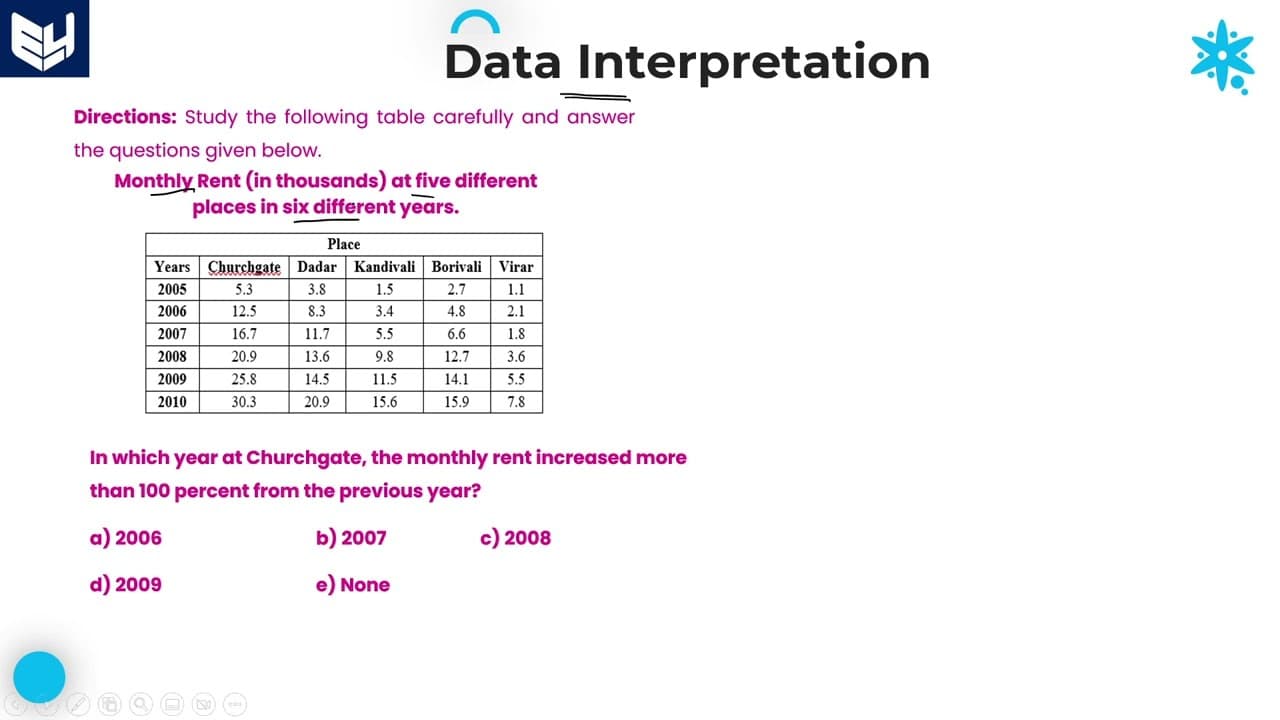
Monthly rent data from 2005 to 2010 for five locations analyzed.
Transcript
hi everyone welcome to the session in this session I am continuing tablet data and operation first of all before going to the question we need to read the information which is given in the sentence uh table as well as after that then only we can go with the questions first read the information which is provided that is uh here the information is ab... Read More
Key Insights
- 👪 The monthly rent data spans five locations from 2005 to 2010, with values represented in thousands.
- ✖️ To derive actual rental amounts, each value must be multiplied by 1,000.
- 🤩 Understanding percentage increase calculations is key to analyzing rent trends over time.
- 🛀 Significant rent increases can indicate market trends, with Churchgate showing notable growth.
- 👪 Comparing rent values directly between different locations is an effective strategy for identifying the highest rent.
- 👋 The importance of good data interpretation is critical in generating accurate analyses and conclusions.
- 🍹 Approximating percentages requires careful denominator calculations, particularly when summing multiple values across years.
Install to Summarize YouTube Videos and Get Transcripts
Explore YouTube Video Summarizer or Get YouTube Transcript Extractor
Questions & Answers
Q: What does the monthly rent data represent in this analysis?
The monthly rent data represents the rental prices at five different locations over six years (2005 to 2010). The values are expressed in thousands, meaning that each figure in the table must be multiplied by 1,000 to derive the actual rent amounts, promoting clarity in understanding the dataset.
Q: How is a more than 100% increase in rent calculated?
To calculate a more than 100% increase, you compare the rent of the current year to the previous year. If this year's rent is at least double that of the previous year, it represents more than a 100% increase. For instance, if last year's rent was 100 and this year’s is above 200, it indicates the required growth.
Q: In which year did Churchgate experience a rent increase greater than 100%?
Churchgate experienced a rent increase greater than 100% in 2006. The analysis shows a significant growth from 5.3 (in thousands) in 2005 to 12.5 (in thousands) in 2006, exceeding the threshold needed to be categorized as more than a 100% increase.
Q: What was the monthly rent difference between Andheri in 2009 and Borivali in 2007?
The difference in monthly rent between Andheri in 2009 (14.5 thousand) and Borivali in 2007 (6.6 thousand) is calculated as follows: 14,500 - 6,600 equals 7,900. Thus, the monthly rent difference is 7,900, showing how much higher the rent was in Andheri compared to Borivali during these years.
Q: How do you calculate the approximate percentage of a value relative to total rent for Virar?
To calculate the approximate percentage of Kanwadi's rent in 2008 (9.8) relative to the total rent for Virar across all years, you add up all the yearly rents for Virar, then divide 9.8 by that sum and multiply by 100 to get the percentage. The final result indicates how significant the single year's rent is compared to the total.
Q: What method is suggested for identifying the most expensive location for rent?
The suggested method for identifying the most expensive location is to compare the highest rent values for each location year by year. By observing various years' data, one can eliminate options with consistently lower rent values until the highest is identified, which, in this case, is Churchgate.
Q: What importance does the content place on understanding units of measurement in rent data analysis?
The content emphasizes the critical importance of understanding the units of measurement since all values are expressed in thousands. Multiplying each figure by 1,000 is essential for performing accurate calculations, as failing to do so can lead to erroneous interpretations of rent levels and increases.
Q: What general approach should be taken when solving rent analysis problems?
A systematic approach should be taken when solving rent analysis problems by first interpreting the provided data accurately, making necessary calculations, drawing comparisons between years and locations, and eliminating options where possible. This logical and stepwise method simplifies the process of finding solutions and insights.
Summary & Key Takeaways
-
The content explains how to interpret a table showing monthly rent in five different locations from 2005 to 2010, emphasizing that values are in thousands.
-
It provides a step-by-step method for calculating percentage increases in rent over the years and assessing overall monthly rent differences between locations.
-
Practical examples are given to illustrate the calculations, focusing on identifying which location had the highest rent increase and which was the most expensive overall.
Read in Other Languages (beta)
Share This Summary 📚
Summarize YouTube Videos and Get Video Transcripts with 1-Click
Try YouTube Summary with ChatGPT & Claude or YouTube Transcript Generator