This AI changes animation forever
TL;DR
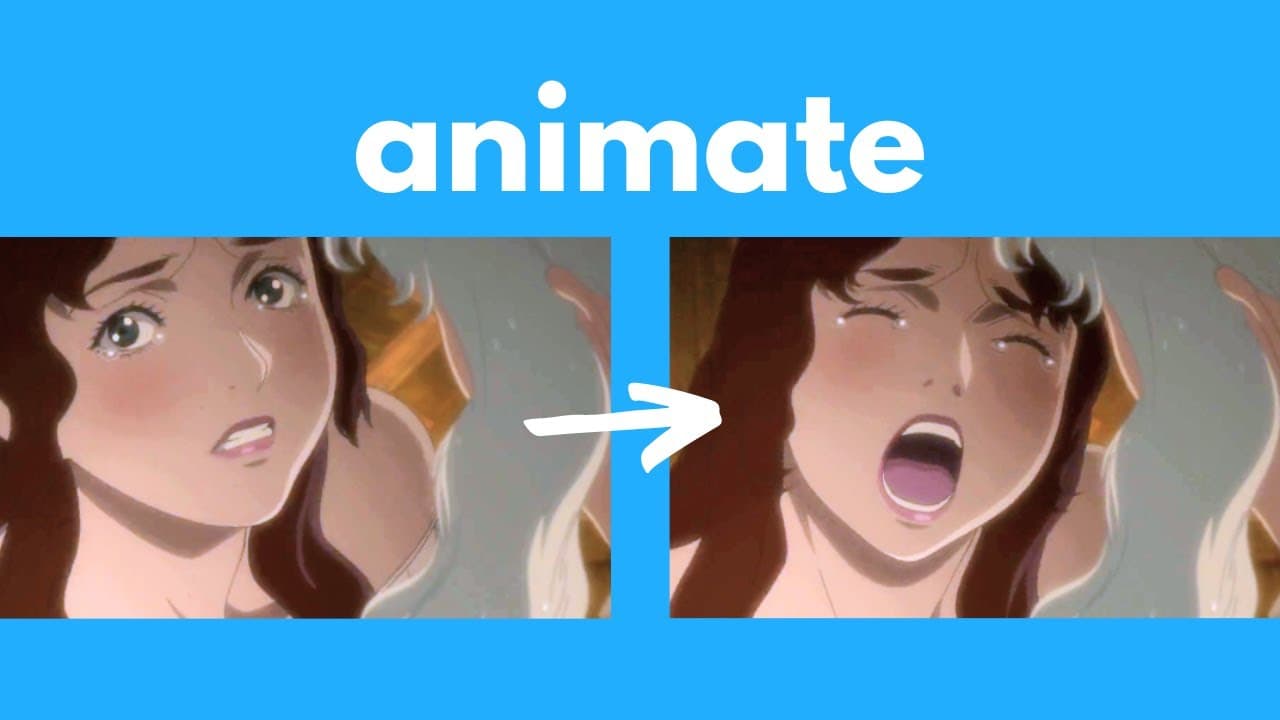
ToonCrafter simplifies animation creation using AI, even for beginners.
Transcript
ladies and gentlemen I am so excited to share this tool with you today this is one of the most powerful and free AI tools for you to generate anime and cartoons even if you suck at drawing even if you've never made an animation before in your life this just makes it incredibly easy for you to create and direct your own animation and unlike ... Read More
Key Insights
- ToonCrafter is a free and open-source AI tool that enables users to create animations from start and end frames, making animation accessible even to those without drawing skills.
- The tool uses AI to generate animations that include detailed movements such as blinking eyes and moving hair, enhancing the realism of the animation.
- ToonCrafter supports animations from both fully colored scenes and sketches, allowing creators to choose their preferred starting point.
- The AI provides users with the ability to add sparse sketch guidance for more control over the animation, offering greater directorial input.
- ToonCrafter's animations are consistent and free from many common artifacts found in other AI animation tools, making it a superior choice for quality results.
- Users can run ToonCrafter locally on their computers or online via Hugging Face, providing flexibility based on their hardware capabilities.
- The tool is currently limited to generating videos at 16 frames per second and a resolution of 512x320, but improvements are likely in future updates.
- ToonCrafter empowers animators by handling repetitive tasks, allowing them to focus on creativity and potentially revolutionizing the animation industry.
Install to Summarize YouTube Videos and Get Transcripts
Explore YouTube Video Summarizer or Get YouTube Transcript Extractor
Questions & Answers
Q: What is ToonCrafter and how does it work?
ToonCrafter is a free, open-source AI tool developed for creating animations from start and end frames. Users input an initial and a final frame, and the AI generates the animation between the two. It supports both colored images and sketches, making it versatile for different creative processes.
Q: What are the key features of ToonCrafter?
ToonCrafter's key features include the ability to generate animations from start and end frames, support for both colored scenes and sketches, sparse sketch guidance for more control, and consistent, high-quality outputs. It is accessible online and can also be installed locally, offering flexibility in use.
Q: How does ToonCrafter compare to other AI animation tools?
ToonCrafter surpasses other AI animation tools by producing more consistent and artifact-free animations. It addresses common issues found in other tools, such as inconsistencies in generated movements and deformations, making it a superior choice for quality and reliability.
Q: What are the current limitations of ToonCrafter?
ToonCrafter is currently limited to generating videos at 16 frames per second with a resolution of 512x320. These limitations mean that users cannot yet produce full HD quality videos, but the tool is expected to improve with future updates.
Q: How can users install and run ToonCrafter?
Users can install ToonCrafter locally by following instructions on its GitHub page, which includes setting up Python and necessary dependencies. Alternatively, users can run it online via Hugging Face, which requires no installation and is ideal for those without high-performance hardware.
Q: What impact could ToonCrafter have on the animation industry?
ToonCrafter could significantly impact the animation industry by reducing the manual workload of animators, allowing them to focus on creativity. It democratizes animation production, making it accessible to a broader audience and potentially transforming traditional animation workflows.
Q: Can ToonCrafter be used for commercial purposes?
ToonCrafter is open-source and does not impose copyright restrictions, allowing users to potentially create and monetize their animations. However, users are expected to comply with local laws when using the tool for commercial purposes.
Q: What are some potential challenges users might face with ToonCrafter?
Users might encounter issues such as artifacts in the generated animations, especially in complex scenes. Additionally, the tool requires some technical setup for local installation, which may pose a challenge for users unfamiliar with Python and command-line interfaces.
Summary & Key Takeaways
-
ToonCrafter is a groundbreaking AI tool that democratizes animation creation by allowing users to generate animations from simple start and end frames. It is open-source and free to use, making it accessible to a wide audience.
-
The tool is capable of producing high-quality animations with realistic movements, such as blinking and hair motion, from both colored scenes and sketches. Users can enhance control with sparse sketch guidance for more precise outcomes.
-
ToonCrafter can be used online via Hugging Face or installed locally, catering to users with varying hardware capabilities. While it currently has limitations in frame rate and resolution, it represents a significant advancement in AI-driven animation.
Read in Other Languages (beta)
Share This Summary 📚
Summarize YouTube Videos and Get Video Transcripts with 1-Click
Try YouTube Summary with ChatGPT & Claude or YouTube Transcript Generator
Explore More Summaries from AI Search 📚
Summarize YouTube Videos and Get Video Transcripts with 1-Click
Try YouTube Summary with ChatGPT & Claude or YouTube Transcript Generator