Use Open WebUI with Your N8N AI Agents - Voice Chat Included!
TL;DR
Integrate Open WebUI with N8N for local AI agent workflows.
Transcript
last month I showed you how to run all of your AI locally including your llms your vector database for Rag and n8n for your agent workflows we did this all using the local AI starter kit developed by the n8n team however there was one huge component missing that a lot of you requested in the comments open web UI so we could have a nice and featur i... Read More
Key Insights
- The integration of Open WebUI with N8N allows users to chat with their AI workflows directly, enhancing the accessibility and usability of local AI setups.
- Open WebUI provides a chat GPT-like interface with features such as functions and pipelines, enabling custom functionality and interaction with API endpoints.
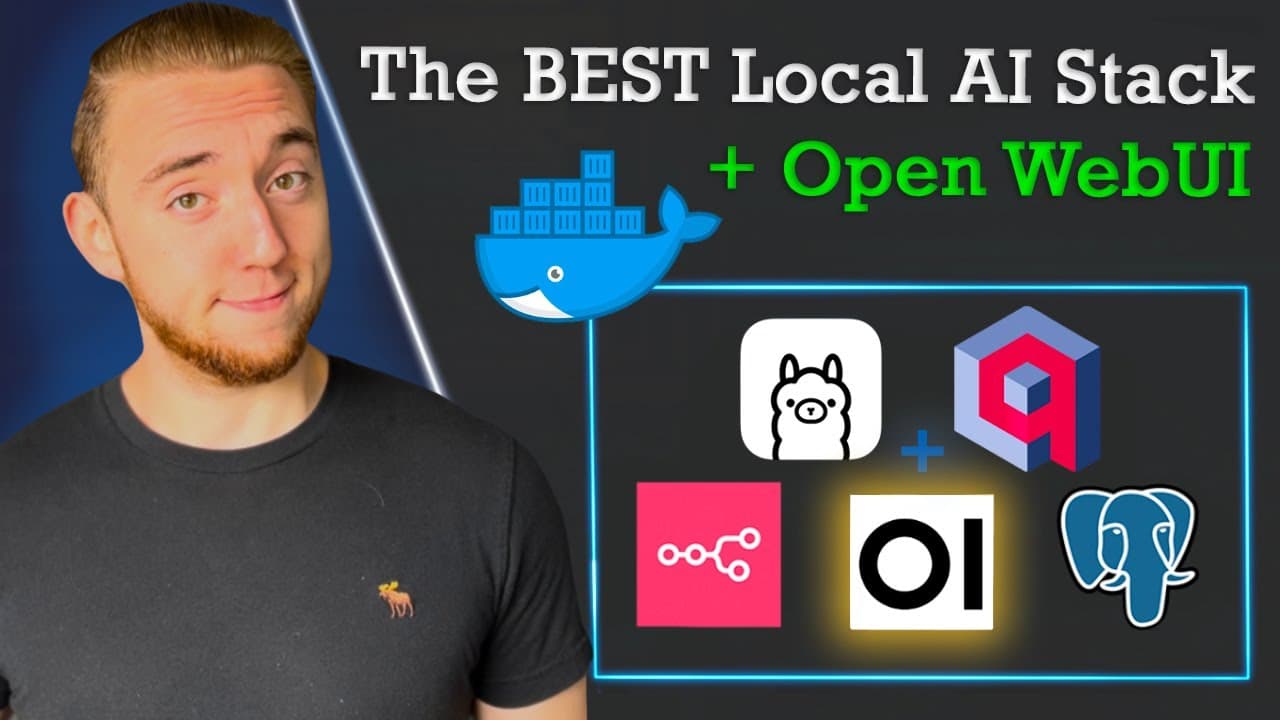
- The local AI starter kit combines services like N8N, Olama, Quadrant, and Postgres to create a comprehensive environment for running AI workflows locally.
- Docker Compose is used to package and run all necessary services locally, simplifying the process of setting up a local AI environment.
- The integration supports voice interaction, allowing users to communicate with their AI agents using voice commands through Open WebUI.
- Setting up the integration involves configuring a web hook in N8N and creating a custom function in Open WebUI to handle requests and responses.
- The integration is designed to be flexible, enabling users to customize it for various AI agents and workflows using different models and tools.
- The project aims to make local AI setups more accessible, encouraging users to experiment and extend the capabilities of their AI agents.
Install to Summarize YouTube Videos and Get Transcripts
Explore YouTube Video Summarizer or Get YouTube Transcript Extractor
Questions & Answers
Q: What is the main purpose of integrating Open WebUI with N8N?
The main purpose of integrating Open WebUI with N8N is to provide a user-friendly interface for interacting with AI workflows locally. This integration allows users to chat with their AI agents directly within Open WebUI, enhancing accessibility and usability. It also supports voice interaction, making it easier for users to communicate with their AI setups.
Q: How does the local AI starter kit simplify the setup process?
The local AI starter kit simplifies the setup process by using Docker Compose to package and run all necessary services locally. This includes N8N for workflow automation, Olama for large language models, Quadrant for vector databases, and Postgres for SQL databases. By combining these services into a single package, users can easily set up a comprehensive environment for running AI workflows without complex configurations.
Q: What are the key features of Open WebUI highlighted in the video?
The video highlights key features of Open WebUI, including its chat GPT-like interface and the ability to implement custom functionality through functions and pipelines. These features allow users to interact with their own agents and API endpoints, enabling a wide range of customization and integration possibilities. Open WebUI also supports voice interaction, further enhancing user engagement with AI workflows.
Q: How does the integration support voice interaction with AI agents?
The integration supports voice interaction by leveraging Open WebUI's built-in voice chat capabilities. Users can enable their microphone in the browser and communicate with their AI agents using voice commands. This feature enhances the user experience by providing a more natural and intuitive way to interact with AI workflows, making it easier to access and utilize AI capabilities.
Q: What steps are involved in setting up the integration between Open WebUI and N8N?
Setting up the integration involves configuring a web hook in N8N to handle requests from Open WebUI and creating a custom function in Open WebUI to interact with the N8N workflow. Users need to specify parameters such as the N8N web hook URL, input and output fields, and optional authentication details. The process is designed to be flexible, allowing users to customize it for various AI agents and workflows.
Q: How can users customize the integration for different AI agents?
Users can customize the integration by modifying the function in Open WebUI to interact with different API endpoints or agents. The integration is designed to be flexible, allowing users to change parameters such as the input and output fields, authentication methods, and the specific AI models or tools used. This enables users to tailor the setup to their specific needs and experiment with different AI capabilities.
Q: What resources are provided to help users get started with the integration?
The video provides detailed instructions and resources to help users get started with the integration. This includes links to the GitHub repository with the local AI starter kit, the README file with setup instructions, and the custom function created for Open WebUI. Additionally, the video offers a step-by-step walkthrough of the setup process, making it easier for users to follow along and implement the integration themselves.
Q: What are the future plans for extending the local AI stack?
The creator plans to continue extending the local AI stack by adding new features and capabilities based on user feedback and emerging technologies. The goal is to make local AI setups even more accessible and powerful, encouraging users to experiment and push the limits of what is possible with AI. The creator invites viewers to share their ideas and suggestions for future enhancements, fostering a collaborative and innovative community around local AI development.
Summary & Key Takeaways
-
The video introduces the integration of Open WebUI with N8N, allowing users to chat with their AI workflows locally. It includes a walkthrough of setting up the local AI stack using Docker Compose, combining services like Olama, Quadrant, and Postgres.
-
Key features of Open WebUI, such as functions and pipelines, are highlighted, demonstrating how they enable custom functionality and interaction with N8N workflows. The integration also supports voice interaction, enhancing user engagement.
-
The project aims to simplify the process of running AI workflows locally, making it accessible for users to experiment and extend their AI capabilities. The video provides detailed instructions and resources for setting up and using the integration.
Read in Other Languages (beta)
Share This Summary 📚
Summarize YouTube Videos and Get Video Transcripts with 1-Click
Try YouTube Summary with ChatGPT & Claude or YouTube Transcript Generator
Explore More Summaries from Cole Medin 📚

Summarize YouTube Videos and Get Video Transcripts with 1-Click
Try YouTube Summary with ChatGPT & Claude or YouTube Transcript Generator