How to Perform Linear Regression in R for Wine Prices
TL;DR
To perform linear regression in R for predicting wine prices, load your dataset using the read.csv function and use the lm function to create models with various independent variables. By analyzing coefficients and R-squared values, you can assess model performance and refine your analysis accordingly.
Transcript
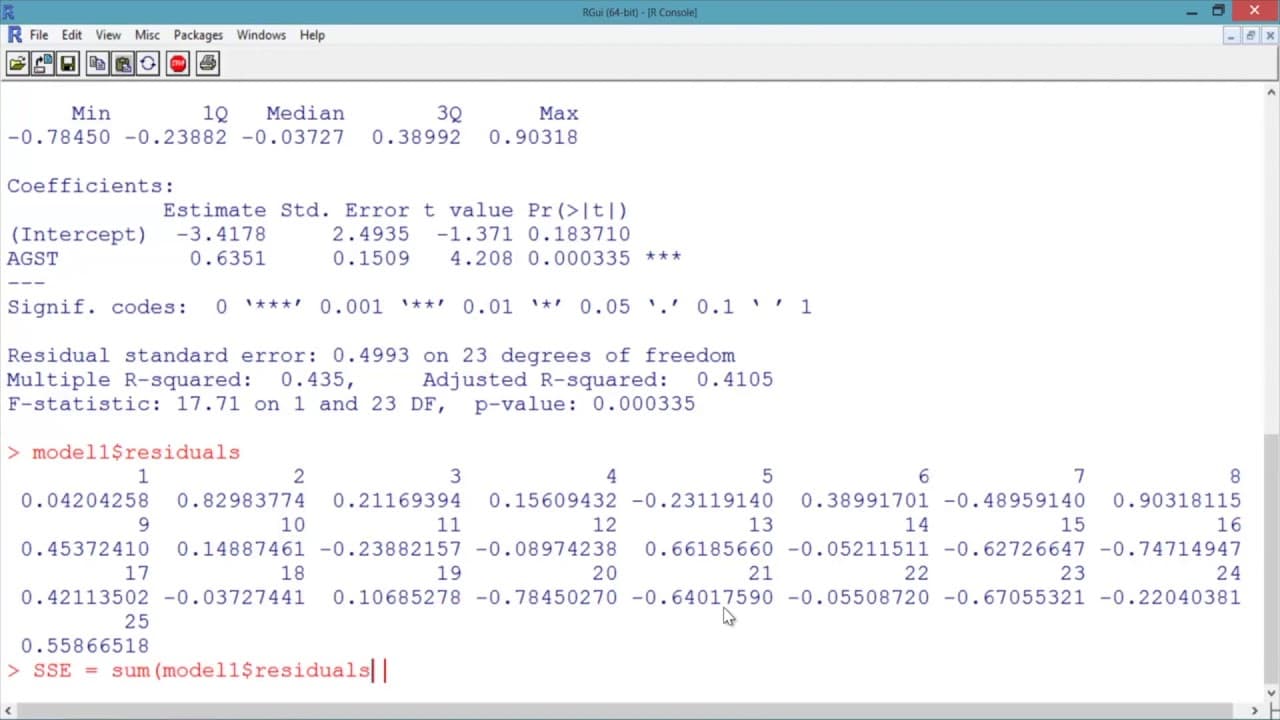
In our R Console, let's start by loading our data set. Don't forget to make sure you're in the directory containing the file wine.csv first. We'll call our data frame wine, and we'll use the read.csv function to read in the data file wine.csv. We can look at the structure of our data by using the str function. We can see that we have a data frame w... Read More
Key Insights
- 😫 The data set "wine.csv" contains 25 observations and 7 variables.
- 🙈 Linear regression models can be built using the lm function in R.
- ❓ The coefficients in a linear regression model represent the estimated beta values for each independent variable.
- 🪜 Adjusted R-squared helps evaluate the impact of adding independent variables to a model.
- 🍹 The sum of squared errors (SSE) is a measure of how well a model fits the data.
- 🪜 Adding relevant independent variables can significantly improve the performance of a linear regression model.
- ❎ Multiple R-squared increases when more independent variables are added, but Adjusted R-squared considers their significance.
Install to Summarize YouTube Videos and Get Transcripts
Explore YouTube Video Summarizer or Get YouTube Transcript Extractor
Questions & Answers
Q: What is the purpose of using the str function?
The str function helps us understand the structure of the data set by providing information about the variables and observations it contains. It helps us determine how many variables and observations are present in the data.
Q: How is a linear regression model built using the lm function?
To build a linear regression model, the lm function is used. It takes the dependent variable and independent variable(s) as arguments, separated by a tilde (~) symbol. The lm function also requires specifying the data set to be used. The output of the lm function is stored in a variable for further analysis.
Q: What does the summary of the linear regression model provide?
The summary of the linear regression model includes the description of the function used, the residuals or error terms, and the coefficients of the model. The coefficients represent the estimates of the beta values for each variable in the model.
Q: How is Adjusted R-squared used to evaluate a model's performance?
Adjusted R-squared adjusts the R-squared value to account for the number of independent variables used relative to the number of data points. It helps determine if adding an independent variable improves the model or not. If the Adjusted R-squared decreases after adding a variable, it suggests that the variable does not contribute significantly to the model.
Summary & Key Takeaways
-
The content demonstrates how to load and analyze a data set called "wine.csv" using R programming.
-
The data set consists of 25 observations and 7 variables, including the year, price, and various independent variables.
-
Linear regression models are built using different combinations of independent variables to predict the price of wine.
Read in Other Languages (beta)
Share This Summary 📚
Summarize YouTube Videos and Get Video Transcripts with 1-Click
Try YouTube Summary with ChatGPT & Claude or YouTube Transcript Generator
Explore More Summaries from MIT OpenCourseWare 📚

Summarize YouTube Videos and Get Video Transcripts with 1-Click
Try YouTube Summary with ChatGPT & Claude or YouTube Transcript Generator