How to make a Tower Defense Game - #1 Path Navigation
TL;DR
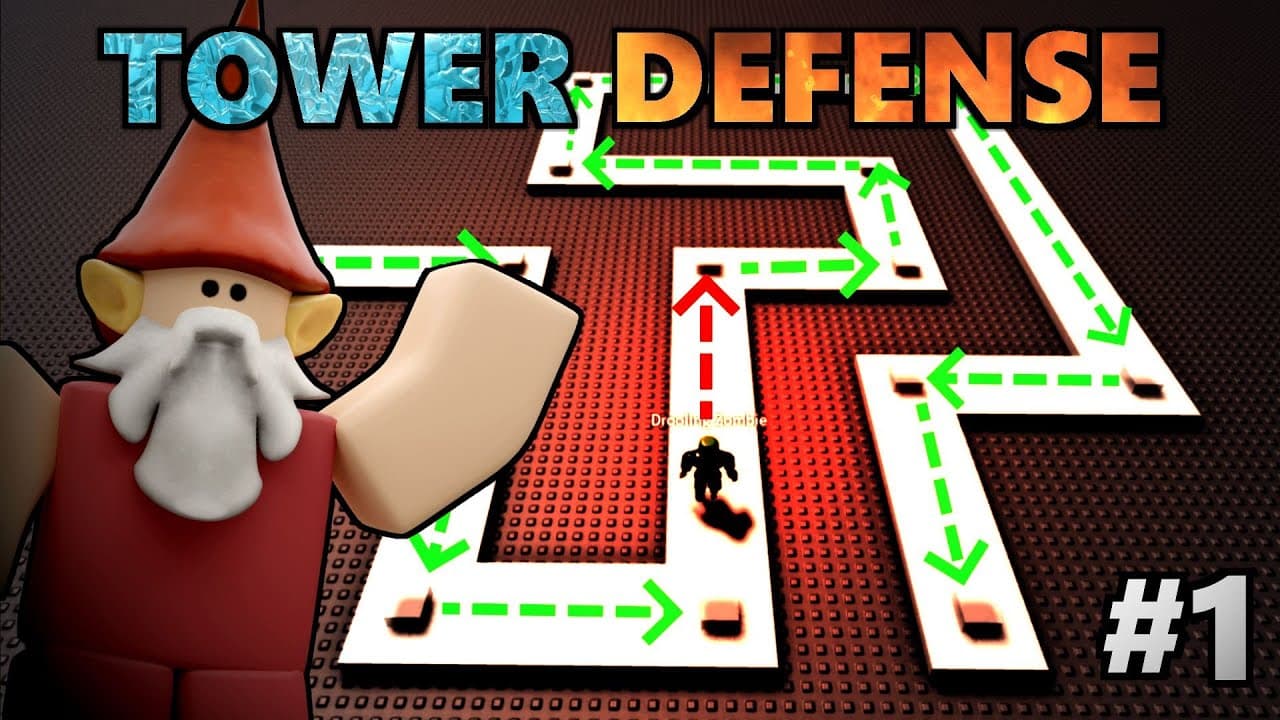
Learn how to create a basic pathway for enemies and move them along the path in a tower defense game.
Transcript
so you want to make a tower defense based game well hello my fellow gnomes you have come to the right place let's get straight into it okay so the first thing we're going to do is we're just going to create a little basic pathway for our enemies to move down so starting in a blank base plate and we're just going to add in a part there we go that wi... Read More
Key Insights
- 🎮 Tower Defense Game: The tutorial provides step-by-step instructions on creating a basic pathway for enemies by adding parts and selecting a zombie character as the monster.
- 🔄 Animation and Scripts: The tutorial guides users on modifying the zombie character's scripts and animations, including deleting unwanted scripts and renaming animations.
- ️ Waypoints for Path: Instead of using the Pathfinding Service, the tutorial suggests utilizing waypoints to create a fixed path for the zombie character to follow by placing parts along the pathway.
- 📂 Organization: The tutorial emphasizes the importance of organizing the game elements by creating folders for path parts and waypoints, anchoring the parts, and disabling collisions.
- 🔁 Looping and Movement: The tutorial explains how to use a for loop to loop through the waypoints and move the zombie character to each specified waypoint using the humanoid's "MoveTo" function.
- ️ Delayed Movement: To ensure the zombie character reaches each waypoint before moving to the next one, the tutorial instructs users to include a "MoveToFinished" function with a weight to create a pause in movement.
- ⚠️ Debugging: The tutorial demonstrates the importance of checking the output window for any errors or issues when coding, as it helps identify and fix mistakes in the script.
- 🌊 Future Steps: The tutorial mentions that there is more to be done, specifically focusing on implementing wave-based attacks in the game, hinting at the continuity of the tutorial series.
Install to Summarize YouTube Videos and Get Transcripts
Explore YouTube Video Summarizer or Get YouTube Transcript Extractor
Questions & Answers
Q: How do you create a pathway for enemies to follow in a tower defense game?
To create a pathway, add path pieces to the game and organize them in a folder. Then, customize waypoints along the path using numbered identifiers.
Q: How can you make an enemy character move along the created pathway in a tower defense game?
Use a for loop to iterate through the waypoints and move the enemy character to each waypoint one by one, creating a smooth movement along the path.
Q: Is there a specific method to ensure that the enemy character reaches each waypoint before moving to the next one?
Yes, you can use the "move to finished" command to make the enemy character wait at each waypoint before proceeding to the next one, ensuring that they reach each waypoint in order.
Q: What happens if you delete the mesh parts inside the enemy character in a tower defense game?
Deleting the mesh parts can result in a blocky-looking character. It is recommended to keep the mesh parts intact to maintain the appearance of the enemy character.
Q: How can you customize the appearance of the pathway in a tower defense game?
You can anchor the path pieces, disable collisions with the enemy character, and make the path pieces semi-transparent to create a visually appealing pathway.
Q: Can you use a pathfinding service to create a pathway for enemies in a tower defense game?
Yes, a pathfinding service can be used, but it requires creating invisible walls along the path, which can be time-consuming. In this case, a simpler solution using custom waypoints is implemented.
Q: Can the created pathway be modified or expanded in a tower defense game?
The created pathway is a fixed path that is not meant to be modified or expanded. It is suitable for short and straightforward paths in tower defense games.
Summary & Key Takeaways
-
Create a basic pathway for enemies to follow in a tower defense game by adding path pieces and organizing them in a folder.
-
Customize waypoints along the path using numbered identifiers to guide the enemy's movement.
-
Use a for loop to iterate through the waypoints and move the enemy to each waypoint one by one, creating a smooth movement along the path.
Read in Other Languages (beta)
Share This Summary 📚
Summarize YouTube Videos and Get Video Transcripts with 1-Click
Try YouTube Summary with ChatGPT & Claude or YouTube Transcript Generator
Explore More Summaries from GnomeCode 📚
Summarize YouTube Videos and Get Video Transcripts with 1-Click
Try YouTube Summary with ChatGPT & Claude or YouTube Transcript Generator